Sorry, but there's really nothing to see here right now. Our server is in maintenance mode – and our
little bot is trying to sort the error messages with its last bit of energy.
Whether it was a data leak, a power outage in the cluster, or just a grumpy bit – we don't know yet.
But what we do know is:
The data drama escalated into a server meltdown. But don't worry: We're on it.
What now?
Everything is surely running smoothly over at our colleagues from inside
digital – why not stop by!
Or you could pass the time by visiting our social media channels – for example Instagram, YouTube or TikTok. At least there are no
server problems there – promised.
Thanks for your patience. Our bot is already rebooting at full speed. 🔧
NewsTabletPrivacy Woes No More: Android Screen Sharing Gets a One-Tap Stop Function
Android’s screen sharing feature has been a vital productivity tool for many users. It has been improved with the early build of Android 15, adding support to select which area of the app will be shown. It turns out it is gaining another enhancement for quick disabling during a screen sharing or casting session.
Don’t miss: Screen Mirroring from Samsung Phones to Windows PC Is About to Get Easier
More ways to securely use screen sharing
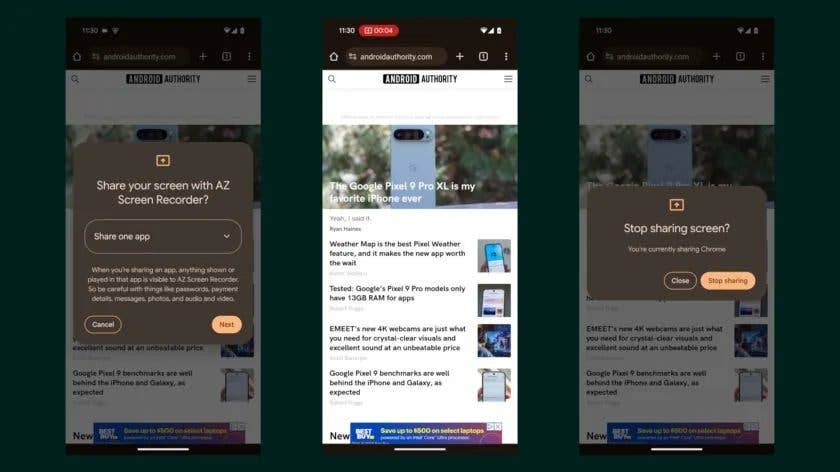
Found in the latest Android 15 QPR1 (Quarterly Platform Release) beta firmware (via Android Authority), users can now abruptly end screen sharing by locking their devices. This adds an option and quick fail-safe button to the original control that requires manually pressing the virtual end key and confirming the action when stopping the session.
The new method also significantly improved security. Before, third-party apps in the previous version had access to what was currently displayed on your screen even when your device was locked without a label or reminder that screen sharing was still running.
Apart from this change, Google has given the screen sharing feature a few important upgrades. For instance, screen sharing with third-party is now aptly labeled through icons and text with a different description in the pop-up window. And recently, the internet search giant has made it possible to access the screen sharing controls from the status bar without displaying your notifications.
Right now, the gesture is available with the Android 15 QPR1 Beta 2 and is expected to be a feature added to the stable release of QPR1. However, it’s also unlikely that many manufacturers will be able to adopt it in time for their Android 15 public releases. Hence, we could see this available to a wider number of devices in Android 16.
Google’s Pixel devices should be getting the final Android QPR1 by December 2024. The update is also confirmed to include several quality-of-life changes ranging from several bug fixes and optimizations.
Which Android version are you running? Have you tried the screen sharing function on your Android device before? Tell us your experience.
We mark partner links with this symbol. If you click on one of these links or buttons–or make a purchase through them–we may receive a small commission from the retailer. This doesn’t affect the price you pay, but it helps us keep nextpit free for everyone. Thanks for your support!







0 comments