Sorry, but there's really nothing to see here right now. Our server is in maintenance mode – and our
little bot is trying to sort the error messages with its last bit of energy.
Whether it was a data leak, a power outage in the cluster, or just a grumpy bit – we don't know yet.
But what we do know is:
The data drama escalated into a server meltdown. But don't worry: We're on it.
What now?
Everything is surely running smoothly over at our colleagues from inside
digital – why not stop by!
Or you could pass the time by visiting our social media channels – for example Instagram, YouTube or TikTok. At least there are no
server problems there – promised.
Thanks for your patience. Our bot is already rebooting at full speed. 🔧
The benefits of incognito browsing on YouTube go beyond preventing others from accessing your watched video history. If you want to browse without leaving any traces or simply avoid Google’s AI recommendations, learn how to enable incognito mode on YouTube and be anonymous on the platform.
Related: Private browsing: How to use incognito mode on Android
How to activate the incognito mode on YouTube
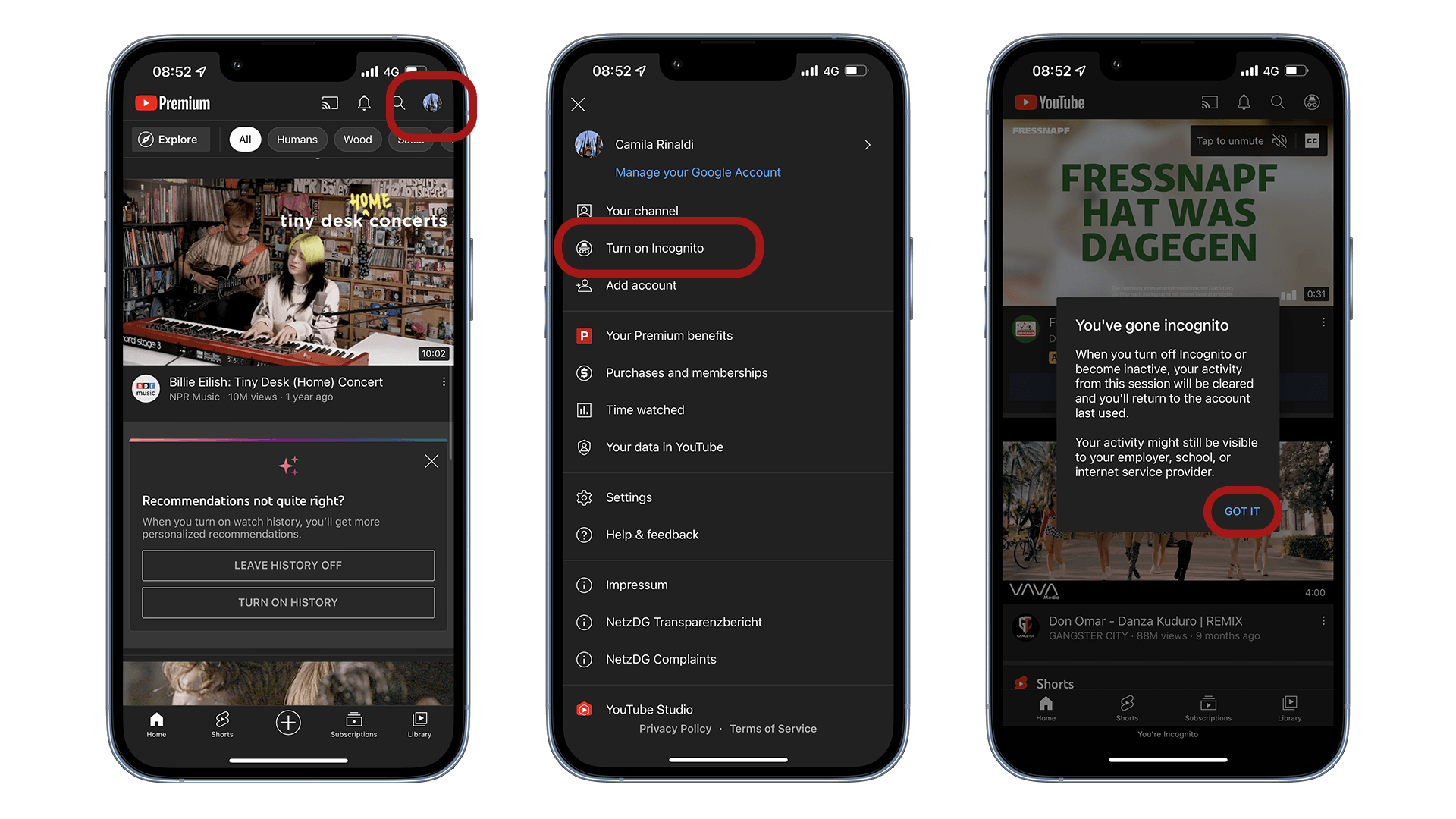
If you prefer that YouTube does not record your browsing data on the streaming service, activating the incognito mode is one of the first actions you can take. The good news is that this is done quickly from within the app:
Open the YouTube app on your Android or iOS smartphone.
In the top right corner, click on your profile picture.
Now just click on the Turn on incognito option.
Here, a prompt message will identify that you have enabled anonymous browsing on the platform, but that your activities may still be visible to your employer, school, or ISP.
Click Got it to browse the session anonymously.
As you can see, you need to be very careful about using this function correctly, as private browsing is only valid so YouTube does not record your visit history. Thus, you do not compromise the future suggestions of the platform’s recommendation algorithm, or simply do not feed Google’s AI with your browsing data and interests.
It is worth remembering that when you enable incognito mode and subscribe to YouTube Premium, the service will be temporarily disabled because it does not use your account data. Therefore, benefits such as not seeing advertisements or using Picture-in-Picture mode (PiP) will be revoked until you turn off incognito mode.
Now, if you want to browse without worrying about recommendations based on your behavior on the platform and still keep the benefits of the Premium account, I suggest pausing the history of watched videos as well as the history of searches on the platform. To do so, simply go to the app’s Settings > History and Privacy >enable the options Pause watch history and Pause search history.
In addition, from time to time it is always good to clear the history of videos and searches on the platform. To do so, simply access History and Privacy in the settings > click the Clear watch history and Clear search history options.
The only caveat I make here, since I chose long ago to pause my activities on the platform, is that you will not have access to the videos you watch after clearing the history and pausing the history and search data. This can be frustrating at times. Also, video recommendations will be pretty random from then on. But until then, that is the intention behind this choice, right?
Do you use private browsing on YouTube? Or do you prefer Google’s algorithm recommendations? Is privacy or content curation based on your interests important to you? Share your opinion with our community in the comments below.
Ich habe 15 Jahre Erfahrung in der Bewertung von Smartphones und Wearables und vereine technisches Know-how mit einer echten Leidenschaft für Innovation. Ich habe bekannte Tech-Websites wie AndroidPIT und Canaltech in Brasilien geleitet und möchte jetzt meine Expertise mit einem Publikum auf der ganzen Welt – unter anderem in den USA, Deutschland, Frankreich, Spanien und Brasilien – durch ehrliche, praxisnahe Tests teilen.
Kürzlich habe ich meinen Fokus auf digitale Gesundheit verlagert, mit einem besonderen Augenmerk auf Geschlechtergerechtigkeit und dem Ziel den geschlechtsspezifischen Datengraben zu überwinden. Ich brenne dafür, durch einfache, klare Texte Frauen in den Bereichen Technik und Gesundheit eine stärkere Stimme zu geben. Ob ich nun die neuesten Gadgets teste oder neue Trends im Bereich der digitalen Gesundheit erkunde – ich bemühe mich stets, komplexe Themen verständlich aufzubereiten.
Persönlich bin ich ein begeisterter Läufer – ich habe 2024 den Berlin-Marathon absolviert – und bereite mich auf eine lange Radtour von Deutschland nach Österreich vor, die im Jahr 2025 in nur vier Tagen schaffen will.
Use Newpipe and skip the ads and tracking. Add a VPN to improve the actual anonymity as it’s trivial to add your IP address to the data and figure out you are anyway.







Use Newpipe and skip the ads and tracking. Add a VPN to improve the actual anonymity as it’s trivial to add your IP address to the data and figure out you are anyway.
Thanks, I didn’t know about this option