Sorry, but there's really nothing to see here right now. Our server is in maintenance mode – and our
little bot is trying to sort the error messages with its last bit of energy.
Whether it was a data leak, a power outage in the cluster, or just a grumpy bit – we don't know yet.
But what we do know is:
The data drama escalated into a server meltdown. But don't worry: We're on it.
What now?
Everything is surely running smoothly over at our colleagues from inside
digital – why not stop by!
Or you could pass the time by visiting our social media channels – for example Instagram, YouTube or TikTok. At least there are no
server problems there – promised.
Thanks for your patience. Our bot is already rebooting at full speed. 🔧
NewsTabletSamsung’s Popular Galaxy Devices to Get a Taste of Galaxy AI
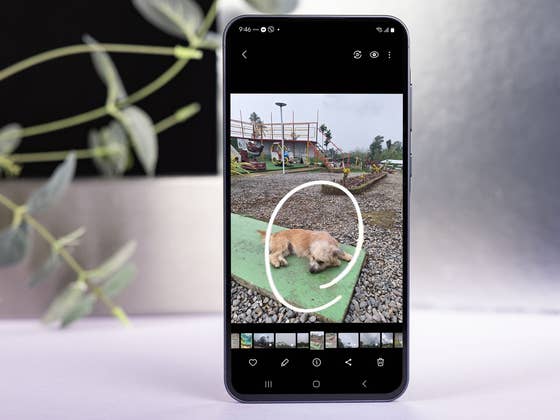
Samsung announced it will introduce its AI-powered Circle to Search feature to selected mid-range Galaxy smartphones and tablets. This feature is one of the most popular tools in Galaxy AI which debuted with the Galaxy S24 series first and was later enabled on older high-end Galaxy models.
With Circle to Search, users can search for information by circling texts or objects in images and videos anywhere on the screen without launching an assistant, search app, or switching apps. Samsung has updated Circle to Search to include translation of different languages while Google is working on adding an audio search function.
First Galaxy AI to arrive on mid-range Galaxy devices
In a press release, Samsung mentioned Circle to Search will be added to last year’s Galaxy A34 and Galaxy A54 and the latest Galaxy A35 (review) and Galaxy A55 (review) models. This will arrive in a software update that should arrive on these mid-range Galaxy smartphones this month.
Apart from these handsets, the South Koreans will also roll out Circle to Search to the Galaxy Tab S9 FE and Galaxy Tab S9 FE+ (review). They are the first tablets to receive the AI feature after the Galaxy Tab S9 series and should take advantage of the S Pen when using the feature.
While we have a dedicated demonstration of the different Galaxy AI features on supported phones, below is a brief guide on using Circle to Search.
How to use Circle to Search on the Galaxy A and Galaxy Tab S FE:
Press and hold the Home button or the navigation handle (if you are using gesture navigation).
Draw a circle on the screen to select the text, image, or video you want to search.
Alternatively, you can add text to the search bar to narrow down your results.
Swipe up to see more results at the bottom of the screen.
Empfohlener redaktioneller Inhalt
Dieser externe Inhalt von YouTube wurde von der nextpit Redaktion ausgewählt und ergänzt den Artikel. Du hast die Wahl, ob du diesen Inhalt laden möchtest.
Externen Inhalt erlauben
Ich bin damit einverstanden, dass externer Inhalt geladen wird. Personenbezogene Daten werden womöglich an Drittplattformen übermittelt. Nähere Informationen enthält die Datenschutzerklärung.
If you have a Galaxy phone or Android device that doesn’t support Circle to Search, you can use Google Lens by manually picking an image or screenshot from the gallery. If you’re browsing, you can use Google’s image search feature.
Will there be more Galaxy AI features coming to mid-range Galaxy devices?
The addition of Galaxy AI to Samsung’s Galaxy A and Galaxy Tab S FE is not surprising given these are among the company’s best-selling devices. One way or another, this will expand the AI craze to more users.
Earlier this year, Samsung confirmed it plans to optimize many of the Galaxy AI features and bring them to more Galaxy devices. Unfortunately, they haven’t shared a timeline nor specified which functions are arriving.
Aside from Circle to Search, which AI feature would you like to see on your handset? Tell us in the comments.
We mark partner links with this symbol. If you click on one of these links or buttons–or make a purchase through them–we may receive a small commission from the retailer. This doesn’t affect the price you pay, but it helps us keep nextpit free for everyone. Thanks for your support!







0 comments