


The discovery was made by Zscaler’s ThreatLabz team during an investigation into a large-scale malware campaign targeting Android users. Many of the removed apps were found to contain the well-known banking trojan Anatsa, also known as TeaBot.
How Anatsa Malware Steals Your Data and Your Money
Anatsa was first documented in 2020. It was embedded in various fake and malicious apps and widely used to steal sensitive user data and banking credentials. The current report suggests the Trojan now targets over 830 banking, cryptocurrency, and digital wallet apps, with recent activity covering Germany and South Korea.
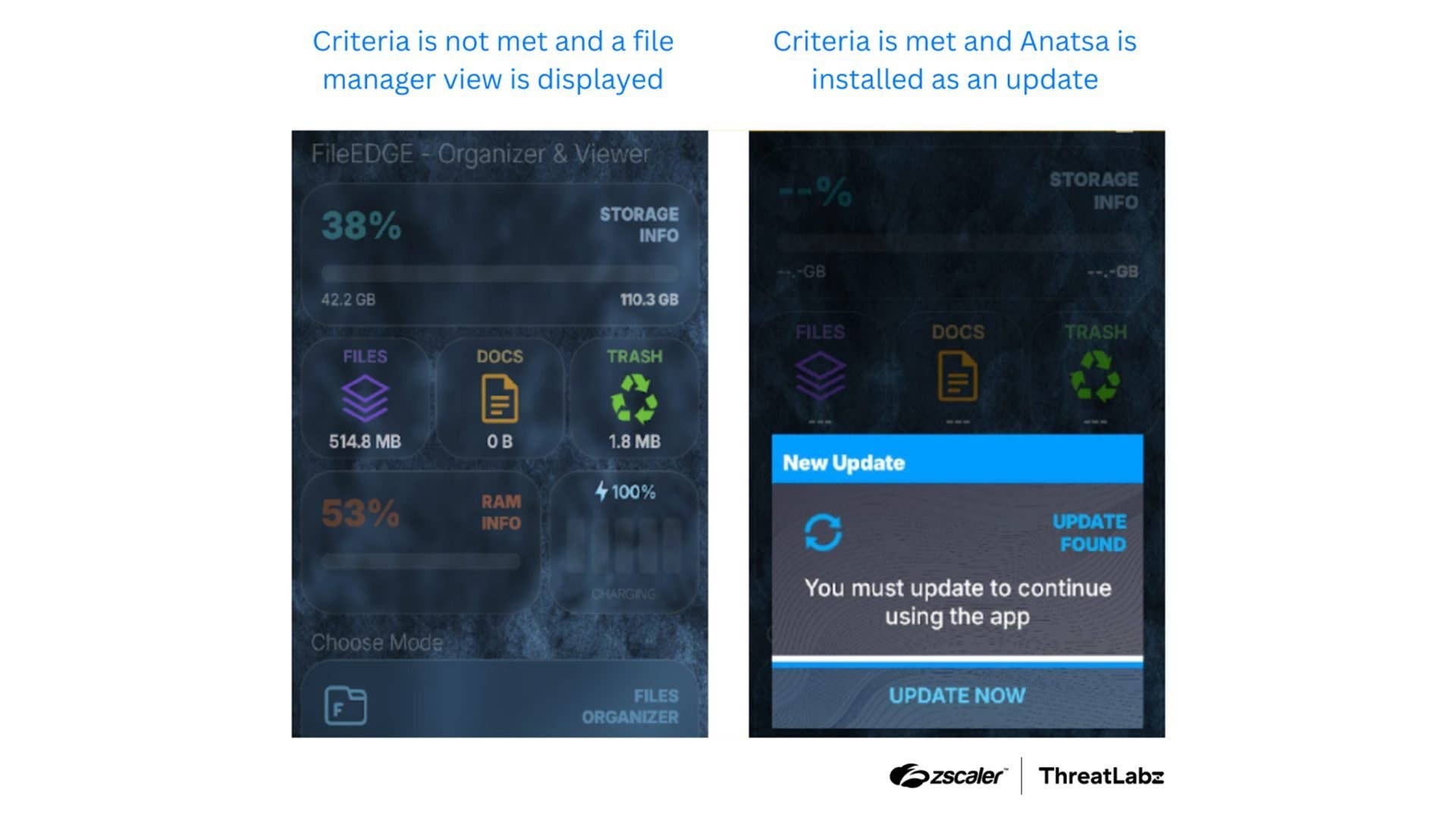
Hackers disguise these apps to appear legitimate when targeting vulnerable Android devices. Some examples of the trojan’s disguises include PDF or document readers, wellness apps, and flashlight tools. One recent case involved an app called Document Reader – File Manager, published by a suspicious developer named orukov5 on the Play Store, and it had accumulated over a thousand installs before it was taken down.

Once installed, the app exploits accessibility loopholes to gain permissions. It then acts as a channel to download malicious payloads, such as execution codes, from remote servers via app updates. These are deployed silently to the affected device. Afterward, the malware begins scanning for installed banking apps, breaches their security, and steals information without the victim’s knowledge.
In some cases, it displays fake login screens to capture account credentials, similar to tactics used by the Hook malware. Attackers then use these stolen details to siphon funds from victims’ bank accounts.
Malwarebytes noted that Anatsa continues to evolve, bypassing new and advanced security safeguards. This makes it increasingly difficult to detect and block.
More Malware Threats: Joker and Harly
In addition to Anatsa, the security researchers also discovered other malware types, including Joker and Harly, being distributed through malicious apps. These are popular adware variants but are also capable of stealing information by reading messages and spying through screenshots and screen recordings.
According to Google, it has detected these threats and addressed the flaws by removing the apps. Affected users were reportedly alerted and advised to delete the apps from their devices.
How to Protect Your Device from Malware
This recent attack highlights how threats continue to evolve despite security enhancements from Google and Apple. Users are strongly advised to take proactive safety measures to protect their devices and data.
Even if an app appears legitimate, always check the publisher and number of downloads and avoid installing third-party apps outside the Play Store. At the same time, avoid granting permissions immediately, and be mindful of what access you’re giving. In some cases, it’s best to uninstall apps you no longer use.
It is also recommended to enable security settings like Google Play Protect, which is on by default. This feature scans apps during download and installation and alerts you to potential threats. Additionally, make sure your phone and core services are updated to the latest software version as it includes the most recent security fixes to vulnerabilities.
What protective measures do you suggest to other digital users? We want to hear your suggestions in the comments.
We mark partner links with this symbol. If you click on one of these links or buttons–or make a purchase through them–we may receive a small commission from the retailer. This doesn’t affect the price you pay, but it helps us keep nextpit free for everyone. Thanks for your support! Prices are based on the date of publication of this article and may be subject to change.



