Nothing CMF Buds Pro 2: $50 Earbuds with Absolutely Brilliant Features


The CMF Buds Pro 2 are affordable wireless headphones priced at just $59, brought to you by Nothing's sub-brand, CMF. These earbuds boast Hi-Res certification, LDAC codec support, and active noise cancellation. Plus, their case includes a unique and rather special feature. What's the catch? I'll break it all down for you in this full review.
Good
- Clean, simple design
- Smart Dial—just great
- Excellent active noise reduction
- Solid battery life
- Affordable price
Bad
- Unbalanced sound by default
- No true multi-touch

CMF Buds Pro 2 Design
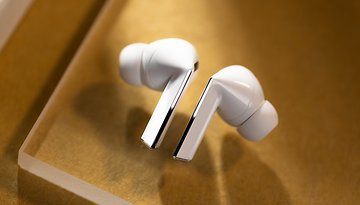
Visually, the CMF Buds Pro 2 are nothing very original. They're the classic hairdryer-style earphones. I like the mix between the matte coating on the stem and the shinier/pearly coating on the buds of each earphone.
The CMF Buds Pro 2 are comfortable to wear. With the default silicone tips, I had no problems with the fit. They are IP55 certified, so can be used for sports without worry.
CMF Buds Pro 2 Design at a Glance:
- Semi-intra format
- Touch-sensitive controls
- Weight per earphone: 4.9 g / Case weight: 46 g
- IP55 certified
- 4 colors: Light gray, Dark gray, Blue, Orange


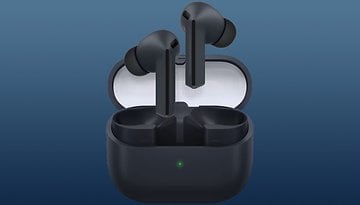
The case is particularly interesting from a design perspective. Its hinge is solid, with no play in the mechanism, and the valve magnets are powerful. Overall, it exudes a truly premium feel. Additionally, the CMF Buds Pro 2 housing includes a thumbwheel.
And this knob isn't just for playing with. Not only do I find the idea ingenious, but the haptic feedback and mechanical clicking noises of the knob are extremely satisfying.
CMF Buds Pro 2: Audio Quality
Like photo quality for smartphones, audio quality often shatters the illusion of premium that inexpensive products aim to inspire. And the CMF Buds Pro 2 are no exception. The audio signature is quite unbalanced.
CMF Buds Pro 2 Audio Quality at a Glance:
- 2 drivers: 11 mm woofer + 6 mm tweeter
- Codecs: SBC/AAC, LDAC
- Hi-Re certified

Lots of bass that drowns out the rest of the musical message. And sometimes, the highs are also a little too prominent, which creates some sibilance concerns with overly strident "S", "F" or "Ch" whistling sounds. Nothing too pronounced that can't be adjusted via the (very comprehensive) equalizer in the Nothing X application.
- Follow this guide to better understand the audio quality of your headphones
Voice clarity, on the other hand, is very good. I really enjoyed listening to or watching podcasts with the CMF Buds Pro 2. Having LDAC on a pair of 50-euro earphones is also pretty cool. Especially since even Sony has deprived its own low-cost earphones, the WF-C510 (test), of this Bluetooth codec, which it owns.
CMF Buds Pro 2 Active Noise Reduction
CMF Buds Pro 2 feature active noise reduction. And it's surprisingly effective. What I like best of all is that you can manually adjust it in several steps.
Solid-borne noise reduction is simply excellent. These low, constant noises are almost totally attenuated. Airborne, fluctuating noises are much less well attenuated. But this is the case with the vast majority of headphones.
CMF Buds Pro 2 Active Noise Reduction at a Glance:
- 3 microphones per earphone
- Adjustable or automatic ANC
- Transparency mode
Overall, the ANC of the CMF Buds Pro 2 convinced me. You immediately feel the difference when you activate it. And apart from human voices or alarms and other sudden/irregular noises, the headphones maintain a bubble of silence around you. Surprising considering their price.
CMF Buds Pro 2: App and Features
The Nothing X application is quite well-designed and generous in terms of features. Nothing's equalizer looks a bit odd with its circular design, but it's very complete. I like the port detection feature, which allows you to pause music or put the headphones to sleep when you remove them.
CMF Buds Pro 2 App and Features at a Glance:
- Android and iOS app
- Bluetooth 5.3
- Full, precise equalizer
- No true multipoint
- 360° audio
- Port detection


But the best feature of all is the "smart dial". Remember the dial on the charger box I mentioned earlier? By default, it's useless. It's just a moving thing to play with. But in the Nothing X application, you can activate its true potential and turn it into a multifunction button.
In all, this wheel can recognize five types of command. The most useful is to turn it in either direction to control volume. Apart from rotation, you can also press it to pause/play - a stroke of genius on Nothing's part. But you can also assign almost any control that would normally be reserved for headphones.
CMF Buds Pro 2 Batteries and Recharging
Personally, I've used Nothing headphones within these parameters:
- 100% charged
- Port detection disabled
- No charging during my session
- Active noise reduction always on
- 50% listening volume
- Paired with Android smartphone
- SBC/AAC codec

I lasted 6 hours and 20 minutes before hearing the low battery warning. That's an average score for wireless headphones in general. Even if, in this price range, we mainly have models without ANC, with an inevitably longer autonomy. The 11 hours without ANC and LDAC are also quite impressive.
The housing of the CMF Buds Pro 2 does not support wireless recharging. However, it does allow three full recharges of the earphones on average. Recharging is quite rapid, taking just over an hour to go from 0 to 100%.
CMF Buds Pro 2 Battery and Recharging at a Glance:
- No wireless recharging
- Without LDAC and without ANC: 11h
- Without LDAC and with ANC: 6h30
- With LDAC and without ANC: 6h30
- With LDAC and with ANC: 4h20
- 10 min recharging time = 3h listening time without ANC or 1h48 with ANC
- Earphone recharging time: 70 minutes
- Case recharge time: 60 minutes
Should I buy CMF Buds Pro 2?
Do I advise you to buy the Nothing CMF Buds Pro 2 at $47? Yes.
They're certainly one of the best-value models I've tested this year. For around fifty euros, you get comfortable earpieces, excellent active noise reduction and Hi-Res sound with LDAC codec.
But Nothing also always manages to bring that little fun factor to its products. Something as simple as a fidget-spinner-like thumbwheel that can also have a real functional purpose makes all the difference. It gamifies the user experience and adds another dimension to the product, I think.
Where to Buy the CMF Buds Pro 2
CMF Buds Pro 2 have been available since July 2024. Initially, Nothing only sold products from its CMF sub-brand on Amazon. But now you can also buy them via Nothing's official store. The launch price of the headphones was $59. Today, you can buy them for $47 at Nothing store*.