When selecting your WhatsApp profile picture, you have several options, including taking a new one with your camera or importing one from your gallery. Additionally, there are alternatives to create an avatar or have one AI-generated. Now, Meta is expanding these choices through integration with Facebook and Instagram.
Import Facebook or Instagram Profile Picture
In the latest WhatsApp beta version 2.25.21.23 for Android, Meta is testing a feature to allow users to import profile pictures directly from their Facebook and Instagram accounts. The options are available in the photo picker when viewing your profile in WhatsApp. However, users report that the feature is disabled by default and requires linking your WhatsApp account with Meta’s Account Center to use this cross-platform functionality.
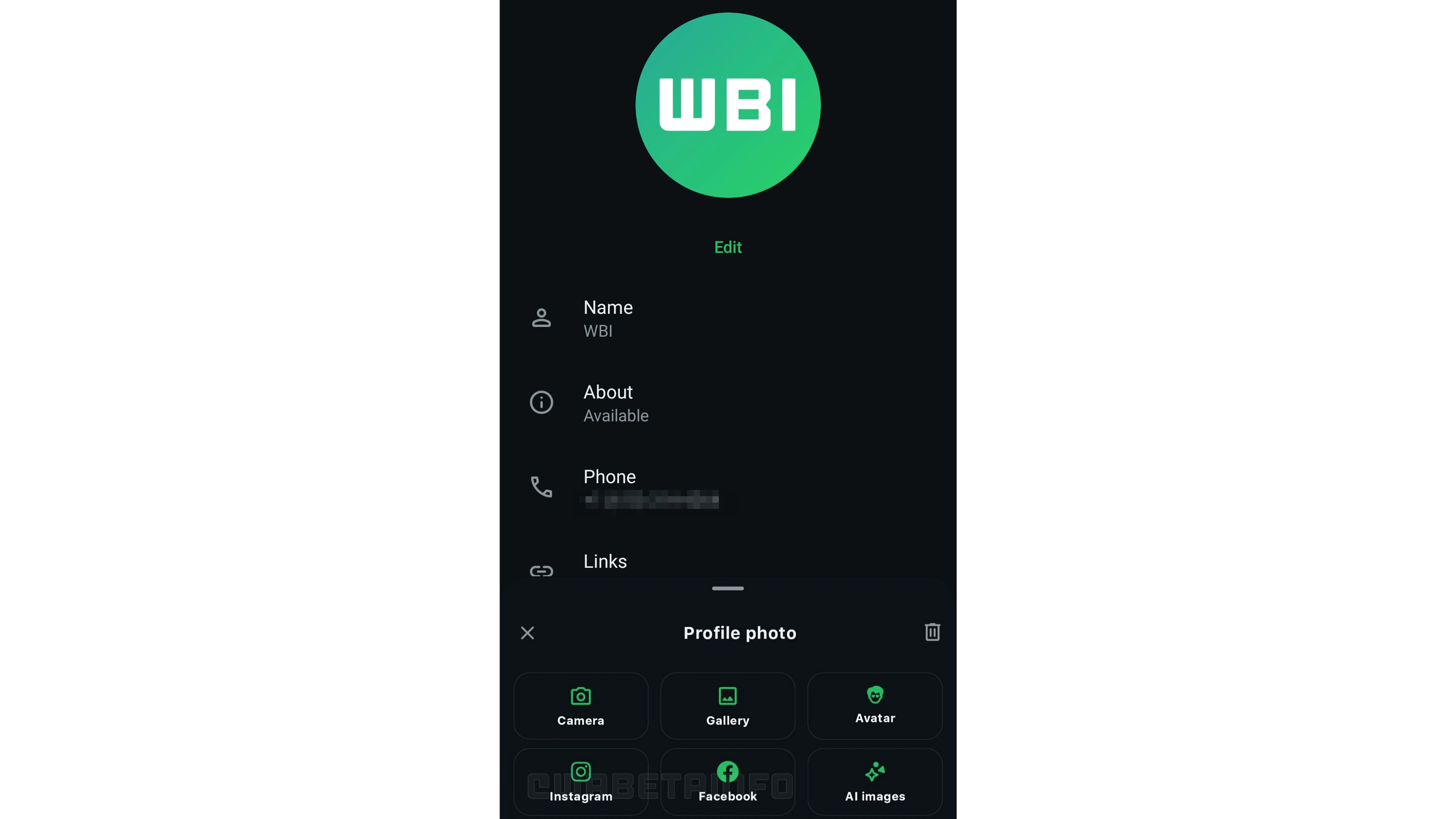
Once you’ve linked and authorized your WhatsApp account to Meta’s Account Center, you can select and use a profile picture from your Facebook or Instagram account for your WhatsApp account. This streamlines the entire process and saves time in syncing your profile picture, as previously, you could only do this manually.
Your Chats Remain Private
As noted in the Account Center, these cross-platform features retain WhatsApp’s end-to-end encryption, ensuring that calls and messages remain private. However, if you have a discoverable or public Facebook or Instagram account and use that profile picture on your WhatsApp, it could make it easier for your contacts in the messenger app to find your public profile online.
Apart from importing profile pictures, WhatsApp has already supported cross-posting of stories and updates to Facebook or Instagram. This is limited to stories and not to other media or chats.
The profile pics feature integration is currently available for select beta testers, which means it’s likely to be rolled out to the public in the near future after the testing phase.
How do you set up your WhatsApp profile picture? What do you think are the benefits of using the same profile picture across your Meta accounts? We welcome your suggestions in the comments.
We mark partner links with this symbol. If you click on one of these links or buttons–or make a purchase through them–we may receive a small commission from the retailer. This doesn’t affect the price you pay, but it helps us keep nextpit free for everyone. Thanks for your support! Prices are based on the date of publication of this article and may be subject to change.