Google Lens is enabling on-screen image search with Assistant

Read in other languages:
In a recent event, Google unveiled several upgrades for its services. While the spotlight was on the new AI chatbot Bard and Maps, Google's Lens is also set to receive a significant improvement that will enable an on-screen search through Assistant. Here's how to use an image search on your iPhone or Android phones without leaving an app or website.
The Lens app on mobile devices already allows image search, but you will need an extra step of saving a photo or screenshot before you can perform an on-screen search. Google is updating the Lens in the coming months, so it could add a new ability of on-screen image search with the help of Google Assistant.
How on-screen image search is done via Assistant
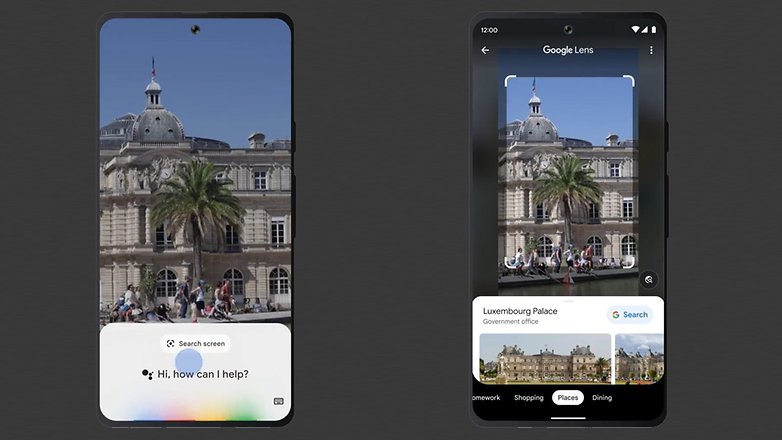
As shown by Google in its clip, a user can search for an image or video being displayed on the screen by summoning Assistant and tapping 'Search screen' from the pop-up menu. While the demo was in the Messages app, Google says that the on-screen image search will be supported on other apps and web pages.
For most non-Pixel Android phones and on Apple's iPhones, activating Assistant requires pressing the home button. Alternatively, you can trigger Assistant by opening the Google keyboard and tapping the microphone icon. In addition, you will need to install both Lens and Assistant to use the upcoming image search feature.
Since Google is still rolling out the search via Assistant, users can opt to capture a photo or screenshot and go through Lens or Google Photos to do an image search. But on desktops, Chrome already has an image search function where you can directly right-click through a photo to choose Search image with Google.
Google releases out multi-search for Lens and Search
At the same time, Google announced that multi-search on Lens and Search is now available globally. Similar to an image search action, you can refine the result by adding variations such as color to a car or nearby places where to buy the item searched.
Do you use Lens or image search in your device too? Which new features are you looking forward to trying out?
Via: GSMArena Source: Twitter/u/GoogleEurope