Sorry, but there's really nothing to see here right now. Our server is in maintenance mode – and our
little bot is trying to sort the error messages with its last bit of energy.
Whether it was a data leak, a power outage in the cluster, or just a grumpy bit – we don't know yet.
But what we do know is:
The data drama escalated into a server meltdown. But don't worry: We're on it.
What now?
Everything is surely running smoothly over at our colleagues from inside
digital – why not stop by!
Or you could pass the time by visiting our social media channels – for example Instagram, YouTube or TikTok. At least there are no
server problems there – promised.
Thanks for your patience. Our bot is already rebooting at full speed. 🔧
NewsGoogle Maps Just Got Smarter, And Lets You Beat Traffic for Good
Google Maps has steadily added thoughtful, useful features over the years, making it a reliable go-to navigation app, even for serious drivers and daily commuters. With Android 16, Google is giving it a significant quality-of-life upgrade through a new feature called Live Updates, designed to help users navigate traffic more efficiently than ever.
Live Updates is one of Android 16’s standout additions. It’s similar to iPhone’s Live Activity feature, which is a persistent and dynamic widget that appears on your home screen, lock screen, and notification panel, even if the app is minimized or dismissed. Beyond its always-visible design, it offers real-time updates for supported apps like Uber, train rides, a timer, and more.
Navigation Feature That Helps You Beat Traffic
Google has been testing Live Updates integration with its first-party apps, including Google Maps. While the feature has been in limited testing for some time, more users are now starting to see it appear when they use Google Maps while navigating.
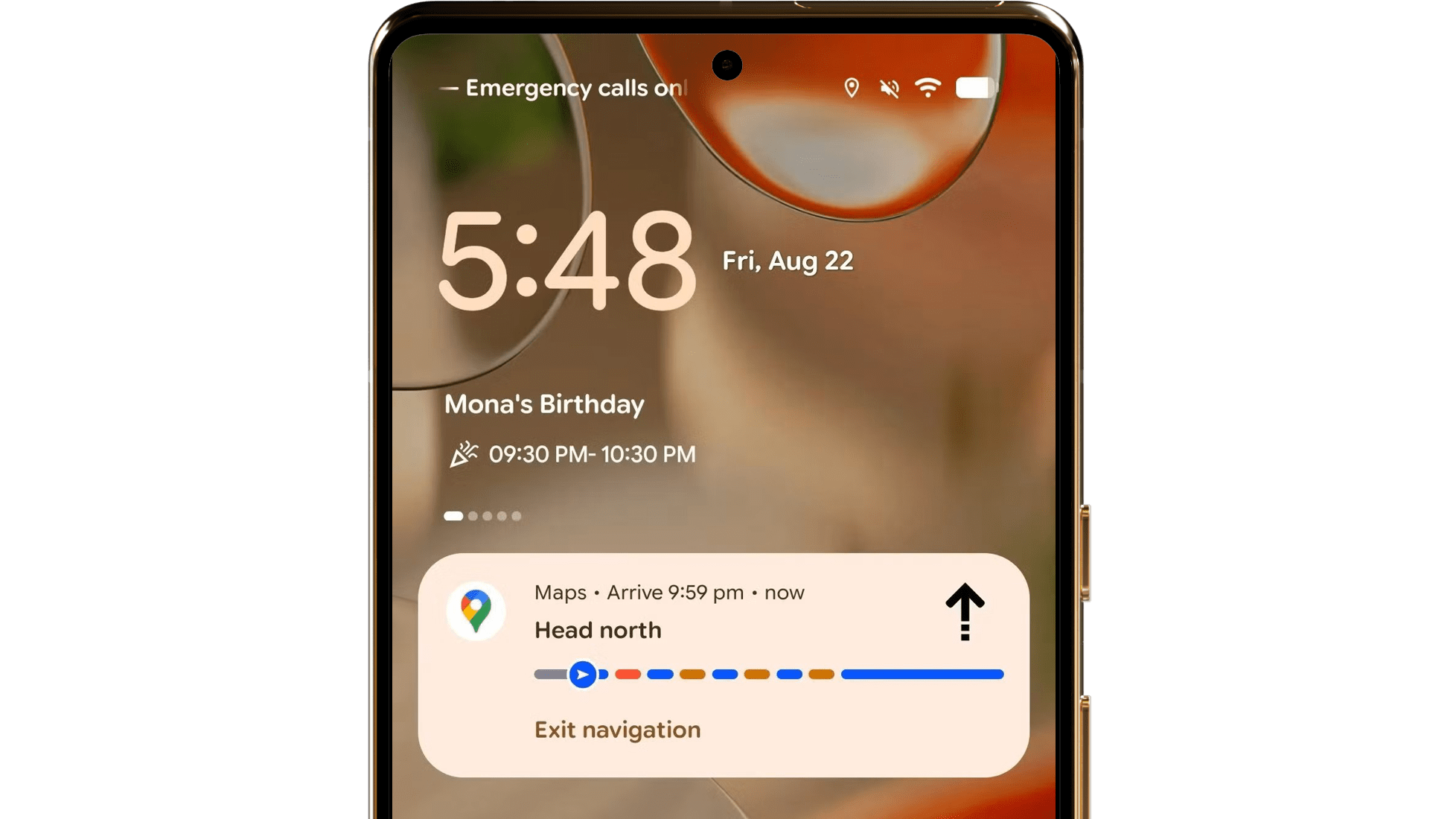
Some testers report (via Android Authority) seeing a floating, sticky window on their home and lock screens, as well as in the notification shade when Quick Settings is partially opened. The widget appears as a rectangular panel showing trip progress, color-coded stops, and even a directional arrow pointing toward your next turn.
There’s also an Exit button to entirely dismiss the widget, while tapping the widget itself opens the full-screen Google Maps app with all navigation details available.
Live Updates also appears to support more than just car trips. It may extend to other commute modes like biking and public transport, including trains and buses. However, we’ll need to wait and see how these are implemented.
This is a highly practical addition, especially for drivers who rely on their phones for navigation while on the road. It reduces the need to reopen the app manually if it’s accidentally closed, keeping directions visible and accessible at all times.
When Will Google Maps’ Live Updates Roll Out?
Live Updates is currently available in Android 16, and the Google Maps integration is still in beta testing. A wider rollout is expected soon, likely tied to the release of Android 16 QPR1.
Which Android version are you running? Have you spotted Live Updates in action on your device? Share your experience with us below.
We mark partner links with this symbol. If you click on one of these links or buttons–or make a purchase through them–we may receive a small commission from the retailer. This doesn’t affect the price you pay, but it helps us keep nextpit free for everyone. Thanks for your support!







0 comments