Sorry, but there's really nothing to see here right now. Our server is in maintenance mode – and our
little bot is trying to sort the error messages with its last bit of energy.
Whether it was a data leak, a power outage in the cluster, or just a grumpy bit – we don't know yet.
But what we do know is:
The data drama escalated into a server meltdown. But don't worry: We're on it.
What now?
Everything is surely running smoothly over at our colleagues from inside
digital – why not stop by!
Or you could pass the time by visiting our social media channels – for example Instagram, YouTube or TikTok. At least there are no
server problems there – promised.
Thanks for your patience. Our bot is already rebooting at full speed. 🔧
NewsTabletGoogle’s Cross-Device Services allows app streaming on Chromebook
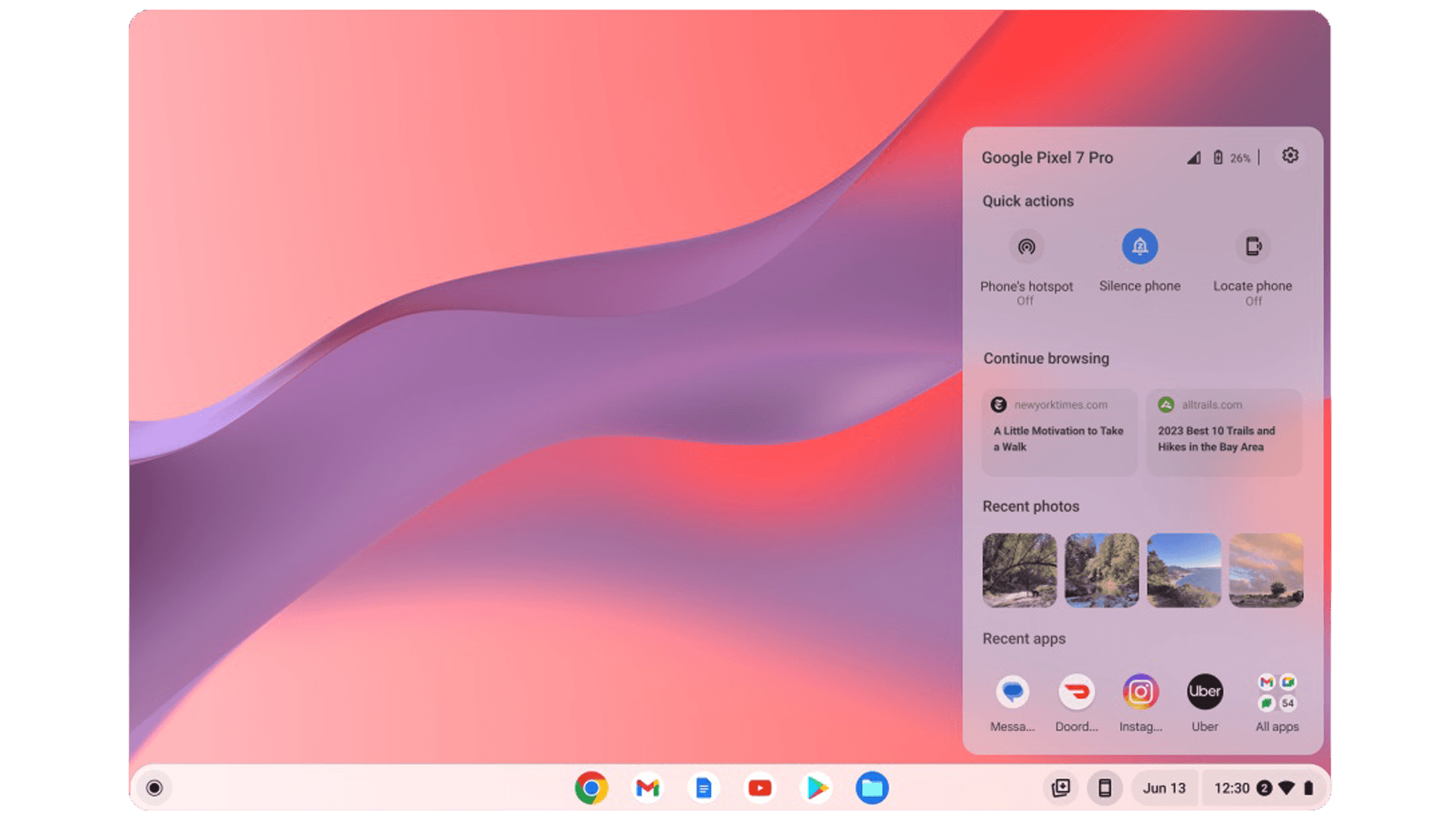
Google is finally enabling Android apps streaming on Chromebooks via the latest Cross-Devices Services app, and this ability is now available for selected users. The feature was first announced last year and has now been added to the existing cross-platform capabilities of the service.
The app allows users to share or manage tasks from an Android device and seamlessly lets you continue your work on a Chromebook. For instance, you can send instant messages to your intended recipients on your Pixel smartphone via a Chromebook. It can be performed remotely or locally within the same network.
How do you activate and use Android app streaming on a Chromebook
Although it is still in beta, it is possible to activate it through a compatible hardware configuration as tested by developer Mishaal Rahman, who also spotted the change. He was able to stream Twitter from the Android 13-powered Pixel 6 Pro and successfully posted tweets on his Chromebook.
Apart from Google’s Pixel handsets, compatible Android devices include the Xiaomi 12T, Oppo Find N2 Flip (review), Asus Zenfone 9, and Nothing Phone 1 (review), among others. Updating the app to its latest version, 1.0.285.1, is a must before any magic happens.
You should also enable the option from your Chromebook via the Phone Hub settings. However, the most important criteria is making sure your account is supported by the opt-in feature, which is solely controlled by Google at the moment. So, there is no way to tell if you have access unless you perform a manual check and test of the service.
Google has yet to publish selected release notes on what would be the scope and limit of its streaming functionality. However, additional testing has confirmed that you’re allowed to run multiple apps, make free-form windows, and select your laptop microphone on top of the basic feature, that is viewing your recent apps. Nonetheless, the new feature does seem to drastically improve the entire app experience.
The search giant is scheduled to announce Android 14 next month. It is possible they could offer additional highlights about the updated Cross-Devices Services or roll out the definitive version. The new operating system is tipped to arrive with optimized performance and improved usability, like transforming your Android phone into a webcam for laptops and Chromebooks.
In other words, you get to stretch your smartphone’s functionality further on your Chromebook. It is somewhat akin to Samsung’s DeX experience, and it would be interesting to see how much more will Google develop this interoperability idea down the road.
Which changes and features do you look forward to most in Google’s next OS? Share to us your thoughts in the comment section.
We mark partner links with this symbol. If you click on one of these links or buttons–or make a purchase through them–we may receive a small commission from the retailer. This doesn’t affect the price you pay, but it helps us keep nextpit free for everyone. Thanks for your support!







0 comments