Sorry, but there's really nothing to see here right now. Our server is in maintenance mode – and our
little bot is trying to sort the error messages with its last bit of energy.
Whether it was a data leak, a power outage in the cluster, or just a grumpy bit – we don't know yet.
But what we do know is:
The data drama escalated into a server meltdown. But don't worry: We're on it.
What now?
Everything is surely running smoothly over at our colleagues from inside
digital – why not stop by!
Or you could pass the time by visiting our social media channels – for example Instagram, YouTube or TikTok. At least there are no
server problems there – promised.
Thanks for your patience. Our bot is already rebooting at full speed. 🔧
NewsSmartphonesApple TV Gets Zoom Video Call App as FaceTime Alternative
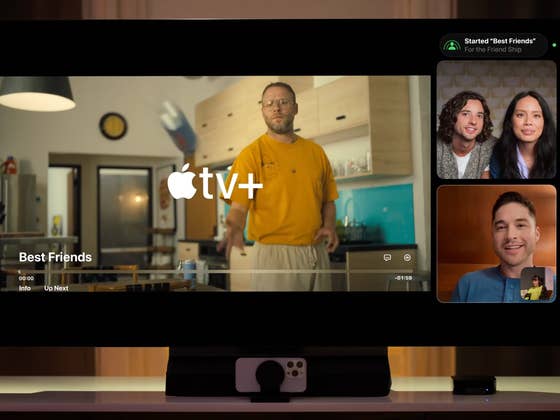
The idea of hosting video conferencing or calls on your TV was explored by Apple when it debuted tvOS 17. Using an iPad or iPhone, you can use these devices to transform them into a web camera for your Apple TV 4K, albeit being limited to the FaceTime app. Fortunately, there is now an alternative as the popular video conferencing platform Zoom is now supported by Apple TV devices.
Don’t miss this: How to enable and use FaceTime on Apple TV in easy steps
Transform your iPhone or iPad into a webcam when using Zoom on Apple TV
Over the weekend, user Sigmund Judge spotted (via Apple Insider) the Zoom app for Apple TV 4K was released on the App Store. If you have a compatible Apple TV 4K model, you should be able to see an option to download and install Zoom on your top-box device.
Many of the core features of the Zoom app for Apple TV 4K are supported in this iteration. For instance, you can start a Zoom call from your iPhone or iPad, before transferring it to your Apple TV 4K. There is also calendar integration that lets you display the Zoom app on top of viewing the in-meeting threaded chat and launching breakout rooms. In addition, users can get meeting invites via mobile as well.
As usual, you will need to pair or connect your Zoom account on your TV first before anything else. This is easily done by following the short step-by-step guide and where you are given the option to scan a QR code using your handset or enter your security credentials manually.
Regarding compatibility, you will need to have a 2nd gen or Apple TV 4K (2021) and a 3rd gen Apple TV 4K (2022) at the very least. It should be noted that it will not be available to the original Apple TV 4K (2017), although the model works fine with FaceTime. Your iPhone should also be running on the latest iOS 17 (or iPadOS 17 on iPad tablets) software that ships with Continuity Camera.
Have you tried video calling on your Apple TV or perhaps using FaceTime? Do you think it is a convenient feature to transfer calls to a big screen? Share your thoughts with us in the comments.
We mark partner links with this symbol. If you click on one of these links or buttons–or make a purchase through them–we may receive a small commission from the retailer. This doesn’t affect the price you pay, but it helps us keep nextpit free for everyone. Thanks for your support!





0 comments