How to create scenes in the Home app: Make sure you always lock the front door
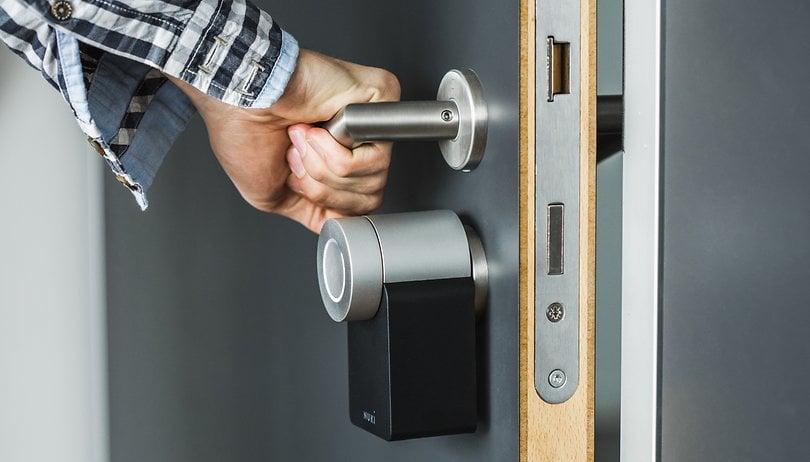

If you're the kind of person who loves smart routines, using the Home app's Scenes feature can be a great way to controle multiple accessories at the same time. In this tutorial, we show you how simple it is to create scenes in the Home app and automate actions from voice commands as basic as "Good morning" and "Good evening".
Using the Scenes feature in the Home app, you can automatically lock the front door when you leave and unlock it when you arrive. I personally like this scene a lot, as I use it often at NextPit, because then I am sure I won't leave the company door unlocked when I leave.
To set up a scene in the Home app, you need an iPhone and your smart home hub—such as a HomePod, HomePod mini, Apple TV (4th generation or later), or iPad.
How to set up a scene in the Home app
After you add a HomeKit accessory to the Home app, you can start creating scenes. Follow the steps below to create a scene on your iPhone or iPad:
- Open the Home app, click the Add (+) button and select Add Scene.
- Select a suggested scene, or go ahead and create a custom scene. The most important thing here is to remember the name of the scene when giving a voice command to Siri.
- Tap or click Add Accessories.
- Select the accessories you want to add and then tap or click Ok. Remember to add only the accessories that you want to control together.
- To adjust the settings for an accessory on an iOS device or iPadOS, tap and hold it.
- To see a preview of the scene, tap Test This Scene. Enable the Include in Favorites option to access the scene in Control Center, the Home tab, and Apple Watch.
- Tap or click Ok.
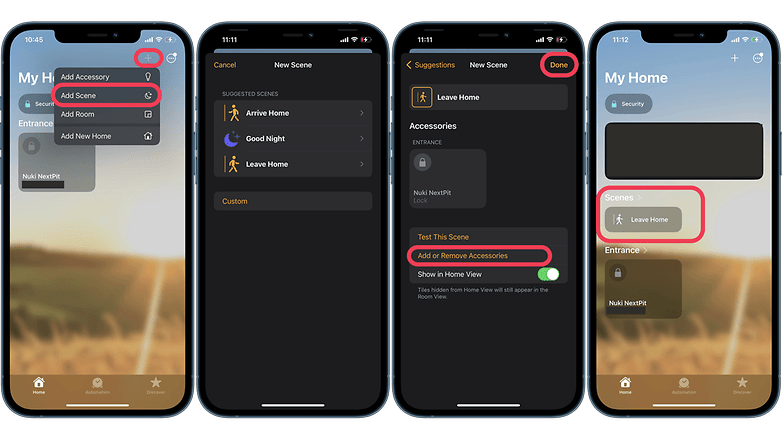
Done! Now just click on the newly created scene to activate it, or just give a voice command to the Siri assistant. If you have a HomePod or Apple TV (4th generation or later) set up as a home center, you can also automate a scene. If you want to add or remove accessories from a scene-on the iPhone or iPad-just long press the scene in question and click Settings.