Sorry, but there's really nothing to see here right now. Our server is in maintenance mode – and our
little bot is trying to sort the error messages with its last bit of energy.
Whether it was a data leak, a power outage in the cluster, or just a grumpy bit – we don't know yet.
But what we do know is:
The data drama escalated into a server meltdown. But don't worry: We're on it.
What now?
Everything is surely running smoothly over at our colleagues from inside
digital – why not stop by!
Or you could pass the time by visiting our social media channels – for example Instagram, YouTube or TikTok. At least there are no
server problems there – promised.
Thanks for your patience. Our bot is already rebooting at full speed. 🔧
How-tosTabletStop iOS and Android apps from tracking you with this simple trick
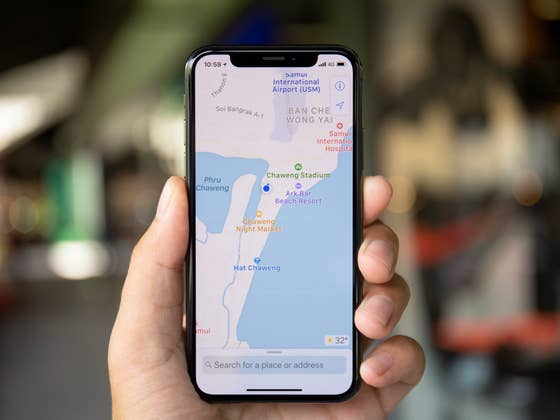
Whether you have an Android smartphone or an iPhone, you’ve probably already downloaded an application asking for access to your location. But does a note-taking application or a mobile game really need to geolocate you to the nearest meter? No. So here’s how to revoke an Android or iOS app’s access to your precise location.
I’m not an iOS expert, but on Android there are two types of geolocation that apps use. The “coarse location” can geolocate you approximately within a radius of 3 km2 and the “fine location” which can determine your precise position within a few meters (50 meters and less). The difference lies in the resources that the application can use, the access of the “fine location” being necessarily more intrusive than for the “coarse location”.
On Android 12, but also iOS 16, when an app requests access to your location, you can now grant it, but restrict that permission to your approximate location.
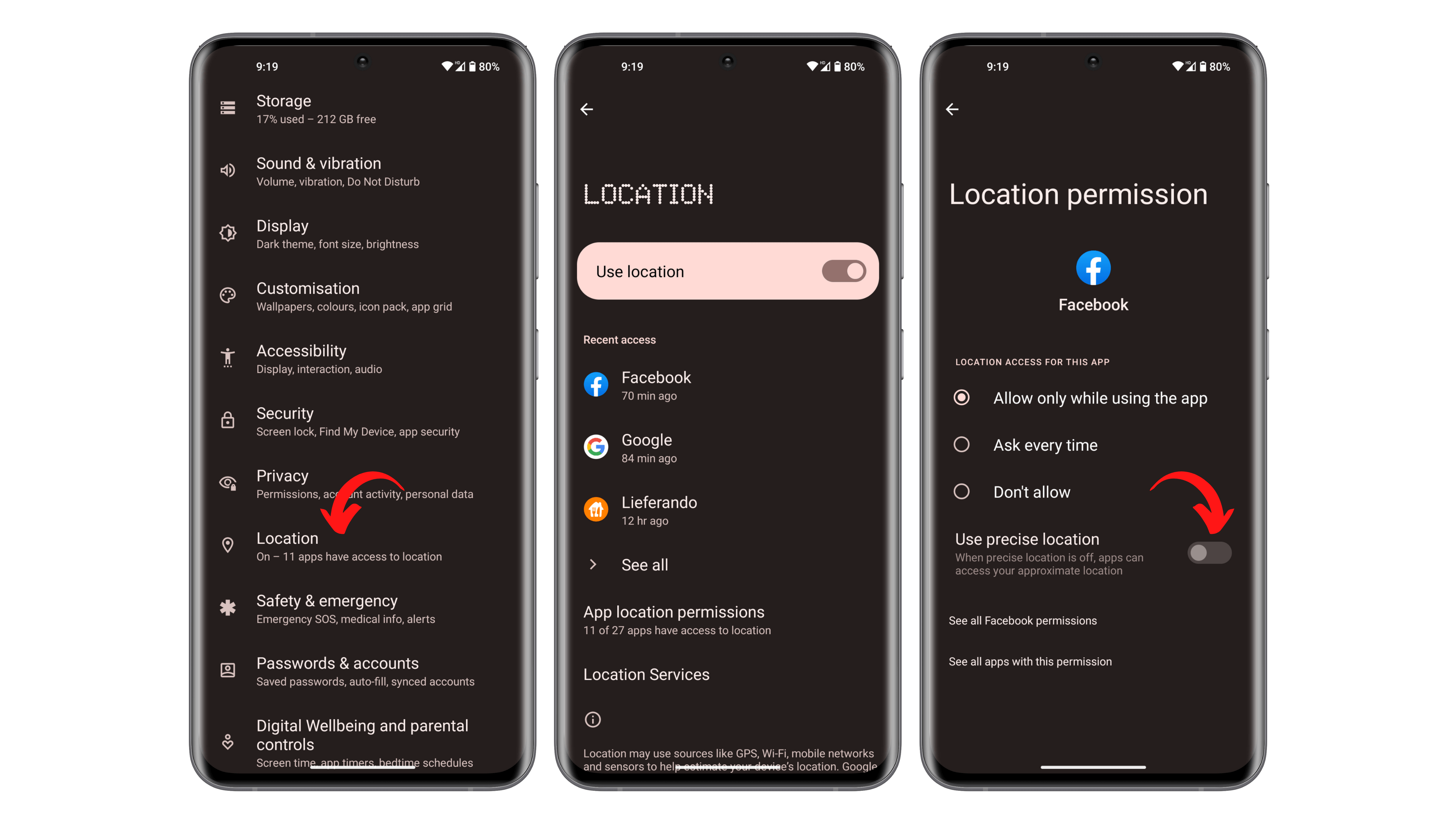
How to revoke access to your precise location on your Android smartphone
On Android, you can go through the famous Privacy Dashboard to manage the permissions granted to your apps:
Go to Settings and then to Location.
Select the application of your choice and press it.
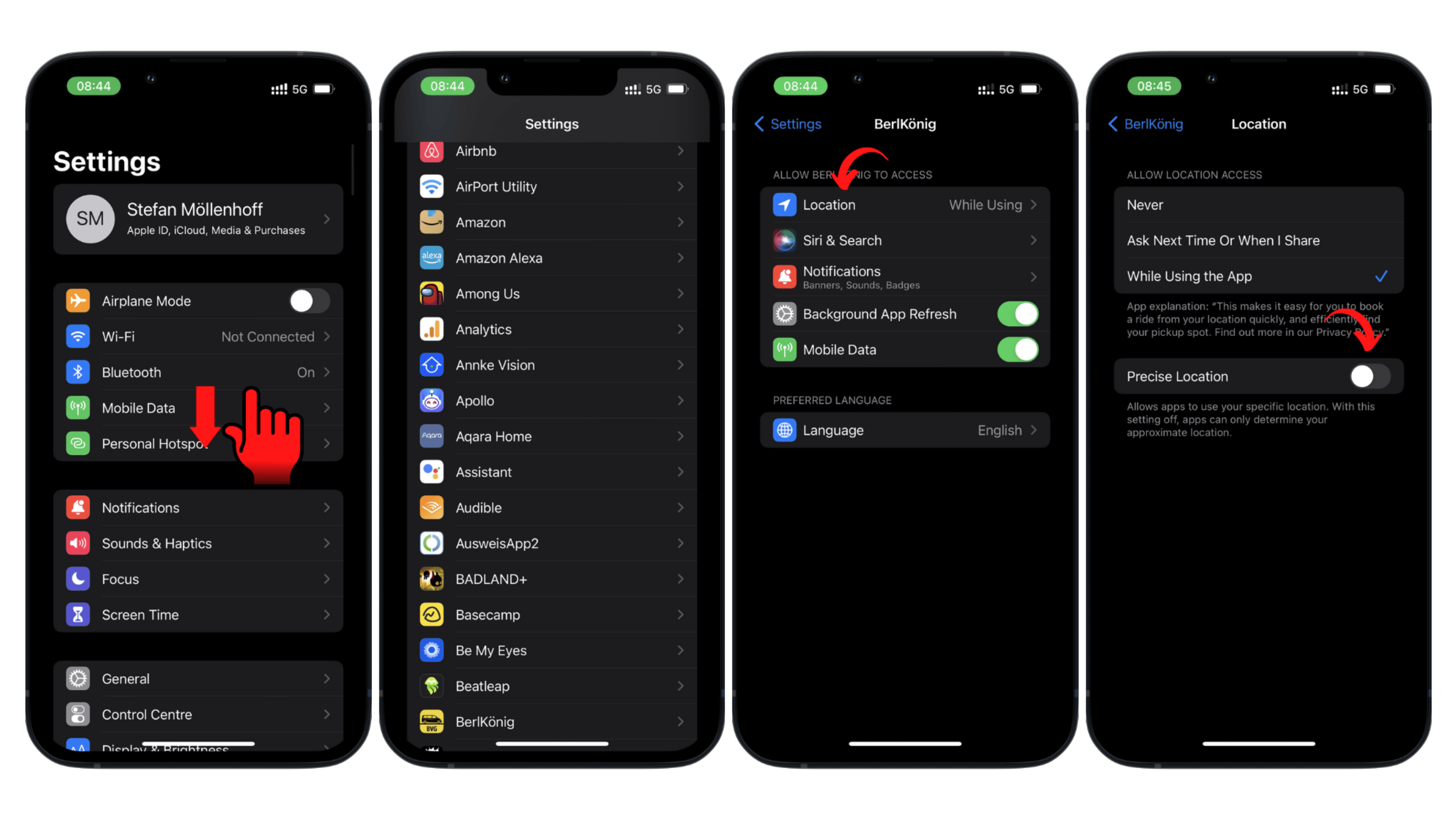
How to revoke access to your exact location on your iPhone
On iOS, the process is much the same. As with Android’s Privacy Dashboard, you can see which apps are accessing your location via the Location Service menu in the Privacy menu.
Go to Settings and scroll down to see a list of your apps.
That’s it for this quick tutorial on how to revoke an app’s access to your exact location. Did this tip help you? Apart from navigation apps like Google Maps or Maps, what kind of apps do you let access your precise location?
Schwarzer Gürtel beim Lesen von Datenblättern. OnePlus-Fanboy a.D. Durchschnittliche Lesezeit für meine Artikel: 48 Minuten. Hasst es, von sich selbst in der dritten Person zu sprechen. Wäre in einem früheren Leben gerne Gaming-Journalist gewesen. Versteht keine Ironie. Head of editorial bei nextpit Frankreich.
Wifi signals your phone detects give away your location, cell tower connection gives your location, particularly with 5G beam forming pointing right at you. Your IP number gives away quite a bit by itself. Have a Bluetooth connection? Lots of those devices also include GPS for identifying the right or most likely connections. How about an apple airtag or similar? No GPS needed to find you. You’re giving it away while also indicating who you hang out by. Running Covid exposure app? Scanning a QR code for a menu or ID? You’ve given out your location.
How many geofence searches/warrants have you been part of? You can’t know, it’s never disclosed.
Your app has a connection to the google sublayers for ad and data transfer. They collect all the secondary methods for location too and share it around.
You can’t stop apps from looking at a lot of this sort of information at all, let alone block them from deeper level access to networking and google ad sharing data networks. Did you post an instagram with the geotag content intact? You gave away your location.
Your gyroscope, "body action" permissions give away quite a bit of info, and can themselves be used to construct a reliable identifier, identifying how you move. The can be used to track your movement from a last known position, or show you got a new phone.
There is a lot about one’s phone that is privacy hostile. They can increase convenience, but you need to recognize that you’re being bought and sold for that convenience.







Meaningless.
Wifi signals your phone detects give away your location, cell tower connection gives your location, particularly with 5G beam forming pointing right at you. Your IP number gives away quite a bit by itself. Have a Bluetooth connection? Lots of those devices also include GPS for identifying the right or most likely connections. How about an apple airtag or similar? No GPS needed to find you. You’re giving it away while also indicating who you hang out by. Running Covid exposure app? Scanning a QR code for a menu or ID? You’ve given out your location.
How many geofence searches/warrants have you been part of? You can’t know, it’s never disclosed.
Your app has a connection to the google sublayers for ad and data transfer. They collect all the secondary methods for location too and share it around.
You can’t stop apps from looking at a lot of this sort of information at all, let alone block them from deeper level access to networking and google ad sharing data networks. Did you post an instagram with the geotag content intact? You gave away your location.
Your gyroscope, "body action" permissions give away quite a bit of info, and can themselves be used to construct a reliable identifier, identifying how you move. The can be used to track your movement from a last known position, or show you got a new phone.
There is a lot about one’s phone that is privacy hostile. They can increase convenience, but you need to recognize that you’re being bought and sold for that convenience.