Sorry, but there's really nothing to see here right now. Our server is in maintenance mode – and our
little bot is trying to sort the error messages with its last bit of energy.
Whether it was a data leak, a power outage in the cluster, or just a grumpy bit – we don't know yet.
But what we do know is:
The data drama escalated into a server meltdown. But don't worry: We're on it.
What now?
Everything is surely running smoothly over at our colleagues from inside
digital – why not stop by!
Or you could pass the time by visiting our social media channels – for example Instagram, YouTube or TikTok. At least there are no
server problems there – promised.
Thanks for your patience. Our bot is already rebooting at full speed. 🔧
How-tosTabletEnable Live Activities to get live data in your iPhone
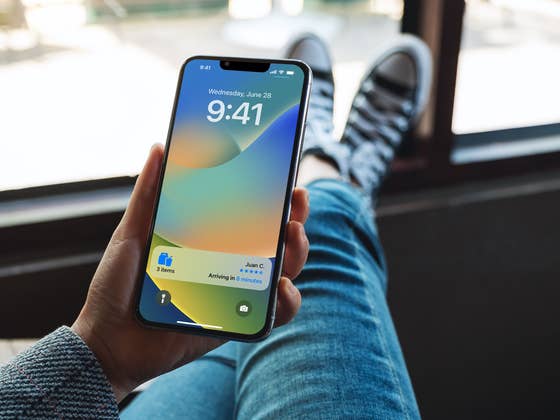
Despite being a rather small update, iOS 16.1 managed to squeeze a useful new feature into the iPhone line: Live Activities. The option enables apps to give live updates to notifications like deliveries, flight data, and much more. Learn how to enable a Live Activity on your updated iPhone.
Looking for a new iPhone? Check NextPit’s comparison of the available models
For iPhone 14 Pro (Max) owners, Live Activities offers extra perks such as a persistent display around the selfie camera notch, with a shortcut icon offering the option to quickly display the status of whatever action an app is tracking.
As mentioned above, Live Activities are available for third-party apps starting in iOS 16.1. So, update your iPhone’s system and then follow these steps:
As of writing this how-to, app support for the feature is still a bit limited but we expect the option to catch up as soon as devs familiarize themselves with Live Activities. And as usual, we can also look forward to implementations with a varying range of qualities. Hopefully, Apple won’t allow the feature to be abused.
What do you think about Live Activities? Do you believe it is not that different from regular notifications? Share your opinions in the comments below!
We mark partner links with this symbol. If you click on one of these links or buttons–or make a purchase through them–we may receive a small commission from the retailer. This doesn’t affect the price you pay, but it helps us keep nextpit free for everyone. Thanks for your support!
Seit 2008 schreibe ich für verschiedene Websites in Brasilien, Spanien, Dänemark und Deutschland über Technologie und habe mich auf mobile Ökosysteme spezialisiert. Dabei dreht sich bei mir alles um die interessantesten Modelle, ihre Komponenten und natürlich die ganze Welt der Apps. Dabei lege ich nicht nur Wert auf Leistung und Spezifikationen, sondern auch auf Aspekte wie Reparaturfähigkeit, Haltbarkeit und Herstellersupport.








0 comments