Sorry, but there's really nothing to see here right now. Our server is in maintenance mode – and our
little bot is trying to sort the error messages with its last bit of energy.
Whether it was a data leak, a power outage in the cluster, or just a grumpy bit – we don't know yet.
But what we do know is:
The data drama escalated into a server meltdown. But don't worry: We're on it.
What now?
Everything is surely running smoothly over at our colleagues from inside
digital – why not stop by!
Or you could pass the time by visiting our social media channels – for example Instagram, YouTube or TikTok. At least there are no
server problems there – promised.
Thanks for your patience. Our bot is already rebooting at full speed. 🔧
ReviewsWithings ScanWatch 2 Review: High Hopes, Mixed Results!
Withings raised the stakes in 2023. The company is poised to introduce a urinalysis device to the market, and its Remote Patient Monitoring program enhances the doctor-patient relationship by offering greater freedom. Additionally, the latest generation of their hybrid watch was launched in August. However, the question arises: can a small company like Withings successfully execute multiple significant projects at the same time?
We tested the ScanWatch 2, the brand’s newest hybrid watch that merges analog and digital functionalities. It outperforms the leading competitors in battery life, features an awe-inspiring design, and includes essential functions for those seeking a comprehensive view of their vital signs and more. Yet, does it fulfill the promises made by Withings?
Withings focuses more on health than wellness, so the ScanWatch 2 is expected to offer not only useful vital tracking data but also features that allow easy sharing with doctors.
The ScanWatch 2 includes an optional subscription for in-depth analysis, new and improved features compared to the previous generation, and boasts a 30-day battery life on a single charge.
Above all, as a hybrid smartwatch, it offers all the health data benefits without feeling like you’re wearing a mini-PC on your wrist. But is this impressive health tracker right for you? Continue reading our Withings ScanWatch 2 review to find out.
Before delving into sensors, metrics, and software, let’s appreciate the ingenuity of hybrid smartwatches: everything is tactile, no touch-sensitive displays needed. Moreover, the classic watch design suits a broader range of occasions and complements various lifestyles inherent in you—drawing less attention to the fact that you’re quantifying yourself .
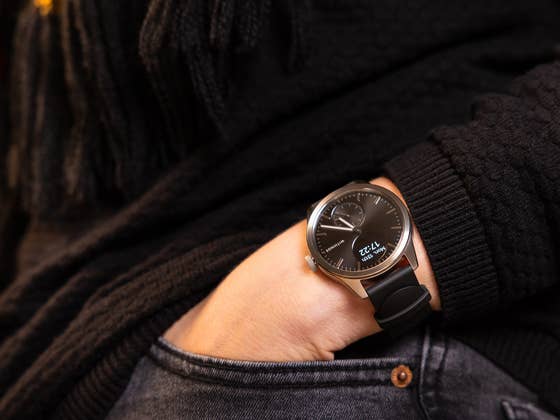
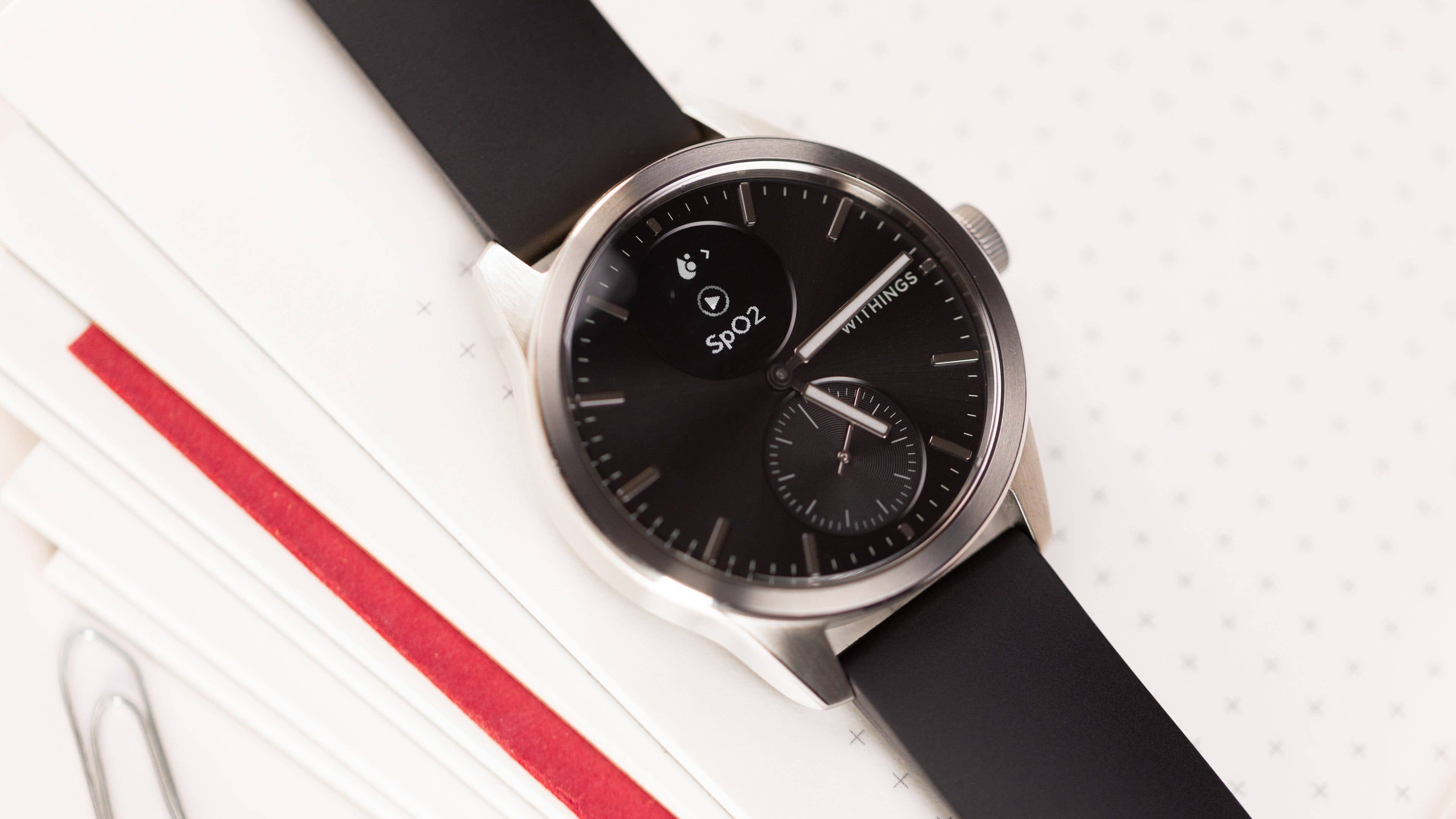
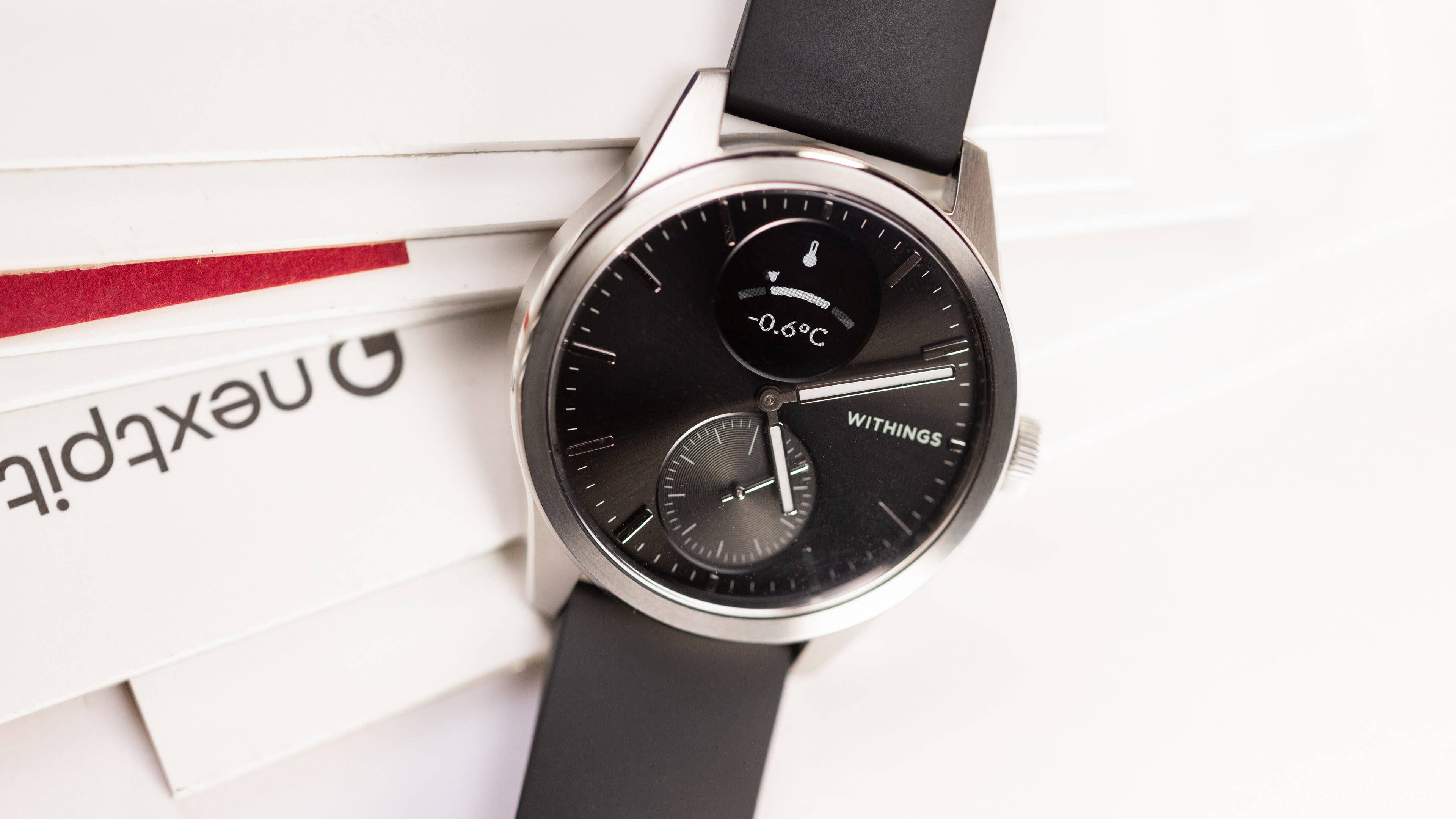
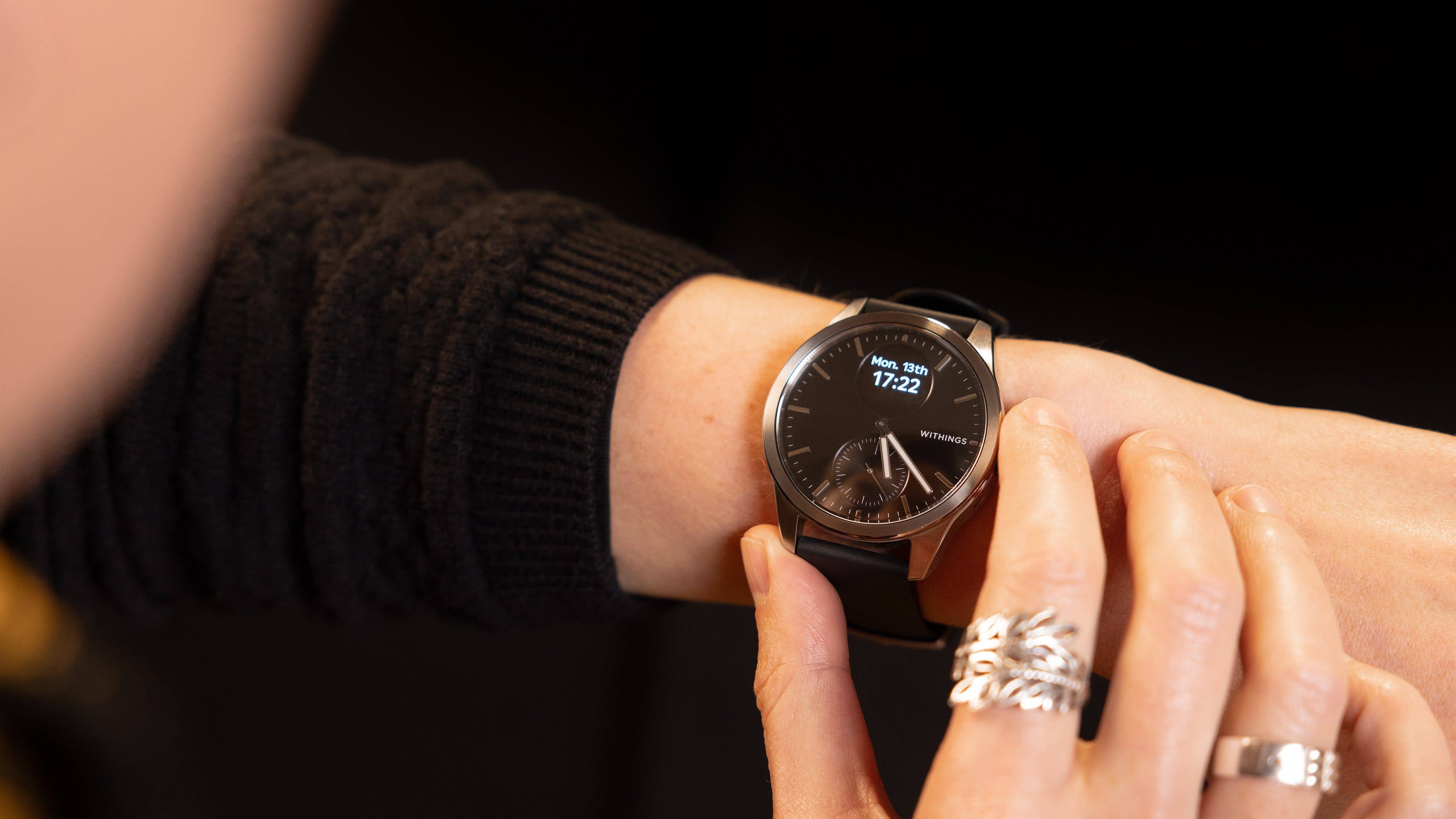
I tested the stainless-steel case with sapphire glass, which is light and beautifully designed. Since I’m used to smartwatches, I ordered the 42 mm size, which I feel looks gorgeous on my small wrist. The device came with the standard wristband, featuring a hook that is effortless to attach and detach. Personally, the standard band is okay, but I would definitely consider ordering an extra one.
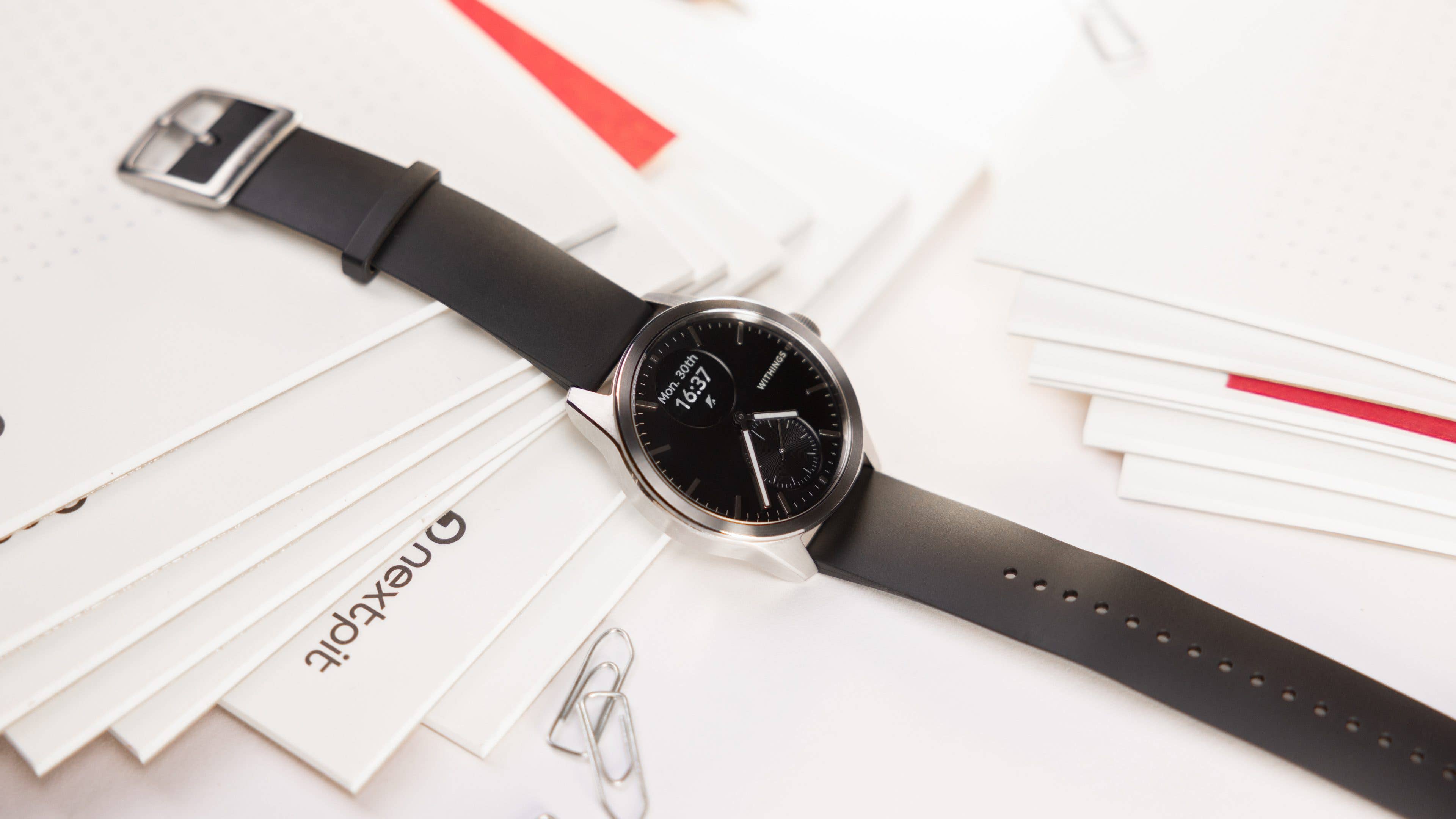
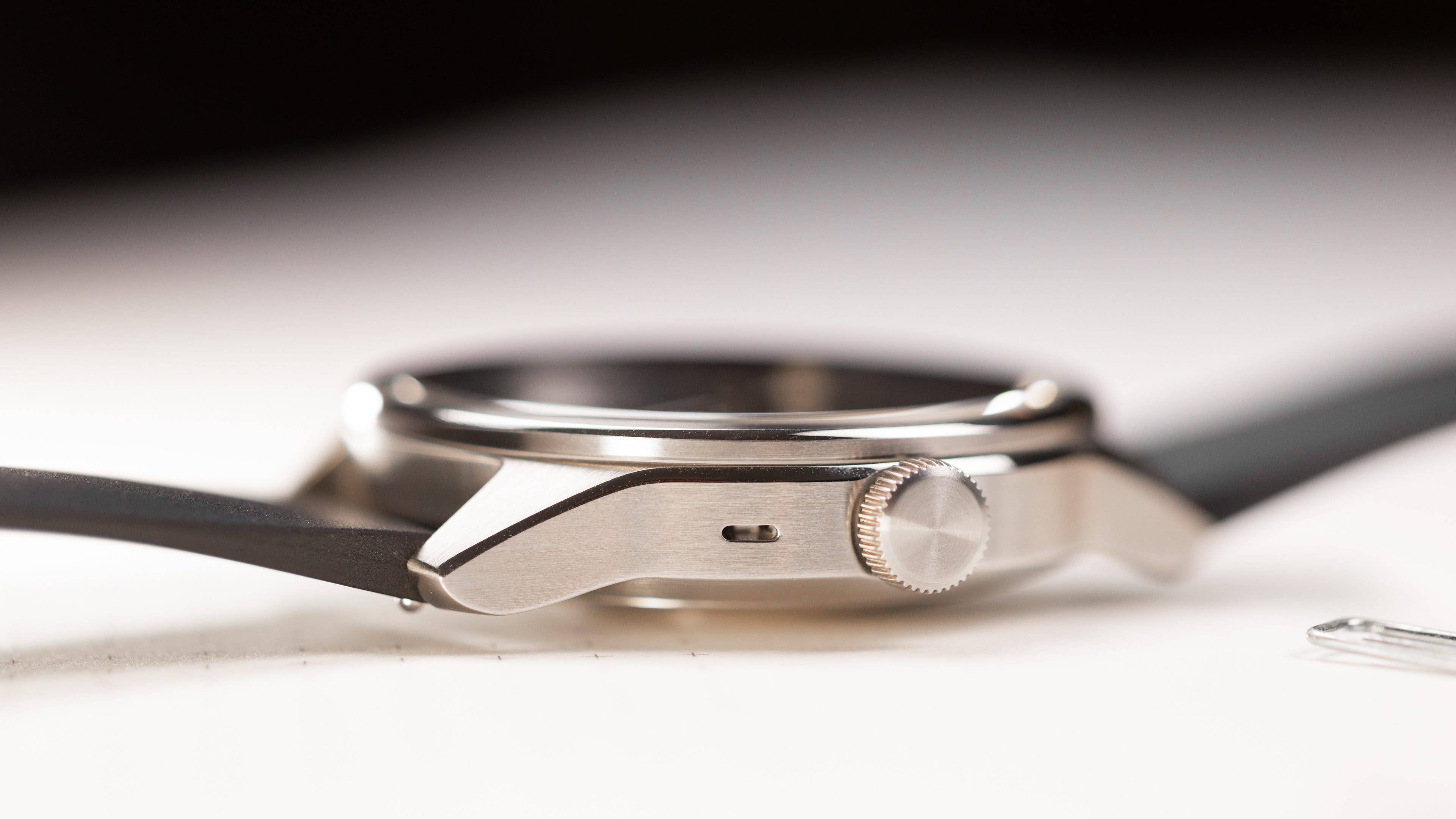
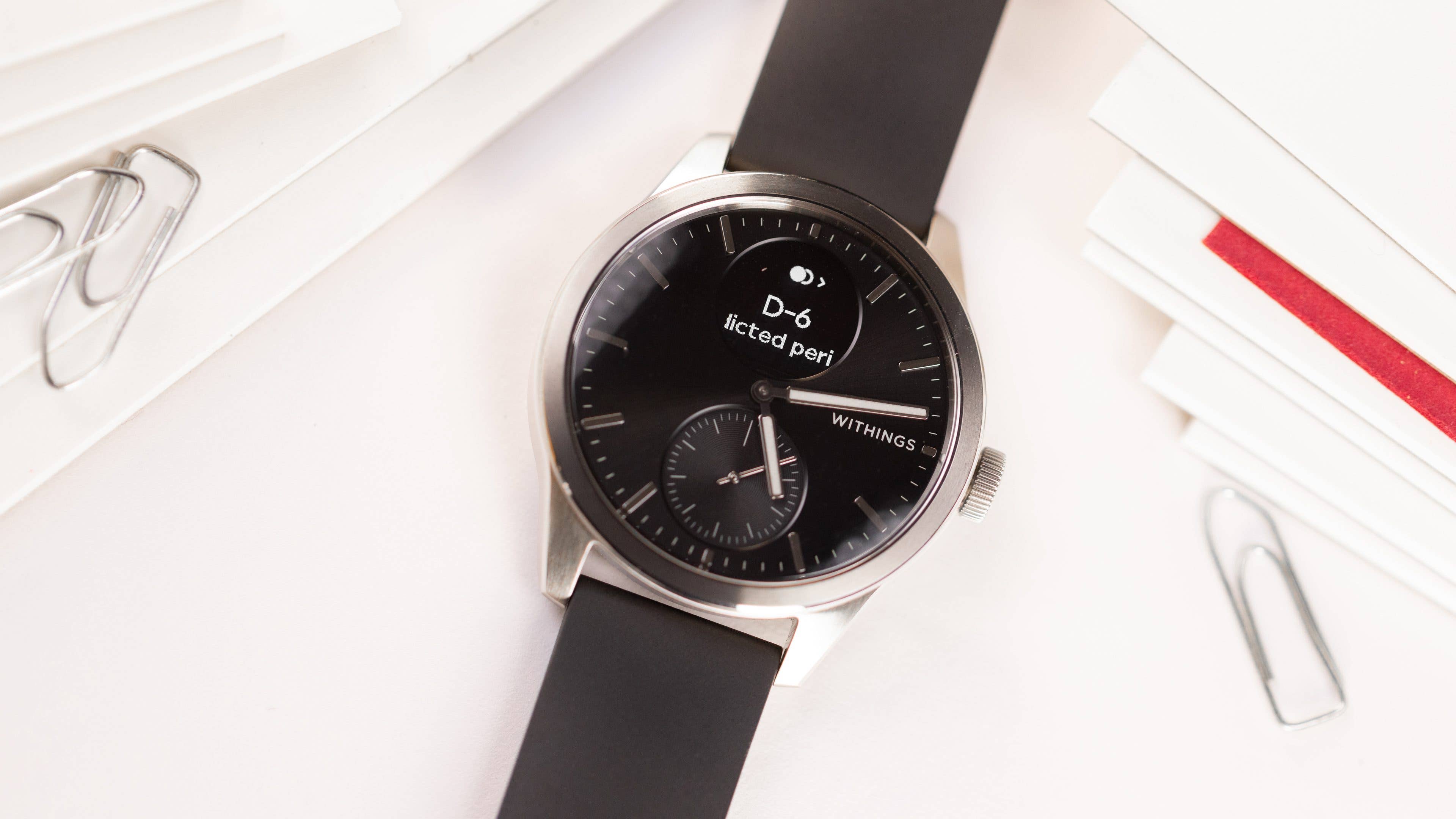
That said, the ScanWatch 2 is very minimalist. It offers a digital display on the top, a digital crown on the right side, and an activity dial on the bottom. I find the Withings signature very elegant and not bothersome at all; in fact, it adds a certain elegance. And since it doesn’t have an Always-on Display feature, it keeps a classic look—however, you can use the “quicklook” option to wake up the screen when you move your wrist.
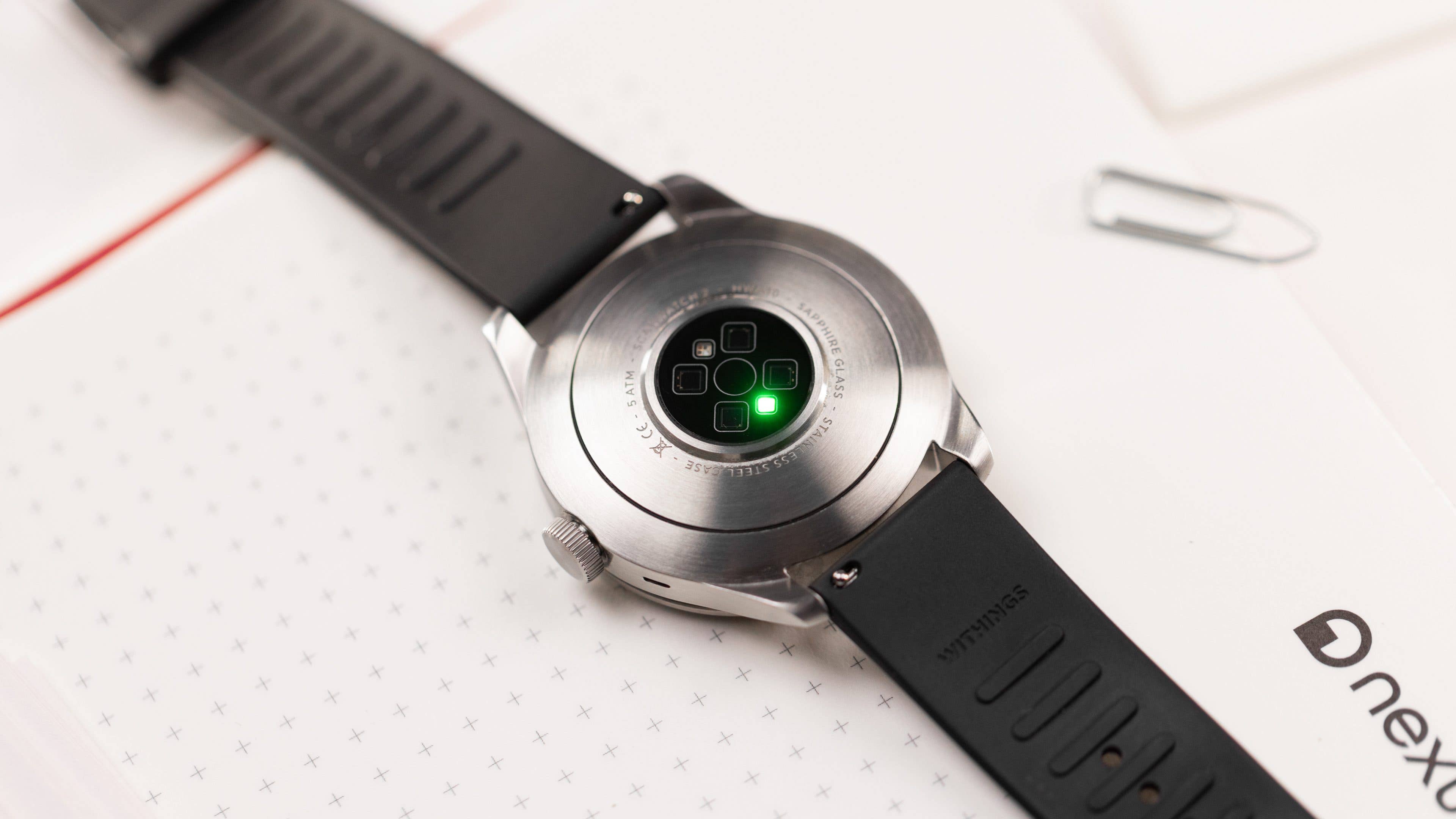
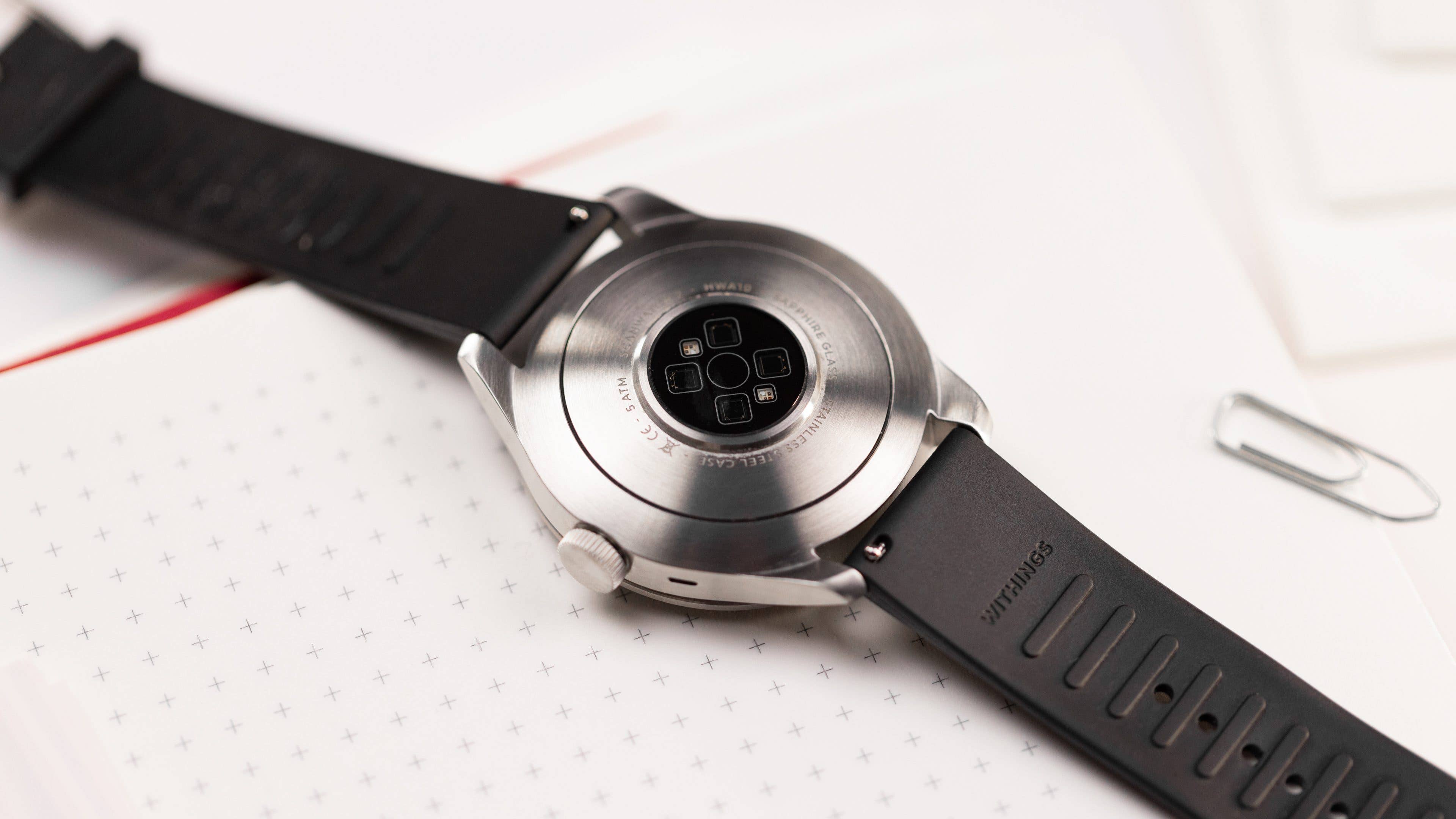
While looking directly at the screen, one might not easily identify it as a hybrid watch. It’s on the back where it becomes clear that this is not purely analog. The sensors on the back directly touch the skin for measuring blood oxygen, heart rate, and body temperature variation. I’ve been using it for a month now and haven’t had any issues with my skin—which tends to happen sometimes with my Apple Watch.
Digital display and controls
When I interviewed Matthieu Menanteau, Head of Product at Withings, I remember him discussing their decision not to introduce new gestures to Withings products. Now, having tested the ScanWatch 2, I can fully appreciate that decision.
Since this is a smartwatch, we should be able to interact with it, right? With the 0.63-inch digital display, the device provides us with information, and we interact with it via the digital crown, just as we would with an analog watch. It’s simple, elegant, and somehow brilliant. Thanks to years of experience using watches like this, getting used to the controls is, once again, simple.
Click it, rotate it, and long press it. These are the ways you navigate through the operating system options. The ScanWatch 2 features a new grayscale OLED display that is effortless to read in any situation, whether indoors or outdoors. Although it’s tiny, it’s also very bright.
Empfohlener redaktioneller Inhalt
Dieser externe Inhalt von YouTube wurde von der nextpit Redaktion ausgewählt und ergänzt den Artikel. Du hast die Wahl, ob du diesen Inhalt laden möchtest.
Externen Inhalt erlauben
Ich bin damit einverstanden, dass externer Inhalt geladen wird. Personenbezogene Daten werden womöglich an Drittplattformen übermittelt. Nähere Informationen enthält die Datenschutzerklärung.
Withings App, OS and UI
The ScanWatch 2 runs on the latest HealthSense software, works in conjunction with the Withings companion app available for both iOS and Android, and brings some new and important features to the lineup .
Pros:
Unlock using biometrics.
Different ways to access your health data.
Health files are available for download in CSV format.
Cons:
It comes with a $10 subscription.
The ScanWatch 2 is not designed for notification access.
The user interface has limited customization options.
One of the things I like most about Withings health tracking services is their versatility. I can access all the data tracked via the watch on my iPhone 15 (review), my iPad 10 (review), and through the desktop. The Withings Health Mate app (iOS | Android) is well adapted for an experience on phones and tablets, and the data is secured via biometrics—i.e., Face ID or fingerprint on Apple devices.
One of the app’s strengths is its compatibility with a variety of Withings smart devices, including smart scales, blood pressure monitors, sleep analyzers, and thermometers. This integration ensures that I have access to a wide array of health data. I’ve been using it connected to the Apple Health kit to access data from my Mi Scale. If you have an Android phone, you can also connect it with Google Fit.
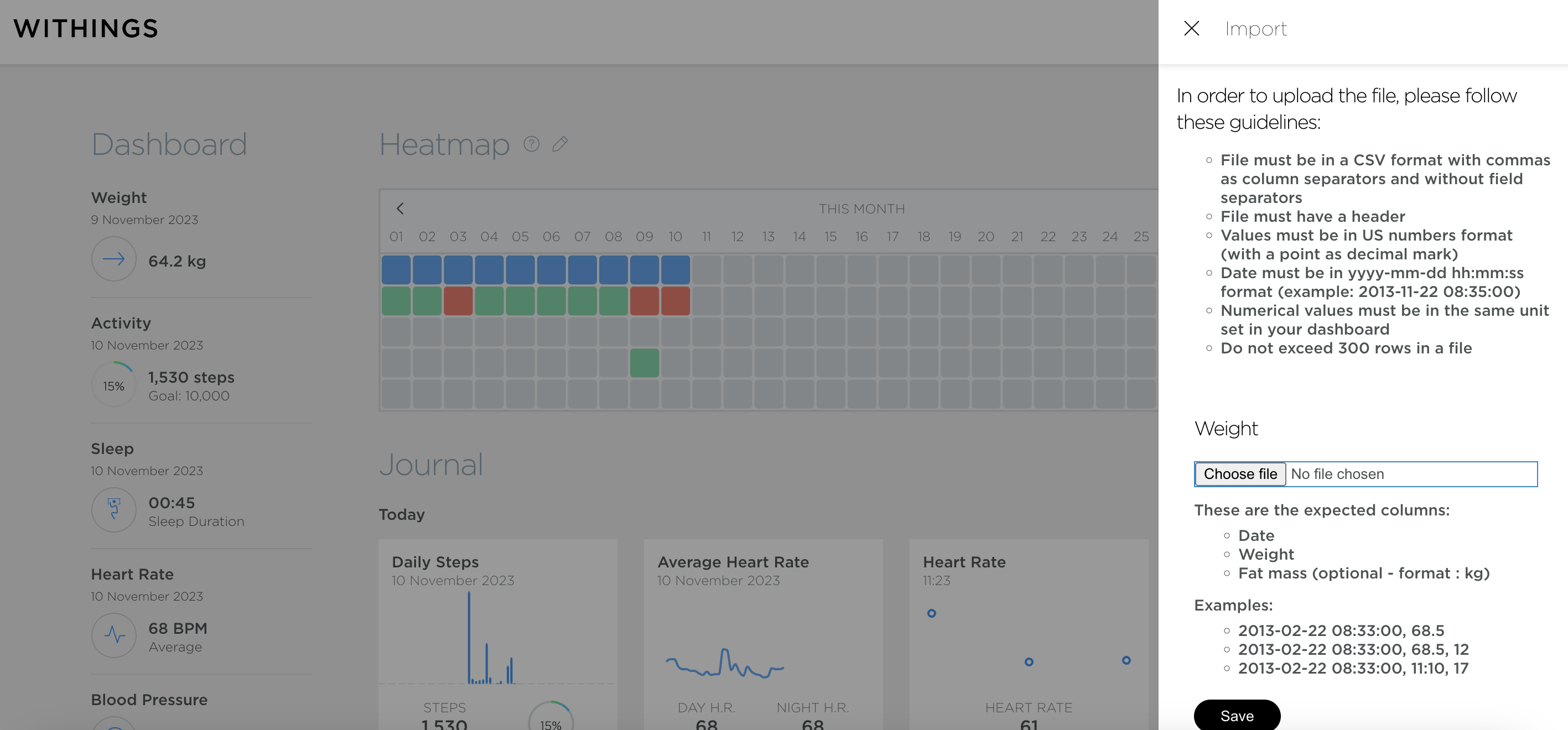
Also, instead of only PDF documents, you can download your data as CSV files and create your own dashboards if you wish, combining information as necessary—you can do it via desktop. Moreover, you can import CSV data from alternative sources to the Withings dashboard.
I, personally, think this is a plus because it also gives you ownership over your data. However, it’s possible you will need to do some cleaning before uploading it to dashboard building platforms. Additionally, the app emphasizes personal data security, maintaining GDPR compliance, and other security measures to protect your health information.
Moving further, the app’s user interface is decent, easy to understand, and brings some colors to the graphic presentations. But truth be told, it could be more consistent. Withings does not give us too much power over the customizations, and sometimes it’s quite difficult to determine whether some data represents the most recent tracking, the best results of the week, or even the weekly average. I’m still struggling with it.
Another annoying feature is the daily notifications that consistently appear in the first position on the home page. I understand that the company wants to educate people on habits and behaviors, but sometimes you just want to check your sleep trends, not repeatedly reread about the importance of sleep.
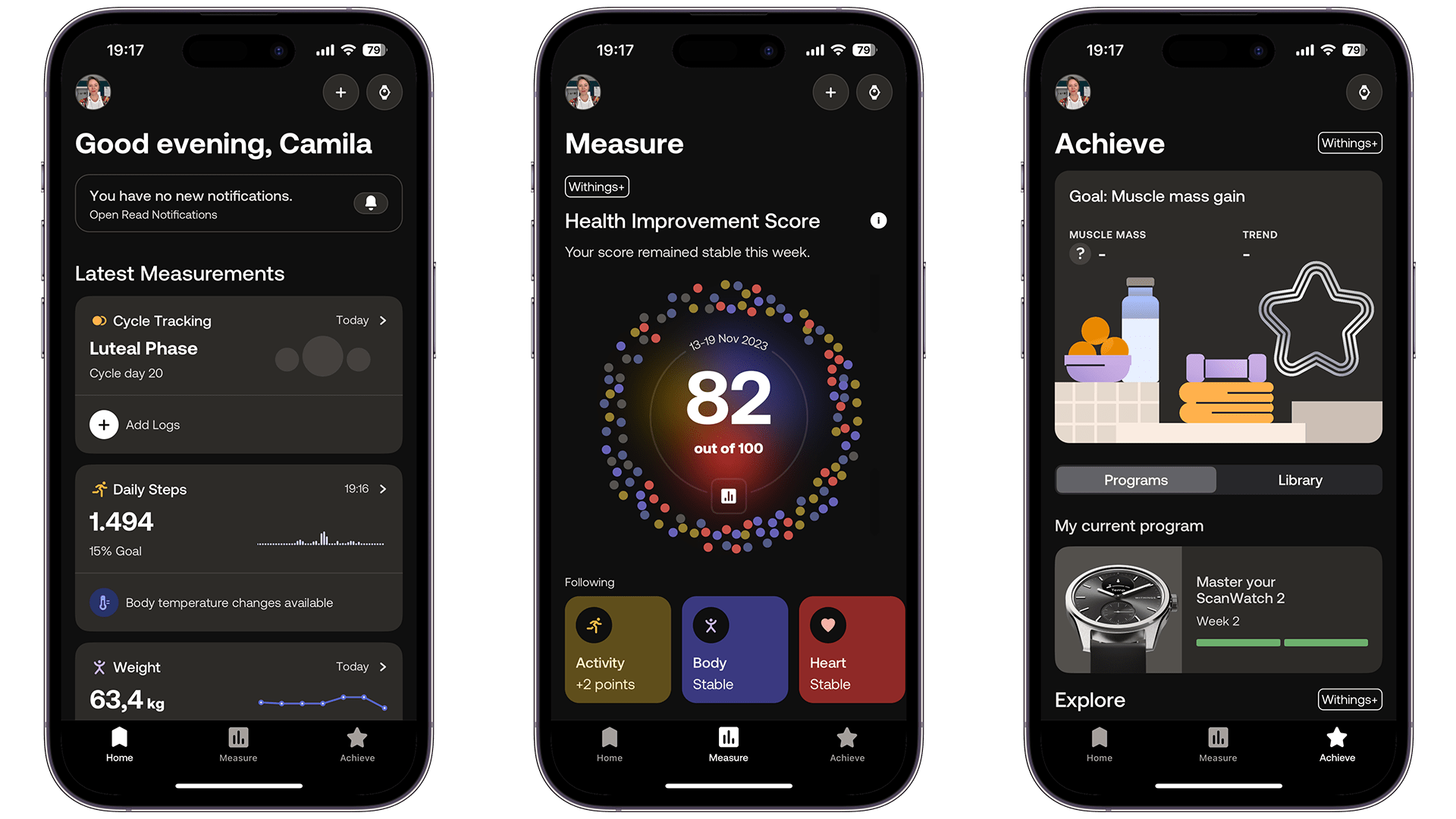
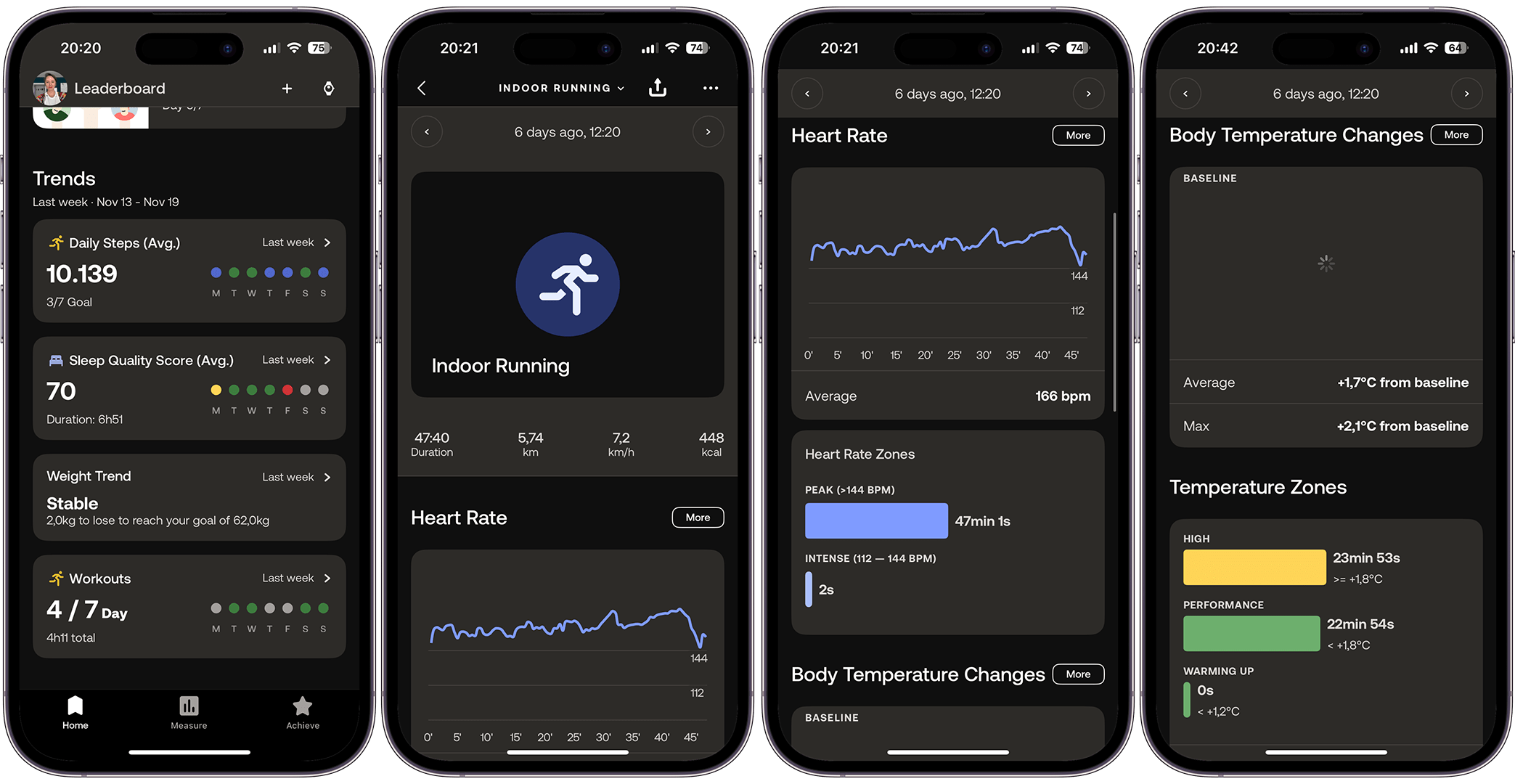
That said, you will work with three different tabs: “Home”, “Measure”, and “Achieve”. The first tab, “Home”, displays notifications at the top, along with your latest measurements, a leaderboard, and trends based on your data. Essentially, this is the main screen of the Withings app, accessible without a subscription.
On the other hand, with the Withings+ subscription, you’ll have access to a second tab, “Measure”. This tab provides a comprehensive health score based on your activity, body, and heart data. In “Measure”, some information from the “Home” screen is repeated, but here it is broken down over longer periods, such as seven days, 30 days, and 12 months.
Still, with a subscription, you get the last tab called “Achieve”, where you can set goals and track their progress, as the name suggests. To be honest, I haven’t used it much. However, I am monitoring my body composition breakdown to understand changes in muscle mass gain. But the system still needs more data to provide a meaningful analysis.
In summary, based on my experience with the Withings Health app so far, I can say that it’s a robust and user-centric tool for advanced health tracking. Its integration with a range of smart devices, focus on accurate and expert-approved health data, and emphasis on data privacy make it a comprehensive health management app. Nevertheless, it’s not flaw-free, and it would benefit greatly from an update fix.
Before discussing the app’s premium features, it’s important to note that if you’re seeking quick access to notifications, this might not be the ideal choice. The screen size limits interaction with notifications.
While you can view them and Withings allows you to select from various apps on your phone, responding or viewing detailed content, as you would on an Apple Watch or Galaxy Watch, isn’t possible. This isn’t a problem for me personally, but it’s worth mentioning for those considering the notification functionality.
It comes with a $10/mo subscription
If you’re just dipping your toes into health tracking, the Withings App is a great, free way to start. It’s simple and covers all the basics. On the other hand, Withings+ promises a deep dive into your health data analysis. Unfortunately, as I’ve mentioned before, it doesn’t quite deliver the same experience as having a personalized health coach, given its mixed results.
Currently, I’m not convinced it’s worth the subscription cost. That doesn’t mean the device isn’t worthwhile; I’m referring specifically to the extras that come with the paid subscription.
Nevertheless, when you purchase the device, it includes a one-month trial of the Plus version, allowing you to test it and decide for yourself. Here is a comparison table summarizing the similarities and differences between the two services:
Withings App
Withings+
Basic Functionality
Free health tracking app.
Premium in-app health service with a $10/mo subscription.
Data Integration
Syncs data from Withings smart health devices.
Takes all data from Withings devices into account for a complete health assessment.
Health Metrics
Provides accurate data for various health aspects like body, activity, heart, sleep, respiratory, mindfulness, and menstrual health.
Offers targeted guidance based on tracked data for sleep, nutrition, and activity.
Health Analysis
Detailed analysis of health data with easy-to-understand metrics.
Advanced insights and connections between data and actions. Personalized Health Improvement Score for tracking overall health.
Guidance & Support
Customized health insights; early detection notifications for chronic conditions.
Daily missions and recommendations, including exclusive content like articles, recipes, and workouts.
Goal Setting
Built-in motivation with reminders and challenges.
Tools for setting goals, tracking milestones, and daily guidance to achieve goals.
Data Privacy & Security
Upholds high standards of privacy and security, including GDPR compliance.
Same as Withings App with guaranteed security and privacy measures.
App Compatibility
Integrates with several health and fitness apps like Apple Health, Google Fit, and more.
Similar to the Withings App.
User Experience
Free download, unlimited storage for health data, and easy tracking of health and fitness.
More personalized and comprehensive experience with a focus on long-term health habits and behavior change.
Subscription & Pricing
Free to download and use.
Requires a $10/mo subscription.
Developed With Experts
Developed in collaboration with doctors and health experts.
Also developed with input from health experts, ensuring reliable and actionable guidance.
Sensors and Health
The ScanWatch 2 comes with a brand new TempTech24/7 module. Think of it as a smart mix of sensors that keep an eye on your body temperature variation all day and night. It’s got a thermistor (that’s a fancy word for a temperature-sensitive resistor), a heat flux sensor to measure the heat flow from your body, a PPG for checking your heart rate, and an accelerometer to track your movements .
What’s really neat is that it uses these sensors together to give you a clear picture of your health, like your breathing rate and how your heart rate changes. According to Withings, the watch recognizes over 40 different activities and makes sure your workouts are tracked just right.
Pros:
The system effectively integrates body temperature variation.
Includes cycle tracking features.
Provides accurate ECG, heart rate monitoring, and SpO2 readings.
Cons:
Sleep stage tracking lacks detailed granularity.
The fitness level profile currently offers limited utility.
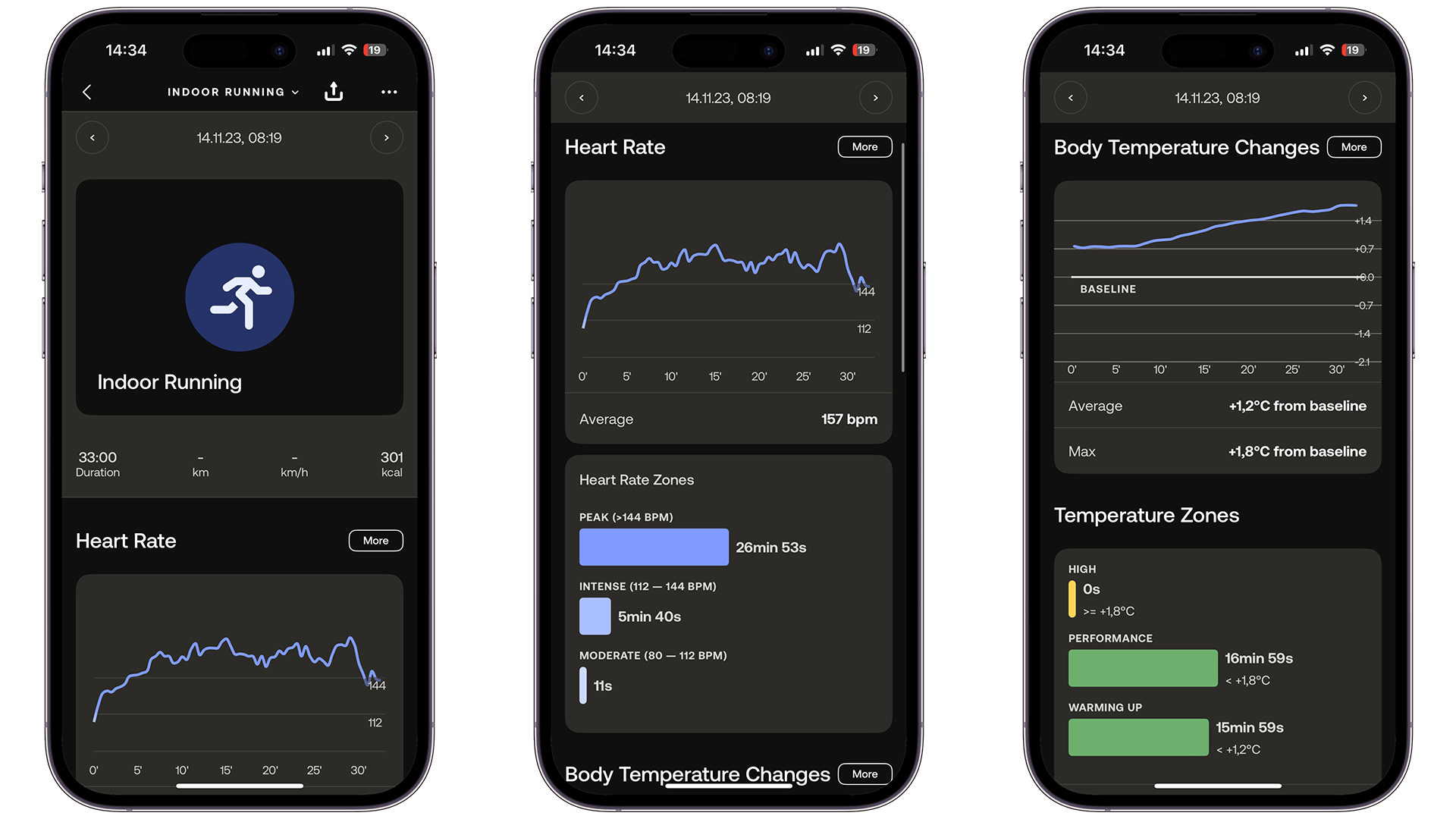
Let’s start with what’s new. The ScanWatch 2 now has a temperature sensor that constantly tracks your body temperature variation. It uses an advanced algorithm to give accurate readings. As on the latest versions of Apple and Galaxy watches, this technology enables the watch to establish an individual’s baseline body temperature.
This feature is particularly useful for monitoring changes in body temperature that may indicate the onset of illness, as well as for understanding temperature fluctuations during various activities like workouts. In my case, it also plays an important role in hormonal changes.
Moreover, the ScanWatch 2’s temperature sensor plays a crucial role in optimizing performance and recovery times for fitness enthusiasts—like me. By providing live updates and data visualization in the companion app, the sensor allows us to monitor how our body temperature changes during exercise. It’s pretty neat!
The temperature sensor in the watch is really handy for avoiding heat exhaustion when we’re working out. It gives us a heads-up if the body is getting too hot, so it’s possible to adjust the exercise routine to stay safe and make the most of it.
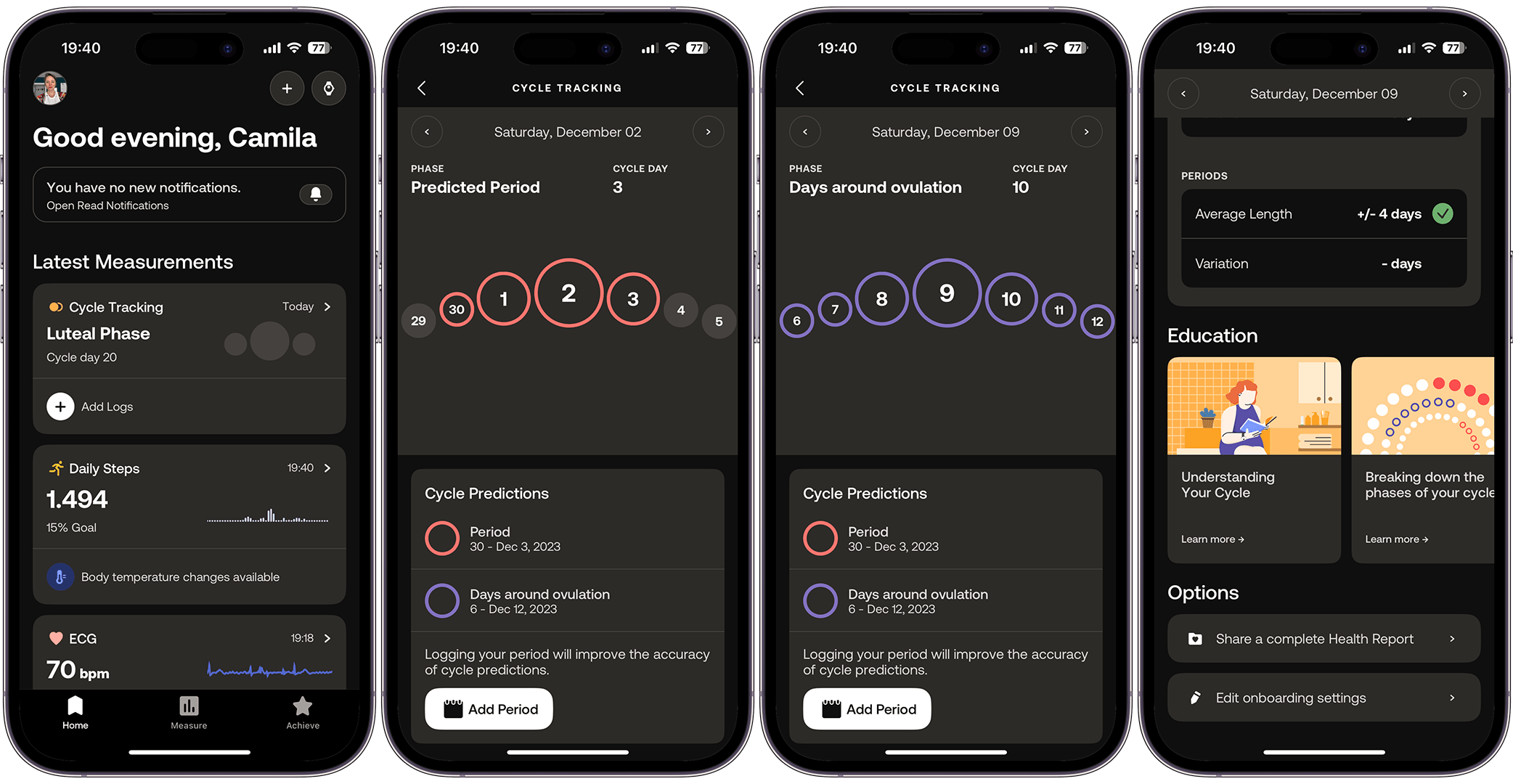
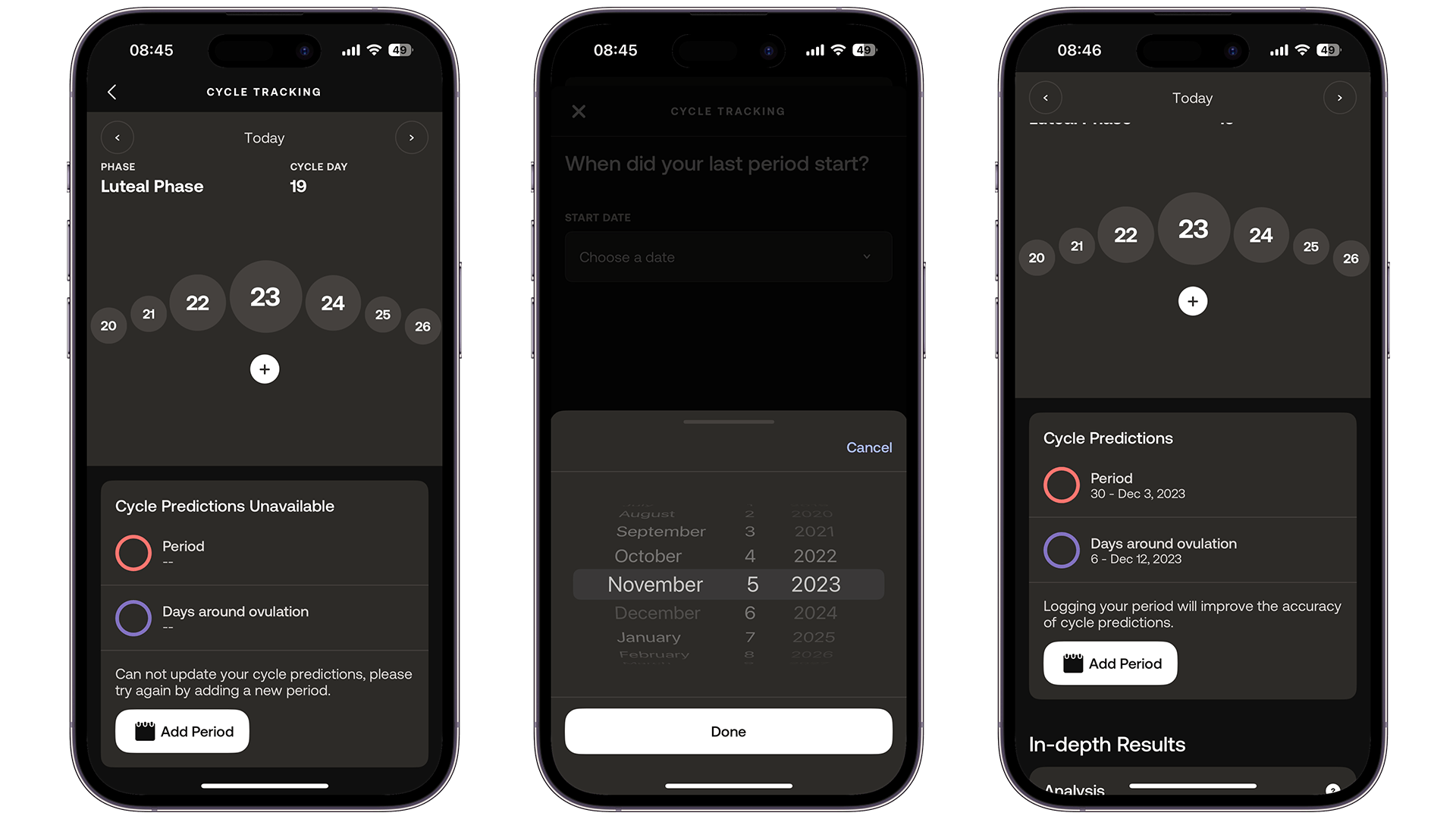
Now, let’s talk about the second brand-new feature on board the Withings App. I recently wrote a series on menstrual cycle guides for individuals who menstruate, focusing extensively on Apple’s and Samsung’s offerings. Both companies introduced this feature somewhat belatedly to their principal fitness and health tracking devices. Withings, however, introduced it even later.
The development team explained that the delay was due to the system initially being developed for release with the U-Scan device. Nonetheless, it’s now available. The feature was released with the latest system update, but it’s still experiencing some issues.
Like many others, the menstrual cycle approach by Withings is a feature that offers comprehensive data tracking for menstrual health. It enables people to monitor their menstrual cycle’s symptoms, duration, and phases, all in one place. Withings offers provides a user-friendly interface for tracking menstrual health over the long term, and also offers notifications and insightful data.
The menstrual cycle feature is integrated with other health data. By comparing menstrual cycle information with other health metrics such as heart rate, respiratory rate, and sleep quality, you can discern important connections between your reproductive health and overall well-being. As explored in our series about the topic, this holistic approach is crucial, considering that significant changes in the menstrual cycle can be indicative of broader health issues, like fibroids, thyroid disorders, or PCOS.
Once you add your last period data to the application, the cycle tracking system is supposed to do some calculations and offer a prediction of your next periods based on the cycle’s and period’s length, and in the case of ScanWatch 2 the variation on wrist temperature. This ballet is not really synced on the hybrid watch yet, though.
Since the release of the feature, I’ve been through my second cycle with the device, and I still needed to add my data manually (again) to get a prediction for my next cycles. This wasn’t supposed to happen, as once you add your data for the first time, the system should offer an estimation of your cycles months ahead. So, something is not working perfectly yet. Please do not confuse this with cycle logging, which must be done manually every month.
When it comes to the ovulation estimate, though, it would take some more time for the system to create data based on your wrist temperature before it starts offering more accurate information on that factor. On my Apple Watch Series 9, it took two to three months to start showing it.
Sleep tracking
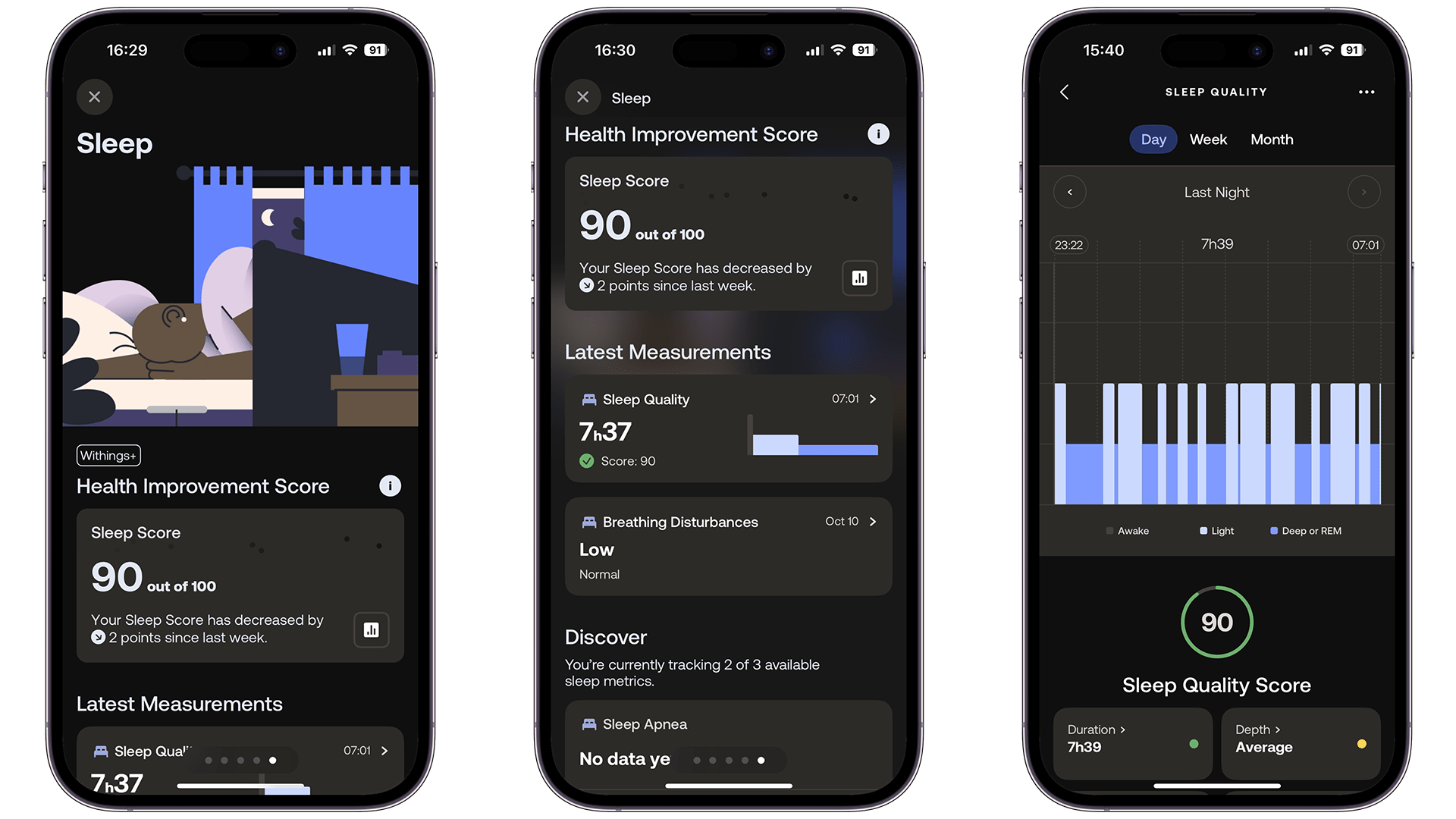
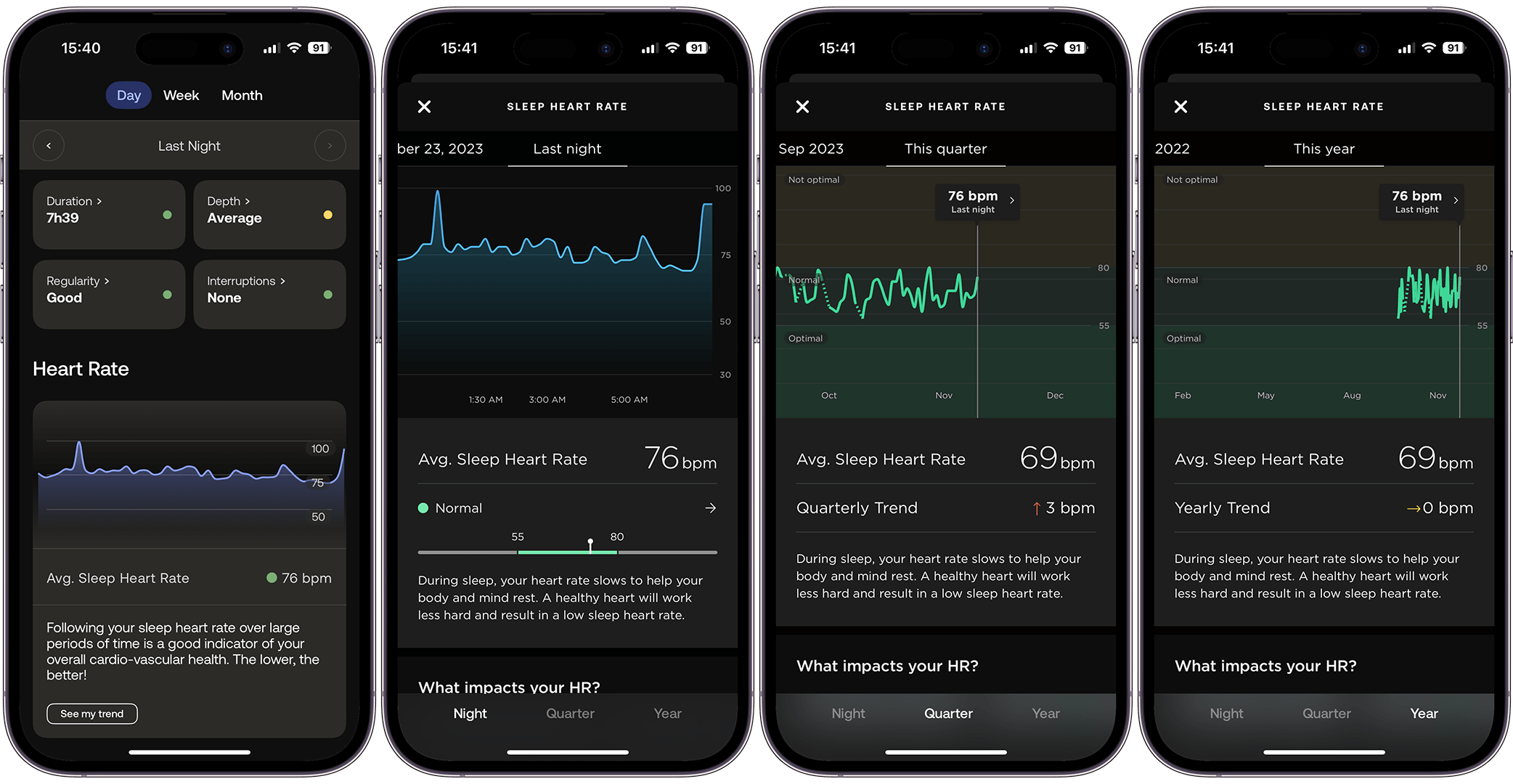
When it comes to sleep tracking, the ScanWatch 2 uses its advanced sensors to monitor various sleep stages, including light, deep, and REM. However, it merges the deep and REM stages instead of separating them, which I don’t really like. I believe each stage is important because they are related to different areas of brain rest.
The watch also detects interruptions and irregularities in sleep, like periods of wakefulness or tossing and turning. This information is used to create a Sleep Quality Score, giving a measurable insight into your sleep health.
However, I do have a concern: the ScanWatch 2 often mistakes my early morning awakenings for naps, disrupting my sleep analysis by seemingly erasing the overnight data automatically. This is quite frustrating. Thankfully, I use an alternative method to track my sleep, preventing the loss of this important data.
Moving to another aspect of sleep, the hybrid watch’s sleep tracking also covers respiratory insights. It monitors breathing rates and detects any disturbances that occur during the night. For example, my mother recently underwent several tests to determine the severity of her sleep apnea, and I believe she could definitely benefit from this feature.
In addition to respiratory tracking, the watch also monitors heart rate variability and blood oxygen levels overnight, adding valuable information to the sleep data. Yes, the device includes SpO2 measurement, which constantly takes readings. I don’t have a third device to measure my blood oxygen levels, but the ScanWatch 2 has proven to be more accurate than the Apple Watch Series 9, which often reports critically low blood oxygen numbers. Comparing the analyses from both devices was a relief for me.
Workouts
Combining all the data that this device can gather, I believe its advanced sensor technology enhances fitness tracking. The watch is equipped with a high dynamic range accelerometer, which significantly improves workout precision.
But there’s a catch: As previously mentioned, this sensor is designed to recognize over 40 different activities, accurately tracking movements. It does a great job counting steps, recognizing running pace and distance, and so on. However, this doesn’t mean it has a feature for automatically recognizing and recording an activity. I always had to initiate it manually.
In contrast, my Apple Watch consistently alerts me and offers to record the workout when I swim, cycle, or reach 1 Km in my outdoor walks or runs. The Samsung Galaxy Watches also do that.
Additionally, the watch provides real-time feedback on your performance, including heart rate zones, pace, calories burned, and distance traveled. This information is easily accessible on the watch, which is super convenient as it allows you to monitor and adjust your workouts as needed.
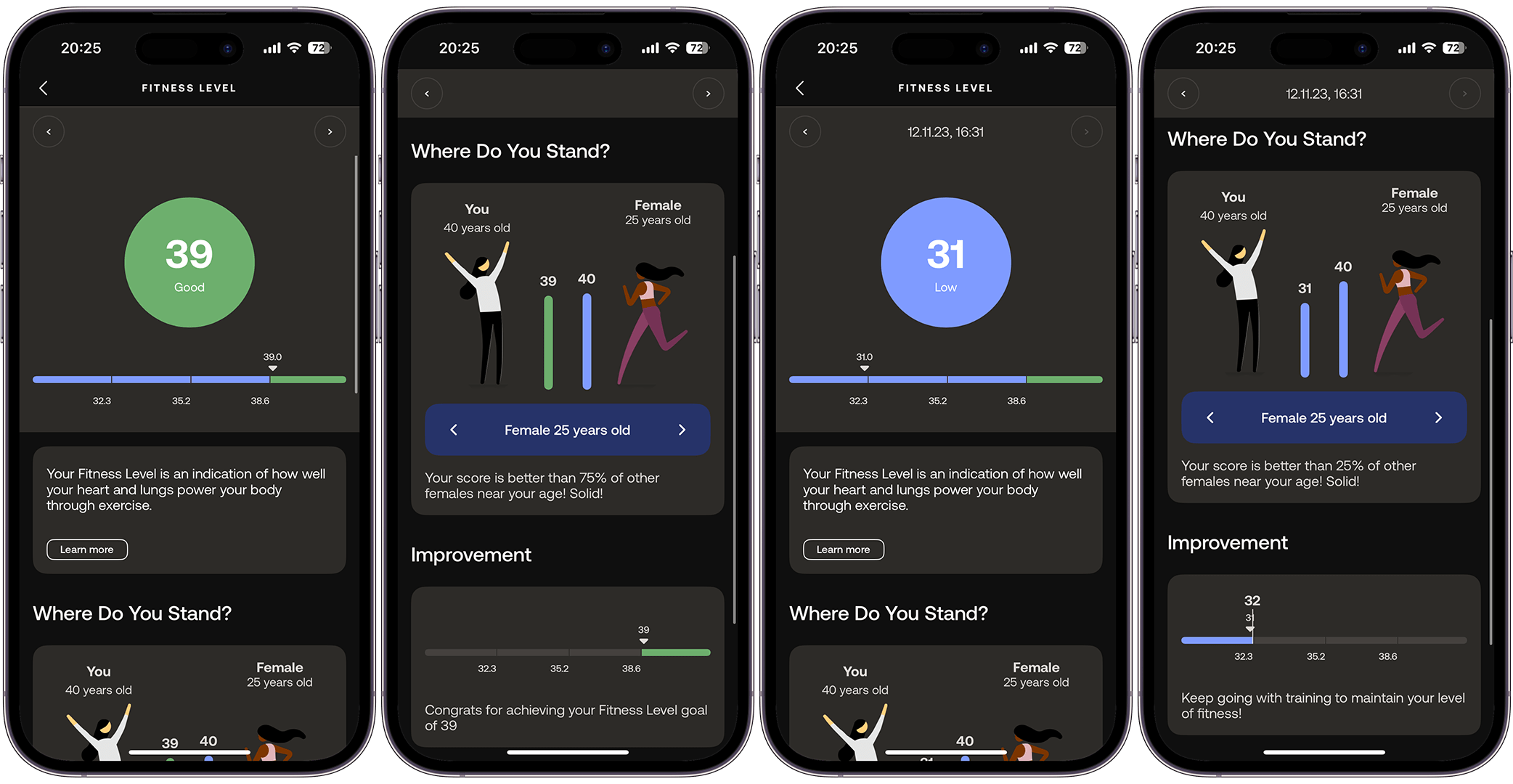
For Withings+ subscribers, the ScanWatch 2 offers workout analysis, which, according to Withings, includes a fitness level assessment through VO2 max estimation. However, I couldn’t find my VO2 max data, so I think it might be calculated in the background.
Honestly, I’m still trying to grasp this fitness level report. On days I work out, my level is good, but it drops to low when I don’t. Frankly, you don’t need a report to understand that, right?
The watch’s capability to monitor body temperature zones during workouts, thanks to its TempTech24/7 module, enhances the training analysis. However, I’ve already discussed this feature.
In conclusion, the ScanWatch 2 is an advanced piece of machinery. In addition to the sensors I’ve already mentioned, it includes a PPG sensor for ECG and continuous heart monitoring. Withings, being a company focused on health, has ensured this monitor’s accuracy. It has been developed with specialists for remote patient monitoring.
Withings ScanWatch 2 battery
Withings states that the ScanWatch 2 can handle up to 30 days of battery life; however, my experience was slightly less than that. This doesn’t diminish the battery life, though, as it still surpasses most of its competitors in the market .
I don’t want to sound snobbish, but I had charged the ScanWatch 2 to 100% on October 24th, and the battery died on November 19th, which means I used the device for 26 days, not the 30 days as stated by Withings. This corresponds to 86.67% of the advertised battery life. I would like to highlight that I am using only the standard settings, without customizing things like ‘Keep Display On’ during workouts.
I also understand that battery usage is subject to the user’s lifestyle. Furthermore, I’ve been using the ScanWatch every day, 24 hours a day, and I typically exercise at least three times a week. So, even though I didn’t reach 30 days with the hybrid watch on my wrist, I still believe that 26 days is an incredible achievement.
Since I’m used to wearing my Apple Watch while testing different wearables, I can’t help but compare the user experience with it. Although I only need to charge the ScanWatch 2 once every 26 days—and not every day—it’s clear that Withings opted to ensure the device is securely fixed during charging instead of offering a seamless experience with a magnetic system like the one Apple offers, which I think is secure and easy to use.
Charger case design aside, it takes approximately 90 minutes to charge the ScanWatch 2 from 0 to 100%. I did it once at my desk while working and another time overnight. In both instances, the long charging period didn’t really matter to me, as it compensates with the device’s long-term battery life.
Since this is already a lengthy review, I will keep my conclusion brief. The ScanWatch 2 is unquestionably one of the best smartwatches I have ever used. It’s a hybrid device equipped with state-of-the-art sensors, boasting a beautiful classic design, and it delivers an impressive array of reports on vital signs. Additionally, it offers a variety of document extensions, which are crucial for this type of technology.
However, Withings needs to focus more on software development to justify the $10/month subscription. I understand that the company is preoccupied with launching the U-Scan device early next year and has made some exciting promises for CES 2024. However, this should not relegate the ScanWatch lineup to a secondary or tertiary priority in their software development.
For now, yes, I place my top recommendation on the new ScanWatch 2, but I would suggest you try the Withings+ subscription to see if it meets your needs—after all, you get a 30-day trial at the time of purchase.
With Withings+ as it currently stands, I would prefer to use AI-generated software to analyze my health data collected by the hybrid watch, as it seems more realistic than the insights provided by the app. This is similar to the approach of Whoop 4.0 (review) when it integrated ChatGPT 4 into its app for more in-depth analysis.
We mark partner links with this symbol. If you click on one of these links or buttons–or make a purchase through them–we may receive a small commission from the retailer. This doesn’t affect the price you pay, but it helps us keep nextpit free for everyone. Thanks for your support!
Ich habe 15 Jahre Erfahrung in der Bewertung von Smartphones und Wearables und vereine technisches Know-how mit einer echten Leidenschaft für Innovation. Ich habe bekannte Tech-Websites wie AndroidPIT und Canaltech in Brasilien geleitet und möchte jetzt meine Expertise mit einem Publikum auf der ganzen Welt – unter anderem in den USA, Deutschland, Frankreich, Spanien und Brasilien – durch ehrliche, praxisnahe Tests teilen.
Kürzlich habe ich meinen Fokus auf digitale Gesundheit verlagert, mit einem besonderen Augenmerk auf Geschlechtergerechtigkeit und dem Ziel den geschlechtsspezifischen Datengraben zu überwinden. Ich brenne dafür, durch einfache, klare Texte Frauen in den Bereichen Technik und Gesundheit eine stärkere Stimme zu geben. Ob ich nun die neuesten Gadgets teste oder neue Trends im Bereich der digitalen Gesundheit erkunde – ich bemühe mich stets, komplexe Themen verständlich aufzubereiten.
Persönlich bin ich ein begeisterter Läufer – ich habe 2024 den Berlin-Marathon absolviert – und bereite mich auf eine lange Radtour von Deutschland nach Österreich vor, die im Jahr 2025 in nur vier Tagen schaffen will.







0 comments