Using Google Maps Offline: Getting Around without the Internet
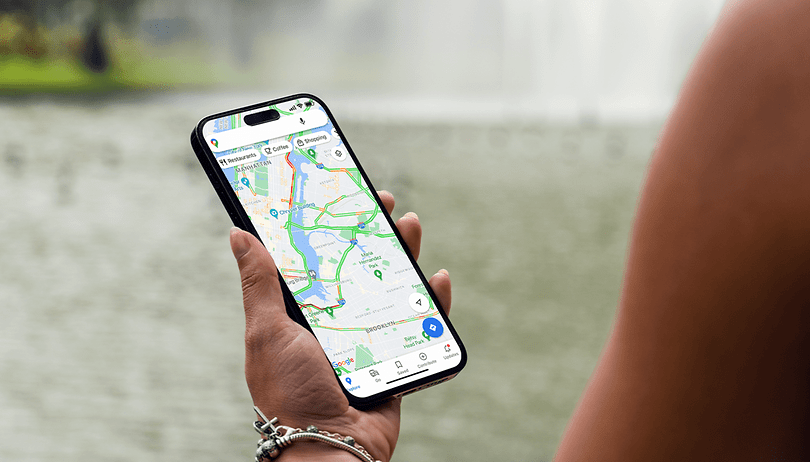

Do you have limited data volume or want to see the perfect route abroad without Wi-Fi or mobile data? With the offline function of Google Maps, routes, map sections or entire cities are available to you without an internet connection so that you can reach your destination. In this guide, we show you how to use Google Maps offline.
Requirements for using Google Maps offline
Before you go nuts downloading maps from Google Maps, make sure you have sufficient storage space on your smartphone. Offline navigation also has some restrictions—cyclists and pedestrians do not have access to route guidance. In addition, real-time traffic data is not updated for drivers.
As a result, you will not be shown an alternative route just in case the traffic conditions change. We also recommend you set your smartphone's settings accordingly for Google to only update maps using Wi-Fi. This will minimize your mobile data consumption.
Download a map section in Google Maps
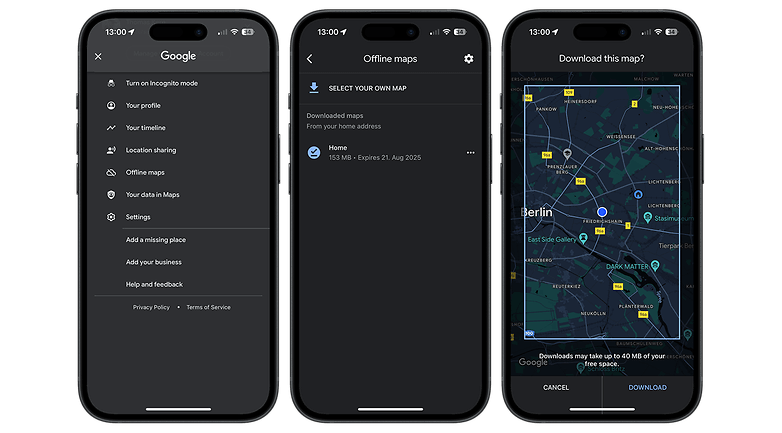
You can select and download any map section in Google Maps. Here's how you do so:
- Open Google Maps.
- Select your profile picture at the top right.
- Select Offline maps.
- Tap on Select your own map.
- Specify the map section and tap Download.
Download entire cities in Google Maps
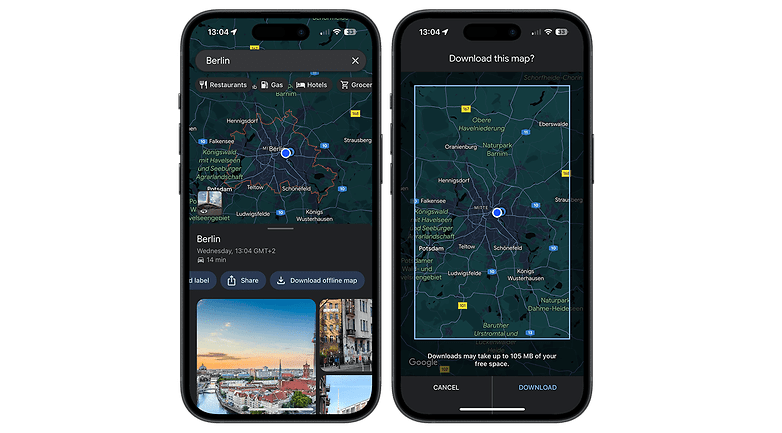
You can also download maps of entire cities if you like! This can be helpful if you are going on a vacation or planning a day trip elsewhere. Here are the steps to download maps of entire cities:
- In Google Maps, search for a location of your choice. Let's take Berlin for example.
- Select Download offline map.
- Select Download.
Deleting offline maps in Google Maps
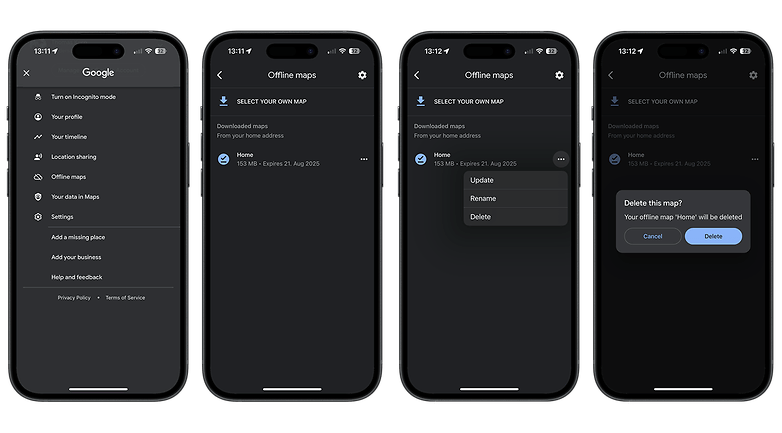
When you're back from your trip or simply want to free up some storage space, we recommend deleting offline maps in Google Maps. Here's how you do so:
- Select your profile picture in the top-right corner of Google Maps.
- Select Offline maps.
- Select the map you want to delete.
- Tap on Delete.
- Select Delete again.














Nice Guidelines For Offline Map
Offline maps are just great when you have limited data to use. It really helped me once I was out of town.
Really helpful!
I prefer Sygic Premium GPS Navigation which uses offline TomTom maps.
I prefer Sygic Premium GPS Navigation which uses offline TomTom maps.
I liked the windows model of allowing us to download maps of states as whole rather than particular areas & locations.
I want offline google map route between two cities so i can use easily.so please suggest is there possible programatically to offline download.
The best thing to do is fit both of the cities into the download square. If they are too distant from each other for that to work, then you must map the route and save the area along the route as separate downloads.
Bro! how i can download and use it on computer?
Hi there, I have too much tried to use downloaded maps. I didn't find where downloaded file exists to run for navigation. I checked it in ' Your places > saved.
But the downloaded files are not available here. I went to offline areas > select 'HO khi' it appears Delete/ update.
pl. let us know where to select the downloaded file to navigate.
When you're offline, if you're within the area of the offline map you've saved, you can navigate as you normally would--there is no need to access it from outside the main map screen when offline.
Easily downloaded an area. Tried to use it next day (still 29 days before expiry!) but the ONLY OPTIONS were to UPDATE (impossible, because now offline) or DELETE. What's wrong?
Offline is an extremely useful feature. We are using Google Maps offline to navigate our yacht through South Pacific coral reefs. Question: is there a way to force the app to download best satellite resolution? Extensive testing has shown that a "useable but not detailed" satellite image is downloaded. Even for a 1km^2 small area.
Hell yeah! Offline comes in handy when the signal gets lost after starting your route! Awesome feature!
Why is there less detail in the downloaded maps than when you are online. Can that be adjusted somehow? I use the offline data in a way that the close detail in the satellite map is necessary.
Very nice article! Is it possible to share an offline map? For example, I have one offline map on my android phone and want to send it to a friend on another android phone. Is that possible? If yes, how? Thanks in advance
Problem with Maps is it uses a lot of battery too. That's why I use it only for short trips. Otherwise I use Nokia Here, now Here To Go which works pretty good. Nokia maps are very accurate and existed before Google Maps. They can be stored on SD card.
One thing I hate with Maps on line is it says nothing when it loses the connection ! Very good way to get quickly lost. I use Maps on my motorbike with vocal guidance. I don't understand why it's not possible to just send and alert message or emergency signal when connection is lost. Anyway, I don't get this problem with Here.
Update 180815: Initially I was pleased with GMaps expanding map size and permitting microSD downloads, but the four-week expiration period negates usefulness for extended traveling. You have to remember to refresh the Google's offline map before departure, and it's really not so easy to find wifi for several hundred MB downloads if they expire while on travels, especially anywhere outside major cities. Google's always had the best online maps, but it fall way behind OSM in map size, available offline detail and the serious problem of files wiping automatically every four weeks. There are several good OSM Android clients, each with regular updates but no automatic deletion of old ones. Each has a substantial learning curve. I have stayed with OSMAnd, which is free to try with full functionality for up to six very large maps.
Now offline maps do not expire after thirty days.
Open google map menu offline areas
Tap on the gear icon. Select the options
Automatically update offline areas and
Automatically download offline areas checked in box.
Now downloaded areas update automatically before expiry date.
Whenever device connect to WIFI fifteen days prior to the expiry date.
Hello. I'm traveling from Moscow all the way to the Pacific coast (Vladivostok) and have planned my route. Is there a way to easily save my all route data offline? I'm guessing there will spots where I wouldn't have net access. Thanks
save every area that you will travel trough, make the areas overlap by a large margin, save those all as offline areas, when you are done click turn off data usage so it doesn't try to use the internet and corrupt your offline maps. also as a backup download the android app Here maps and download all the areas you'll travel to, this is in case google maps doesn't work.