How to fix the ''write to SD card'' problem on KitKat

You may have heard that ability to write to the SD card. You may have even been suffering from this problem without even knowing it wasn't related to your device. Basically, Google is limiting app access on the SD card to their own little sandboxed folder, meaning that one app can no longer write to another app's folder.
While Google's defense of this position is similar to their excuse for read and write to the SD card, but third-party apps cannot. But never fear, the solution is at hand! This fix assumes your device is rooted.
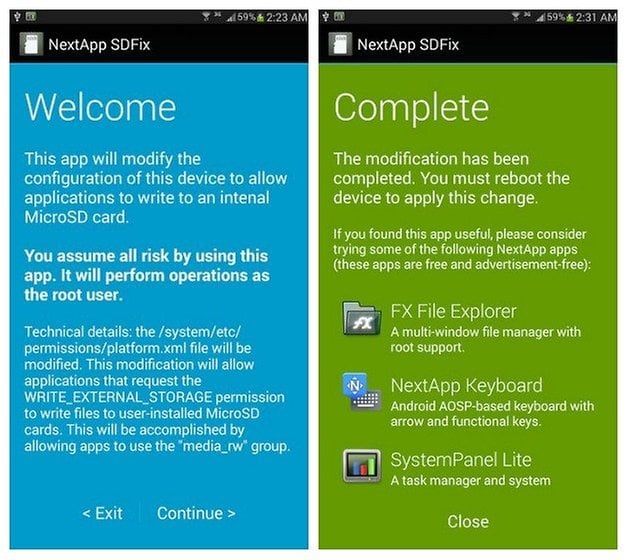
SDFix
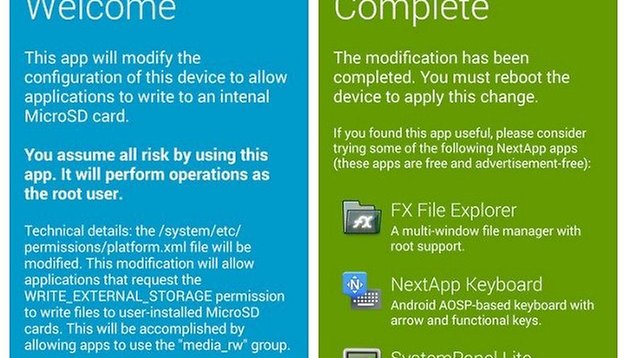
We've already shared flashable zips in the forum to solve this issue, but now you can now grab a nifty app called SDFix from the Play Store, which comes from a senior member over at XDA Developers. The app does nothing more complicated than modify a config file so your third-party apps have permission to read and write to the external SD card once again. All you need to do is launch it, go through the process, reboot and you're done. If you have a stock ROM and are rooted, this is the easiest method. Most custom ROMs are unaffected by the change as they made this mod ages ago.
If you want more information on the history and implications of the removal of SD card privileges in KitKat you can read this excellent breakdown by Cody Toombs at Android Police.
Have you been suffering from this issue? Have you taken the steps to repair it yourself?
Source: XDA Developers




I've had errors using a microSD, I've solved them easily by formatting with the help of a PC and a card reader. Now it works well.
baloney it does not work, and by the way google is also full of it..
It is all about business and the manufacturers want to reduce the complexity of portable devices by removing the detachable battery, and replacing the SD card slot with more internal memory.
Nothing against clouds.
I want to use my SD card
I wan't a version of Android, which can be updated whatever the brand of the devive
I want to get rid of the bloatware
Don't like M$Win, but at least they know, how to make the updates to any PC. It works nearly as well as Linux in this.
What a daft article!! Of course the SD card is accessible if the phone is rooted. Trouble is the warranty is voided as is the insurance cover. What we need is for this stupid restriction to be re moved by that tyrant Google so it can compete with Windows and Apple.
My files. My tablet. I want to decide myself what can be copied and where !
It dows not work, if you have minimal 4-8GB internal FLASH and you want to have your maps and data with you
There is some idiot in Google, who decides, how the file system works. It is jus awfull !
I'm just waiting for a Linux version, which can be installed as Cyanogenmod to my Samsung.
For some reason Google doesn't understand, what the customers expect from Android and Samsung does not understand what customers expect from a tablet.
A tablet would be great, if only somebody makes it right.
(No, I don't want M$Win or Apple -tablet. I have tested them)
Cloud is not even good for files or music. There are still many places with flaky wifi and no 3g reception. I use cloud for backupnand thats it. I will not use a device that does not have expandable storage
What Google, Dropbox and any other cloud provider fails to realize is that nobody in their right mind is going to pay them for storage space on their servers when you can easily buy a Cloud drive from Seagate or Western Digital that connects to your own home network. YOU have your own cloud potential already if you need it. You can get a 2TB drive for 109 bucks on Amazon. Look up: Western Digital My Cloud drives. They have even larger, but pricier ones too.
I have what's called a Pogo Plug that works in the same fashion except it's a small box you plug an external drive into (or a usb flash drive if you wish) and it gives you a cloud from your home network. Accessed it from my job many, many times, Works great.
Cloud may gain a foothold with large businesses, but for everyday guys/gals who need access to or to upload our files while out and about, no way.
Cloud storage is good for files and music but not for games. And while we are getting more powerful hardware that are capable of giving us ps3 quality graphics on our phones. Phones are not capable of holding these games that are getting bigger and bigger every day. And streaming games from the cloud I don't think would be viable with the current cost of data in most countries.
Google is slowly turning into Apple, which is bad. Might have to transition to a Windows device if they start locking things down
I'd be lying if I said I wasn't watching Windows 8.1 VERY closely at this stage. Kitkat has got to go.
And if I do bail, it will be a full-on divorce from Google. Email, calendar, search, Chrome, etc. Everything.
If I'm not happy with their stance on SD cards and leave, then they don't get to mine my data.
If you do manage the Herculean effort of divorcing yourself from Google completely, and don't mind communicating with an Android publication after the fact, let us know how it works out and how difficult you found the process.
This aint austria
in other words, as long as there are no unlimited 3G Plans (no throttle) (and especially at reasonable prices) I wont get that nicely with clouds and everything
I won`t need a FixApp for Root Users, i hope Google will Fix this for non Rooted Users!
Google won't be forcing me to use any cloud storage nor will they tell me what kind of day to day user experience I need or want on the handsets I pay money for. Plain and simple just don't update to Kit Kat 4.4.2 they never informed users of this change to the platform in the first place.
This issue pretty much means that you will not be able to use file Explorers anymore without the fix?