How to send a WhatsApp message to someone without saving their number

With the popularization of WhatsApp, it is already quite common to use the app to exchange messages with people we don't know, including companies and contacts for temporary situations. It is possible to send messages in the app to people outside your contact list, without having to add the number to the phone's address book. Learn how in the guide below.
Whether it's a service provider, a travel companion you need to message on the go, there are a lot of situations where you don't need to add your number to your phone - not to mention secret contacts, but that's a topic best left untouched...
Jump to
- How to send WhatsApp messages without adding the number to your phonebook
- How to send WhatsApp messages to a non-contact from your PC
- Use WhatsApp as a mobile notebook
How to send messages in WhatsApp without adding the number to your phonebook
With the person/company's number written down, just open your phone's browser (Chrome, Safari, Firefox, etc) and follow these steps
- Go to the page: https://api.whatsapp.com/send?phone=[contact-number]
- Complete the address with the number with the country code.
- For example, for the COVID's FAQ from the World Health Organization, the address is this: https://api.whatsapp.com/send/?phone=41798931892
- Confirm the number/contact name shown on the WhatsApp page and click Continue to chat.
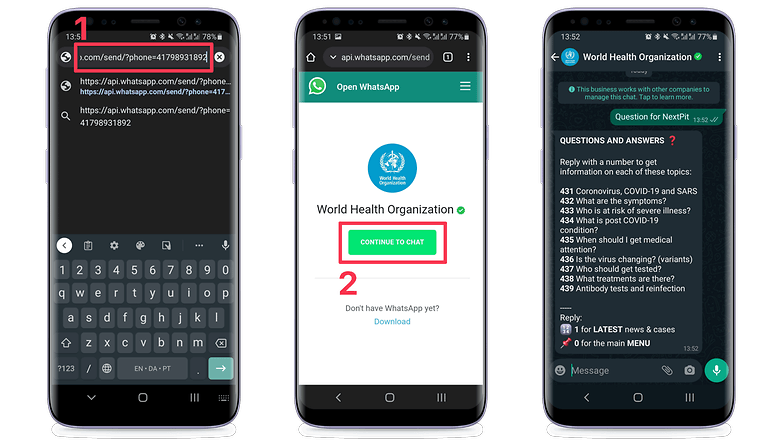
That's it. For some professional WhatsApp accounts - such as the hotline in the example above - the app shows the profile name. In the case of individuals, WhatsApp simply shows the phone number, with the country code, since the contact's number was not added to the phone book.
How to send WhatsApp messages from PC to non-contacts
The same tip can be used on your computer as long as you have already opened WhatsApp Web on your PC. The trick works a little better if you have WhatsApp desktop installed on Windows or macOS, but it can also be used in the browser on your computer.
If you have WhatsApp Desktop installed and running on your computer, open your PC web browser (Chrome, Edge, Safari, Firefox, etc) and follow basically the same steps as on mobile:
- Go to the page: https://api.whatsapp.com/send?phone=[contact-number] (complete with the country code).
- Check the number shown on the WhatsApp page and click Continue to chat.
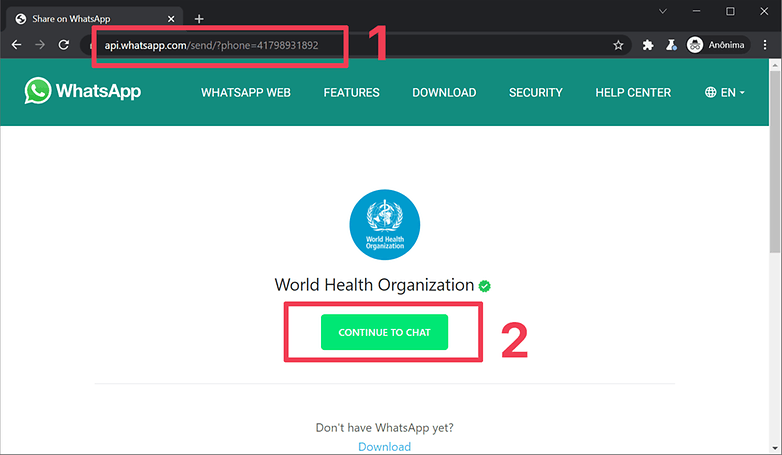
By clicking the button, the WhatsApp app installed on the PC will open, allowing you to chat normally with the other person or company without adding the number to the phone's contact list.
If you do not have WhatsApp Desktop on your computer - for example if you use Linux or opened WhatsApp Web on your tablet - you can send the web address you created - https://api.whatsapp.com/send?phone=[contact number] - to yourself (learn how below) and then just click the link in the WhatsApp Web window itself.
Use the feature to take notes in WhatsApp
The trick to send messages on WhatsApp to numbers outside your contact list allows you to use the app in a new way - similar to a feature in Telegram and Signal - the option to save personal notes on WhatsApp itself.
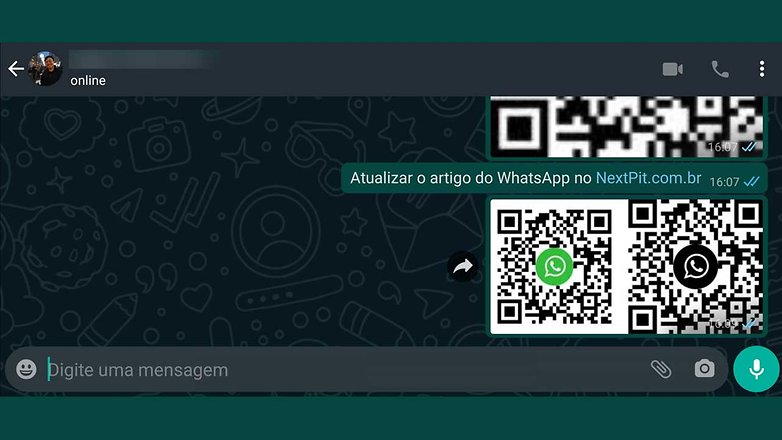
To do this, just link to your own phone number, and WhatsApp will open a conversation screen with your number. To avoid confusion, before sending a message, confirm that it really is your account by checking the number shown and your profile picture.
Did you like the gimmick? Just don't forget to delete compromising notes from time to time. Do you have any suggestions on how to make even better use of this feature? Share your tip in the comments!
The purpose of this article is to gather in one place all the information about how to send messages on WhatsApp to numbers outside your contact list. So, from time to time the instructions will be updated as WhatsApp changes or releases new options. Comments prior to the last update may refer to outdated steps or settings.

















Even there are many sites offering services to generate the WhatsApp message link. I think WhatsApp should have this feature in app.
whatsapp.ovh i preferred to use
I prefer to use the shortcut wa.me/PHONE_NUMBER
whatsapp.ovh easy way
yes its easy to use and remember path
I use easymessage.app for years!
They have app for Android & iPhone and also for web.
I found the website wha.one very useful. Simple website with one click to open Whatsapp chat without saving to the contact.
I have read this full guide but is this way is secure?
Can I know through this link from among the many numbers, which numbers are on Whats App and which are not?
After comparing the different tools, i find the following the cleanest UI and easiest to use. www.sendwhatsappmsg.com
You can download it as an app on your mobile too
Hey, I am using Wand.ga tool to whatsapp anyone without saving number, and surprisingly they are not annoying me
This worked man!
Thanks Wand.ga really this is not annoying
Yeah! It worked :D
Hello, I always use this web tool:
www.rainer.li/whatsapp
Just enter the number and chat with the person you want.
I tried this trick and it worked for some days......after that when I hit message button..the link is redirecting to playstore instead of whatsapp application.......I checked the permissions as well everything is cool.....but I'm not sure how to fix this.......please help
This doesn't work. Is it because I don't allow whatsapp access to my contacts? I don't want whatsapp to have access to my contact list. I just want to send a message.
We don't want to save every contact on our phone then this trick would be advantageous.
My WhatsApp number has been bunned please turn on again my WhatsApp number