Sorry, but there's really nothing to see here right now. Our server is in maintenance mode – and our
little bot is trying to sort the error messages with its last bit of energy.
Whether it was a data leak, a power outage in the cluster, or just a grumpy bit – we don't know yet.
But what we do know is:
The data drama escalated into a server meltdown. But don't worry: We're on it.
What now?
Everything is surely running smoothly over at our colleagues from inside
digital – why not stop by!
Or you could pass the time by visiting our social media channels – for example Instagram, YouTube or TikTok. At least there are no
server problems there – promised.
Thanks for your patience. Our bot is already rebooting at full speed. 🔧
How-tosTabletHow to put limits to app usage on your phone
Lots of smartphones users have no idea how much time they spend on the apps on their phones daily. With “digital wellbeing” tools, we can not only check how many hours we waste on social media, games, and other applications but they also allow users to set daily limits in both Android and iOS. Learn how to control how you spend time on your apps.
Back in my home country, Japan Brazil, Android phone owners spent around 5 hours per day using mobile apps in 2021 on average, and the trend is for that number to keep growing, with more and more people using not only social networks and online games but also shopping, banking, and doing bureaucratic tasks.
To help users in their “digital detox”, both Apple and Google offer tools to control how much time is spent on individual apps, in the iPhone’s case, it is even possible to set limits for app categories (for example, entertainment, games, social networking).
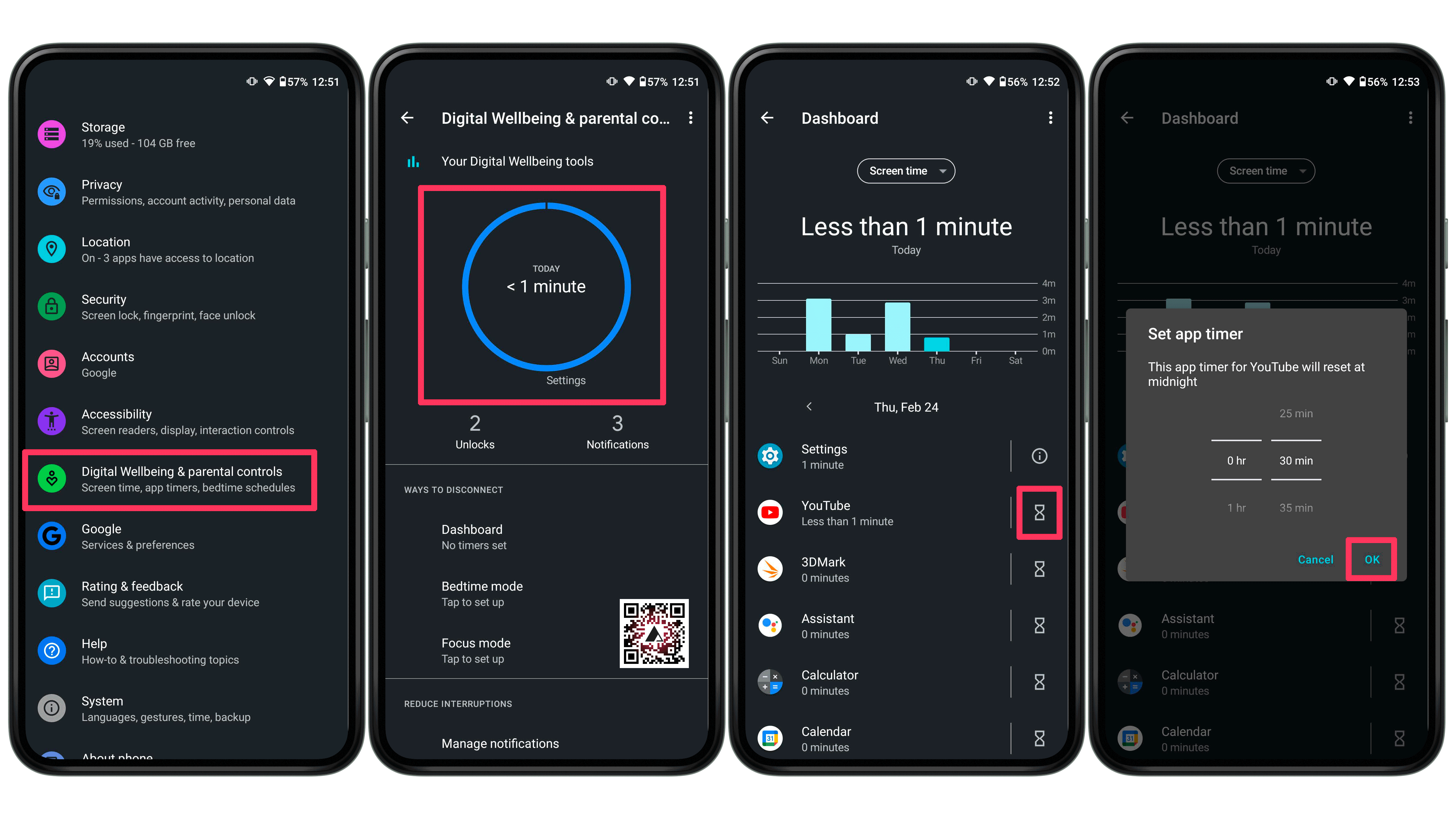
Set time limits for app use on Android
For Android users, the tool to manage how much time can be spent on applications is somewhat hidden in the Digital Wellbeing feature. To activate and set limits on individual apps follow these steps:
Open the Settings app
Open Digital Wellbeing & parental controls.
Tap on the Digital Wellbeing graph (the graph style may change depending on your phone).
Some System skins may show the option as App timers.
Tap on the hourglass icon next to the (un)desired app.
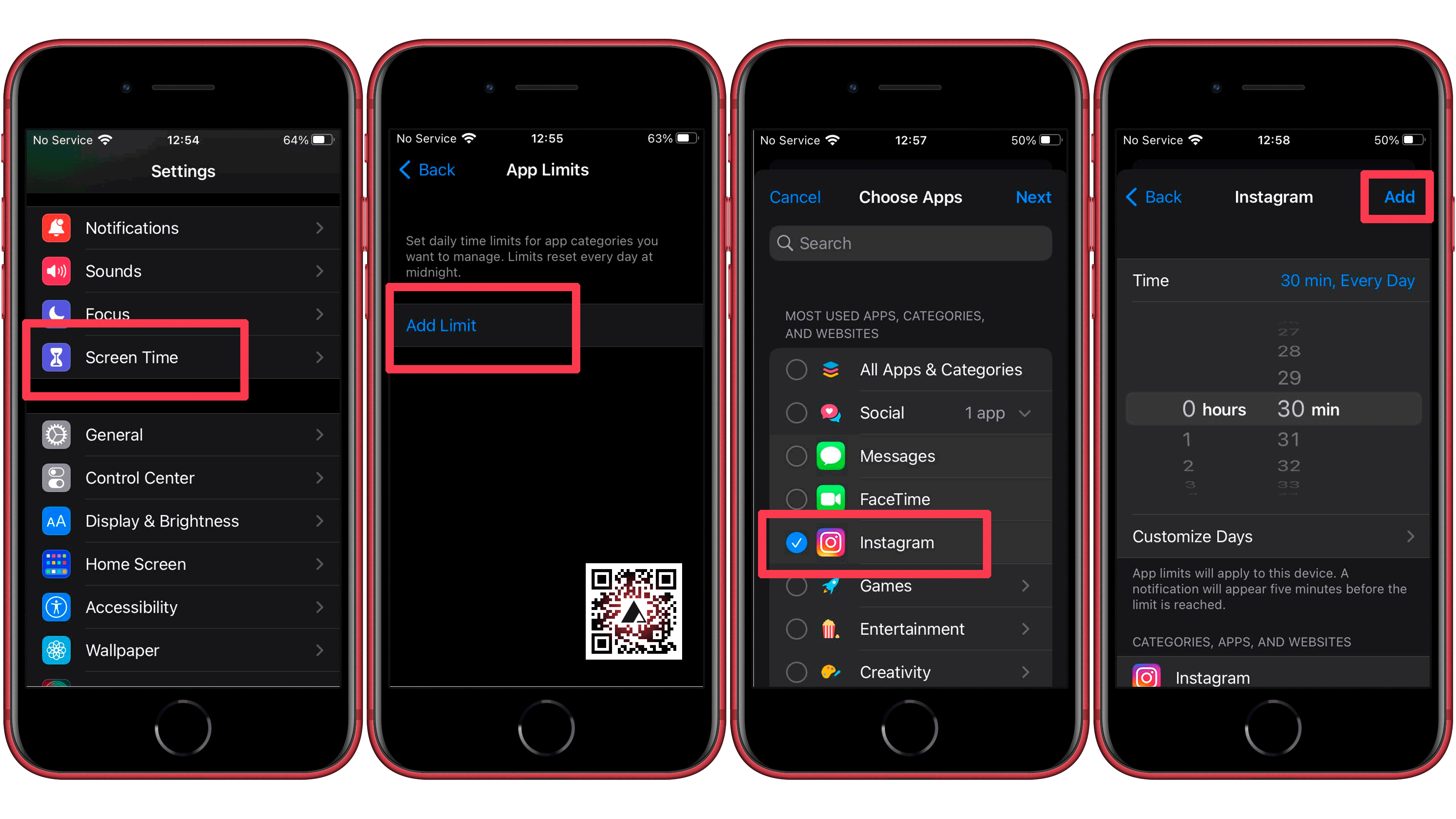
The option on iOS/iPadOS to limit app usage can be activated under the Screen Time feature. You can set daily time limits to all apps, app categories, or even individual applications:
Open the Settings app.
Tap on Screen Time.
Go to App Limits.
Select App Limit.
Choose an app category, or expand them to display individual apps.
The steps above can be followed to edit or remove the time limits on both Android and iOS, of course. And you can also check how much time you have spent on each application in the Digital Wellbeing (Android) or Screen Time (iOS) main screen.
Did you already know this feature? What are your tips to reduce the time wasted on individual apps? Share your suggestions in the comments below!
We mark partner links with this symbol. If you click on one of these links or buttons–or make a purchase through them–we may receive a small commission from the retailer. This doesn’t affect the price you pay, but it helps us keep nextpit free for everyone. Thanks for your support!
Seit 2008 schreibe ich für verschiedene Websites in Brasilien, Spanien, Dänemark und Deutschland über Technologie und habe mich auf mobile Ökosysteme spezialisiert. Dabei dreht sich bei mir alles um die interessantesten Modelle, ihre Komponenten und natürlich die ganze Welt der Apps. Dabei lege ich nicht nur Wert auf Leistung und Spezifikationen, sondern auch auf Aspekte wie Reparaturfähigkeit, Haltbarkeit und Herstellersupport.







0 comments