How to enable 4G on a Samsung Galaxy S4


One of the most interesting features of the Samsung Galaxy S4 is the ability of it to connect to LTE networks, more commonly referred to as fourth generation networks or 4G. Those who possess the device (…and the data plan to back it up!) can activate LTE connection, but it requires a little bit of a work around. In case you didn’t know how to do it, here is a quick tutorial on how to enable 4G LTE on your Galaxy S4.
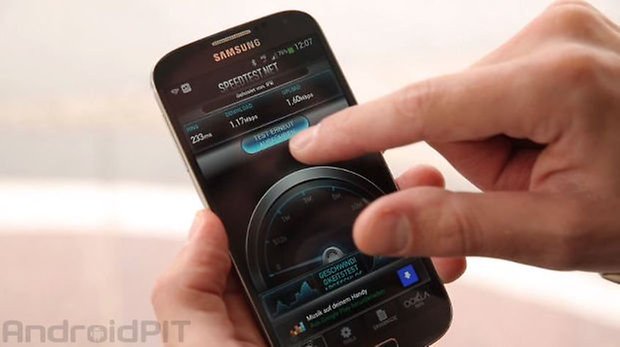
There are many carriers that have LTE networks in place, but you should always check to see if the service map covers your area and that you have a LTE enabled SIM card. Also, be aware that LTE networks permit extremely fast internet browsing and has the capability of uploading and downloading data at ridiculously fast speeds (326 Mbps for download and 86 Mbps for uploading).
- Tap your Menu Key
- Go to Settings
- Tap More Networks
- Go to Network Mode
- Select the Network that you want. For 4G/LTE, choose the LTE/CDMA option. For 3G, choose CDMA.
- Tap OK and the device will apply the new settings and restart.
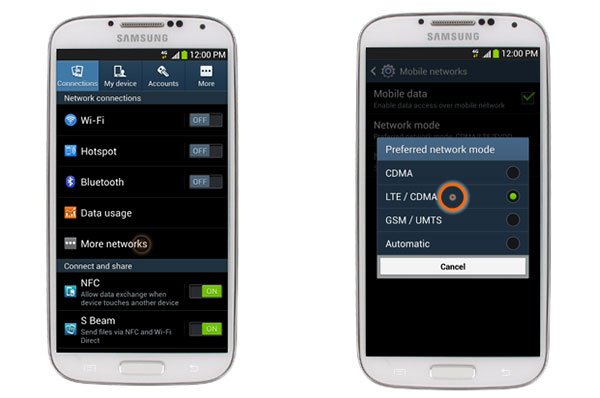
There you go! Enjoy your new blazing fast Samsung Galaxy S4!
EDIT: As per commenter Kevin, this works for Galaxy S4s on Verizon and Sprint. For other networks, it will connect to LTE automatically if available.










My samsung galaxy 4 did not give this option. It only gave the option of WCDMA/GSM and not LTE WCDMA/GSM. so how do you get the 4 g
Sir,I am from India.I am using Samsung Galaxy S4 Verizon 4G LTE device.I am not getting signals when I insert jio sim in my mobile.Please help me how to get signals.
my samsung s4 not open 4g.someone can help me how to open it
I m an Indian user. I hv galaxy s4 and I want to use it on LTE network but as u said there is no LTE/CDMA network preference option available in network setting. Sterling plzz help me out.
Thank you so much! For the longest time, ive been wondering why i only have a H+ connection when i signed up for a 4g data plan. Your article resolved my issue that has been pestering me for ages!!!! Thank you
I'm currently making a guide on how to improve ATT based s4's signals on other carriers.
Follow updates on related tips at: freehelpinghands.wordpress DOT com
totally useless if you have att. haven't gotten the damn thing to do anything but wifi at home. very frustrating.
I can appreciate your enthusiasm for 4G LTE.
However, you might be overselling it a bit.
No matter how strong the signal is on the 4G, it's still NEVER as fast as wifi at home.
At least not for me.
And I'm not even signed up for the fastest speed available with my internet service provider.
4G LTE is definitely way faster than 3G was/is.
But it's not amazingly fast.
Like I said, if you have the standard speed with your ISP at home, using either a cable connection, or AT&T's U-verse service, your wifi at home will still bury the speed of the 4G LTE speed.
Probably anywhere from double the speed, all the way up to quadruple the speed.
Easily.
We definitely HAVE come far with cell speeds.
By leaps and bounds.
I just don't want people to expect a miracle from your article.
Thank you though.
I always look forward to your newsletters, guys!!!!
Take care.
Matt
This is the dumbest article ever. Every s4 is lte enabled by default and at&t def has lte. They have the second largest lte network in the country behind verizon. Also the more networks option only works on Verizon and sprint versions. At&t s4 is setup to automatically connect to the strongest signal whether that is lte 4g or edge. If you want to change the network manually you can dial (#*#*info*#*#) from the phone dialer go to device information and change it there
.
As Kevin pointed out above, all S4s have LTE enabled.
I'm on AT&T. After I click on 'More Networks', there's no 'Network Mode'.
You have to click on "Mobile Networks" before you get to "Network Mode".
I do have a different option under networks...