What is bootloader and what is it used for? Find out in our guide
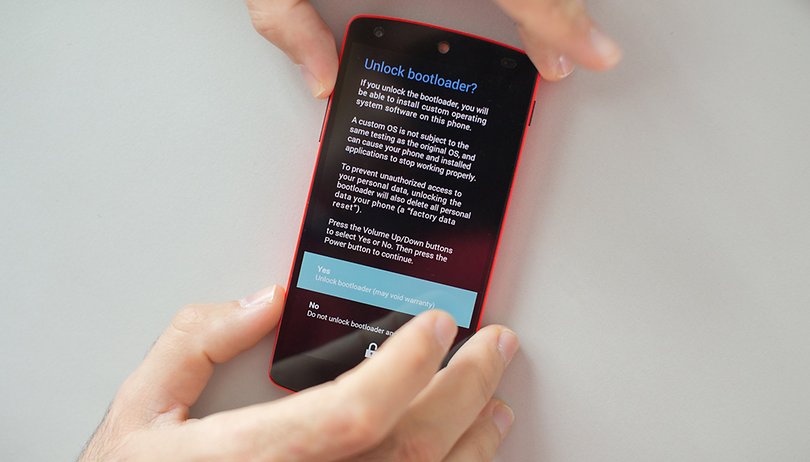

If you own a smartphone and are interested in tech, then it is only a matter of time before you read or hear about locked bootloaders, on how to unlock them and the fact this could void your phone's warranty. Let's get the facts straight: what is a bootloader and what is it used for?
Jump to section:
What is bootloader
Let’s start from the beginning. The bootloader is a program that starts whenever a device is powered on to activate the right operating system. It is therefore not only a trait reserved to Android, but also one that can be find out all devices with an operating, be it a smartphone, a tablet, a PC etc.
It may occur that a device, a computer for example, may be equipped with two different operating systems (dual boot). In this case, either one or the other bootloader starts, depending on the user's preference or what has been pre-programmed to happen automatically.
The same principle also applies to Android devices, except that there is only one operating system in this case. The bootloader determines when to run Android or when to enter ecovery mode, which is an independent runtime environment in a partition separate from the main Android OS that can be found on all Android devices.
Why manufacturers lock the bootloader
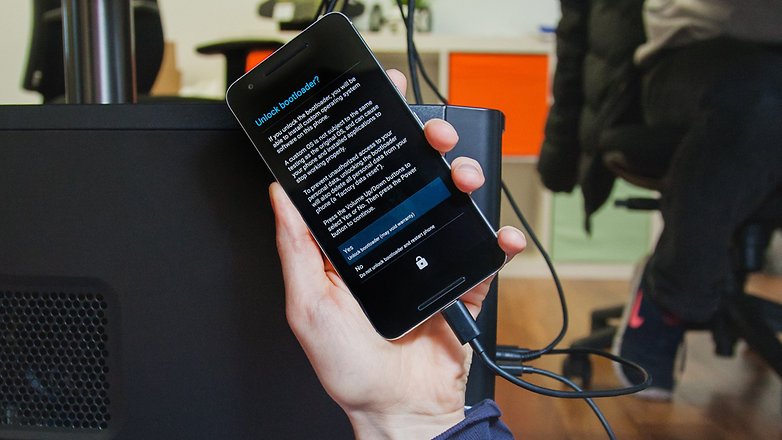
Manufacturers lock the bootloader of their devices so that only the operating system installed on the device can be used. Not all brand acts in the same way either: some manufacturers release their smartphones with the bootloader already unlocked (to the delight of most computer geeks).
To run a custom ROM, you need to unlock the bootloader first
Unlocking the bootloader allows you to install unauthorized software, this operation voids the warranty of your device.
Bootloader locked: what to do?
The bootloader is provided directly by the manufacturer of the device and, given its importance; is found in a section of the phone's memory that can't easily be modified by the user (even though we know how much you’d like to have this freedom!). When you want to modify your own device, one of the biggest obstacles is the locked bootloader. What is involved?
A locked bootloader will only load the authorized operating systems with a digital signature. Almost every smartphone manufacturer decides to lock it by only allowing its own personalized Android to load, preventing the installation of other custom ROMs. But as you know, behind every Android problem, there is always a solution. To be able to run a custom ROMs, you first need to unlock the bootloader, which allows you to start the “unauthorized” operating system.
The method to unlock bootloaders varies per manufacturer who provide different procedures, from sending a simple command from the PC via the USB connection, to download a specific program.
Unlocking the bootloader often requires authorized root access on your device. Before taking action, secure your data by backing it up and take a look at our guides dedicated to the root:
Have you ever unlocked the bootloader of your Android? Which manufacturer do you have and how did you go about it?












I am looking to buy a phone on Amazon it is a LG. It is advertised as having NO Bootloader. Is this the same as having a unlocked Bootloader? If there is none there how will the system know what to start when I turn on the phone? Can I actually load the Bootloader after buying the phone? Or turn it on?
I own a brand new Huawei P20 lite, and my ''good ol' days'' Lenovo vibe k6, with its own Android 7.0 N. I opened the developer settings and I found a function which amazed and surprised me:
OEM unlocking: allow the bootloader to be unlocked.
The Lenovo brand has allowed me actually to be unlocking the bootloader from its own settings app! Not from PC, not from using a third-party app, from the manufacturer's permission! I love that! I will soon try a different OS system on the old phone, to see how it works. Hope you enjoy your day :) if you got a Lenovo k6 owning Android 7.0N, open the settings, tap on 'about phone's, tap the Build Number a couple of times one after another to activate the developer settings and go to them and search through the page and find the OEM unlocking feature. Have fun everyone ??
Lucky for us here in South Africa it is illegal for carriers to lock any devices' bootloader as it will be seen as network locking the device accourding to law the client must be able to feely move between carriers and thus aren't allowed to stop a client from moving to another carrier. Thus it means if a client want to move the client must also be able to change firmware to another carriers firmware if s/he chose to do so. Thus the carriers can't lock the bootloader of any device. Changed my s6 edge's firmware a year or more ago to European firmware as my carrier is useless to put it mildly when it comes to updating firmware.
I've been trying to unlock the bootloader for my HTC incredible but have been unsuccessful so far. It's obvious I need to be more thorough and read EVERYTHING before moving on. Thanks for the guides.
go see:
forum.xda-developers.com
Use the search function for a beginning....
(see my postings below)
You need to go to www.htcdev.com more infos.
DO YOUR HOMEWORK FIRST PEOPLE. DON'T RUSH INTO IT. I HARD-BRICKED A PHONE YEARS AGO. I LEARNED MY LESSON, EVEN THOUGH I STILL DO IT.
Hi
You have a point.
Don't be fooled by the ease of reading the article here though it is written well in understandable words.
Rooting and changing bootloader for installing Roms is dangerous if you don't know what you are doing and therefor following instructions from Internet.
That is why I pointed out to go to XDA developers website and forum because rooting and flashing starts worldwide from there
Once there if you r new to this matter start reading, read more and after having done that read again . Maybe than you understand the basics and maybe than you r ready for your first time flashing your phone.
peace ✌
Don't feel bad lots of us have bricked phones. My suggestion is get an older phone the first time or one that is already damaged. That way it is not a big loss if things go wrong.
Good article for people who are interested to root and install a custom Rom.
I recommend those who are new to this, to read on forum XDA developers. It is the best and biggest forum for things like this where users and developers meet and help each other by providing info and custom Roms are also presented and available for download.
A free unlocked bootloader, than root, than flashing your custom Rom. ..
It can be found all over there
peace✌