List of Android APN settings for US networks

Having the APN settings correctly set up on your Android device is crucial if you want to use your phone for mobile internet and MMS messaging (and who in this day and age doesn't want to do that?). If you can't connect to these services, and have already tried resetting your APN settings to default, then you may need to manually add the APN settings for your network. Here we show you how.
Creating a new APN
If you're using a Nexus device, go to Settings, then tap More, Mobile Networks, Access Point Names, and press the '+' icon to add a new APN.
If you're using a Samsung device, tap Settings, 'More networks', 'Mobile networks', then Access Point Names. Next, press the Settings button on your phone, then tap New APN.
Reaching the 'New APN' creator should be similar on most Android devices.
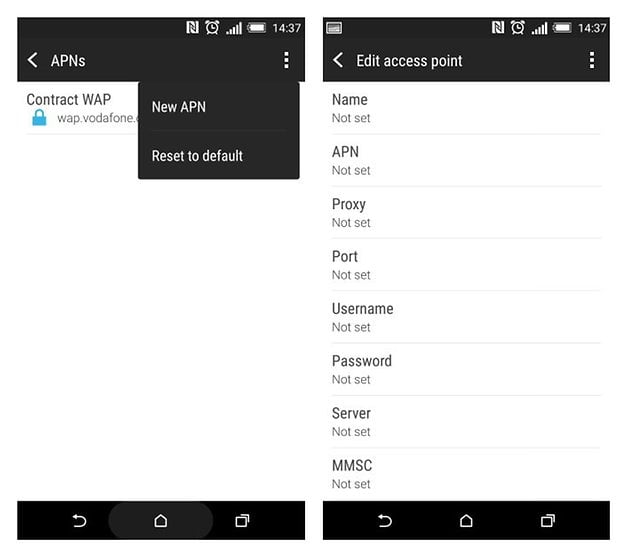
Once you're on the screen where you can add a new APN, you'll need to enter the APN settings for your cellular provider. Thankfully, you don't need to go scouring the internet looking for them, as we've listed the APN settings for every major network right here at AndroidPIT.
Just find your network provider in the list, add all the settings that need to be added (ignoring the ones that say <Not Set>), then tap the Settings button and Save.
AT&T APN settings
Name: ATT Phone, (ATT Broadband for tablets)
APN: phone (broadband for tablets)
Proxy: <Not Set>
Port: <Not Set>
Username: <Not Set>
Password: <Not Set>
Server: <Not Set>
MMSC: http://mmsc.mobile.att.net (Not Set for tablets)
MMS proxy: proxy.mobile.att.net (Not Set for tablets)
MMS port: 80
MCC: 310
MNC: 410
Authentication type: <Not Set>
APN type: default,supl,mms,hipri (Also 'fota' for tablets)
APN Protocol: IPv4 (Enabled for tablets)
Bearer: <Default>
Boost Mobile APN settings
Name: Boost_Mobile
APN: Boost_Mobile
Proxy: <Not Set>
Port: <Not Set>
User Name: Boost_Mobile
Password:
Server:
MMSC: http://mm.myboostmobile.com
MMS Proxy: 68.28.31.7
MMS Port: 80
MCC: 311
MNC: 870
Authentication type: <Not Set>
APN type: default,admin,fota,mms,supl,hipri
APN Protocol: <Not Set>
Bearer: <Not Set>
Sprint APN settings
Name: Sprint
APN: cinet.spcs
Proxy: <Not Set>
Port: <Not Set>
Username: yourMSID@uscc.net
Password: your MSID
Server: wap.voicestream.com
MMSC: http://mmsc1.uscc.net/mmsc/mms
MMS proxy: 68.28.31.7
MMS port: <Not Set>
MCC: 234
MNC: 15
Authentication type: <Not Set>
APN type: <Not Set>
APN Protocol: iPv4
Bearer: <Not Set>
T-Mobile APN settings
Name: T-MOBILE
APN: epc.tmobile.com, or fast.tmobile.com (LTE)
Proxy: <Not Set>
Port: <Not Set>
Username: <Not Set>
Password: <Not Set>
Server: wap.voicestream.com
MMSC: http://mms.msg.eng.t-mobile.com/mms/wapenc
MMS proxy: 216.155.165.50
MMS port: <Not Set>
MCC: 310
MNC: 260
Authentication type: <Not Set>
APN type: <Not Set> or Internet + MMS
APN Protocol: IPv4
Bearer: <Not Set>
US Cellular APN settings
Name: USCC
APN: internet
Proxy: <Not Set>
Port: <Not Set>
Username: yourMSID@uscc.net
Password: your MSID
Server: wap.voicestream.com
MMSC: http://mmsc1.uscc.net/mmsc/mms
MMS proxy: blank
MMS port: 80
MCC: 310
MNC: 120
Authentication type: <Not Set>
APN type: <Not Set> or Internet + MMS
APN Protocol: iPv4
Bearer: <Not Set>
Verizon APN settings
Name: Verizon
APN: internet
Proxy: <Not Set>
Port: <Not Set>
Username: <Not Set>
Password: <Not Set>
Server: <Not Set>
MMSC: http://mms.vtext.com/servlets/mms
MMS proxy: <Not Set>
MMS port: 80
MCC: 310
MNC: 012
Authentication type: <Not Set>
APN type: <Not Set> or Internet + MMS
APN Protocol: <Default>
Bearer: <Not Set>
Virgin Mobile APN settings
Name: Virgin Mobile
APN: Sprint
Proxy: <Not Set>
Port: <Not Set>
Username: <Not Set>
Password: <Not Set>
Server: <Not Set>
MMSC: http://mmsc.vmobl.com:8080/mms?
MMS proxy: 205.239.233.136
MMS port: 81
MCC: 310
MNC: <Not Set>
Authentication type: <Not Set>
APN type: default,supl,mms
APN Protocol: iPv4
Bearer: <Not Set>










Newish phone snob here.
I have a Samsung Note 8 that was originally Verizon but is now running on straight talk wir
It's funny that I have to re-enter these in every new phone I get. I wonder if I'll have problems should I relocate.
Thank you! that was really helpful! on AT&T website they put: APN: NXTGENPHONE and was impossible to have a connection since i have a ASUS Zenfone, it was just change the APN to "phone" and it worked very well! Thank you very much!
More APN Settings read from my BLU Advanced Phone:
(I have only used AT&T, H2O, and Black wireless. Only Black wireless gave me access to data. In Austin Texas and in Honolulu Hawaii)
Name: AT&T GoPhone
APN: pta
APN type: default,mms,supl
MMSC: http://mmsc.mobile.att.net/
MMS proxy: proxy.mobile.att.net
MMS port: 80
MCC: 310
MNC: 410
APN protocol: IPv4
APN roaming protocol: IPv4
I have a Samsung galaxy s2 model number GT-I9100 Android version 4.1.2 I accidentally deleted FOTA upn. Is it important and what are the settings for it so I can put it back.
Thank you for your help in advance
Latest Verizon settings (Galaxy S7 Edge):
Name: Verizon Internet
APN: VZWINTERNET
MCC: 311
MNC: 480
APN type: default,dun,supl
APN protocol: IPv4/IPv6
APN roaming protocol: IPv4/IPv6
Mobile virtual network operator type: None
All other values “Not set”.
I have an unlocked verizon galaxy S 4, I'm using it with my ATM simcard....can you tell me how to exactly set it to work properly and and be able to system update as well...TIA, Rhonda
ATM?