Sorry, but there's really nothing to see here right now. Our server is in maintenance mode – and our
little bot is trying to sort the error messages with its last bit of energy.
Whether it was a data leak, a power outage in the cluster, or just a grumpy bit – we don't know yet.
But what we do know is:
The data drama escalated into a server meltdown. But don't worry: We're on it.
What now?
Everything is surely running smoothly over at our colleagues from inside
digital – why not stop by!
Or you could pass the time by visiting our social media channels – for example Instagram, YouTube or TikTok. At least there are no
server problems there – promised.
Thanks for your patience. Our bot is already rebooting at full speed. 🔧
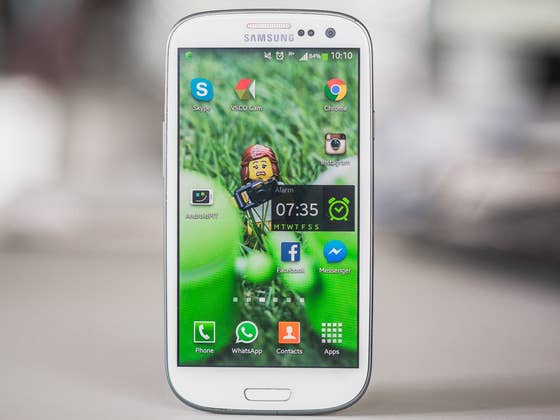
How-tosTabletHow to factory reset the Galaxy S3 for improved performance
Performing a factory or hard reset of any device regularly will improve performance and clear up certain bugs that may have been lingering from dodgy apps, previous firmware update hiccups or just prolonged usage and lag. Considering just how many Galaxy S3 owners have said that they’re happy to stick with their device in the face of the underwhelming Galaxy S5 and expensive S6, refreshing the Galaxy S3’s performance remains timely. Here’s how to do it (it also works on the S4).
Galaxy S3 Android update news
Galaxy S3 tips and tricks
Buy Now: Galaxy S3 cases and covers from Amazon
You have a couple of options for resetting your device. Firstly, you can choose between a basic factory reset, done via the settings menu on the device, and a hard reset, which is done via a hardware button combination and the recovery menu. The latter gives you more options for wiping data, cache and partitions. The other thing you need to consider is whether you want your full system reinstalled after the reset or just your apps and personal data.
Always back up first
Before you even consider doing a factory reset or hard reset you really, really need to back up your system, apps and data to whatever level you need. I always perform an ROM Manager backup and copy my backups, pictures, music, etc, over to my computer manually with a USB cable, just to be safe.
Keep in mind there’s a difference between simply backing up your apps and data and making a complete Nandroid system backup. All of this may seem overly cautious, but after losing all your important data once, you’ll soon see multiple backups as a valuable investment of your time and energy.
Factory reset the Galaxy S3
This is the quick and easy reset option and will wipe your data from the device but won’t affect your SIM or SD card. No reset will affect your SIM contents, but some people are a little paranoid, regardless, If you’re one of them, just take it out first (along with your SD card, if you like).
Then go to the Settings menu, select backup and reset and hit factory data reset, then reset device and delete all. You can achieve the same result using the Android code *2767*3855# from the dialer.
Hard reset the Galaxy S3
This is basically the same as doing a factory reset, but when you use the hardware button combination you have additional options to manually wipe more of your device. Depending on how often you do a reset and wipe or flashing custom ROMs this may be a natural or unnecessarily complicated way of doing it, but I like to be in control, so this is how I do it. You can just do a factory reset and leave it at that, but some people like to do a factory data reset, then wipe the cache partition and then the Dalvik cache separately before a factory reset and then again afterwards, just to be sure. It’s all up to personal preference, but if you choose not to do these last two steps and have any issues after rebooting (like getting stuck in a bootloop), wiping the cache partition and Dalvik cache can quite often be all you need to get you back to where you want to be.
The hardware button combination for the Galaxy S3 is to hold Volume Up, Home and Power buttons until the device vibrates or you see the Galaxy screen. Then, release the Power button while continuing to hold the other two. You’ll now be brought to the Android recovery screen (you can let go of the buttons now).
Using the Volume keys, scroll down to wipe data/factory reset and confirm with a tap of the Power button. Scroll down to delete all user data and again hit the Power button to confirm. You can now reboot the system from the recovery menu. Once your S3 reboots, you should have much smoother system performance.
It’s also a good idea to keep your apps up to date and delete any unused apps to keep things running better too.
What are the combination buttons for the S4 ? Thanks : )*
Log in to Reply
i jsut bought a used S3 and it still shows the previous owners phone number under…about device….1. should i be concerned about malware….i did a factory reset and it still shows and 2. should i do a hard reset…will that wipe out everything..
thanks
Log in to Reply
Not malware. Check the SIM card slot, they probably never took theirs out of it. You could take it out but if you don’t put one in (I’m guessing you didn’t buy cell service?) you will have an annoying "NO SIM CARD" notification.
Log in to Reply
thanks. vry good. vry hlp fl for me…
Log in to Reply
I have been trying to reset my s3 as its stuck on start up and just repeats this. I have followed instructions re the reset and have this coming up before reboot. Reboot hasnt worked so far. The message is E:failed to mount /efs (invalid arguement). Is there a fix for this error please and thankyou in advance.
Log in to Reply
How long does the reboot take after following these steps? I’ve been waiting two hours and it’s still on the start up screen. Did I do something wrong?
Log in to Reply
Please let me know. What should i do now. Even i did factory reset twice, my samsung S3 doesn’t work fine.
Log in to Reply
Followed the button combo directions to the letter and have only managed to rebooted my phone half a dozen times.
Log in to Reply
Hey Kris i have ran into a little problem with my samsung galaxy s3 verizon SCH-I535. I rooted my phone with towelroot and it worked fine the i installed rom manager and selected twrp for my recovery then i went into recovery but it was still stock recovery and so i tried cmw then it came up on my phone with little blue writing at the top and samsung logo and the custom with an unlocked lock under it. And the it went to a screen with little red writing at the to saying secure fail: kernel Then a yellow triangle with an exclamation mark in it saying under it "system software not authorized by verizon wireless has been found on your phone.please turn off your phone and go to the nearest verizon wireless store for help." And it will only let me go into downloading mode but not recovery. I have 2 galaxy nexus and they work fine with cmw and a custom rom on it…if there is any way i can do it without a computer witch i dont have will help me out alot…i want to download the newest cyanogen rom 6.0 to try it iut but it wont let me past the triangle or go into recovery.. Much as help as possible would be great thanks
Log in to Reply
hi there, iv tried to reboot my s3 by holding down the up and center and power but when the recovery screen come up a pic of the android in the background looks dead with an exclaimation inside a red triangle and underneath it says no command, the menu comes up and i have tried to wipe cache partition and wipe data/factory reset. when my phone restarts to set up phone notifications pop up saying unfortunately setup stopped working along with a bunch of other things not working. i hope you understand what im talking about and can help me before i cry and throw my phone at the wall. please please please!
Log in to Reply
Where I can find dalvik cache?
Log in to Reply
My S3 in reboot loop, and I cannot hard reset it by pressing "Volume+, Home and Power buttons". Is there any other ways to reset it or is it dead completely? Thanks in advance.
Log in to Reply
Is there any point using "Back up my data"……if it’s going to save then restore the faulty settings I think are causing my problems in the first place? I’m trying to "get back to square one"…….i.e. the most stripped down installation of Android I can possibly put on my Galaxy S3, with NO other apps and no weird settings so I can see if THAT will restore my ability to perform Voice-to-Text OFFLINE, which I WAS able to do last week…..but now can’t.
Anybody else who has had this problem find a solution?
Log in to Reply
my 4 year old S3 galaxy is locked on the s3 galaxy start screen only, no amount or style of reset seems to work, but I love this phone, can someone tell me another way to maybe re install the software?
Log in to Reply
Thanks for this tutorial!
Log in to Reply
I have a galaxy s 3 that is stuck in manual moad .when u try to select an option it won’t. Someone took the sd card out .how can I recover it?
Log in to Reply
Did you ever solve this problem? I’m having the same issues.
Log in to Reply
hardresetle.com/samsung-galaksi-s3-hard-reset/
Log in to Reply
any one found out what has happened because mine has been and is still doing the same since Saturday night.
Log in to Reply
I went into the manual mode and volume up/down keys won’t work just the power key. When I restart my phone in normal mode volume keys work perfect. Any ideas??









What are the combination buttons for the S4 ? Thanks : )*
i jsut bought a used S3 and it still shows the previous owners phone number under…about device….1. should i be concerned about malware….i did a factory reset and it still shows and 2. should i do a hard reset…will that wipe out everything..
thanks
Not malware. Check the SIM card slot, they probably never took theirs out of it. You could take it out but if you don’t put one in (I’m guessing you didn’t buy cell service?) you will have an annoying "NO SIM CARD" notification.
thanks. vry good.
vry hlp fl for me…
I have been trying to reset my s3 as its stuck on start up and just repeats this. I have followed instructions re the reset and have this coming up before reboot. Reboot hasnt worked so far. The message is E:failed to mount /efs (invalid arguement). Is there a fix for this error please and thankyou in advance.
How long does the reboot take after following these steps? I’ve been waiting two hours and it’s still on the start up screen. Did I do something wrong?
Please let me know. What should i do now. Even i did factory reset twice, my samsung S3 doesn’t work fine.
Followed the button combo directions to the letter and have only managed to rebooted my phone half a dozen times.
Hey Kris i have ran into a little problem with my samsung galaxy s3 verizon SCH-I535. I rooted my phone with towelroot and it worked fine the i installed rom manager and selected twrp for my recovery then i went into recovery but it was still stock recovery and so i tried cmw then it came up on my phone with little blue writing at the top and samsung logo and the custom with an unlocked lock under it. And the it went to a screen with little red writing at the to saying secure fail: kernel
Then a yellow triangle with an exclamation mark in it saying under it "system software not authorized by verizon wireless has been found on your phone.please turn off your phone and go to the nearest verizon wireless store for help." And it will only let me go into downloading mode but not recovery. I have 2 galaxy nexus and they work fine with cmw and a custom rom on it…if there is any way i can do it without a computer witch i dont have will help me out alot…i want to download the newest cyanogen rom 6.0 to try it iut but it wont let me past the triangle or go into recovery..
Much as help as possible would be great
thanks
hi there, iv tried to reboot my s3 by holding down the up and center and power but when the recovery screen come up a pic of the android in the background looks dead with an exclaimation inside a red triangle and underneath it says no command, the menu comes up and i have tried to wipe cache partition and wipe data/factory reset. when my phone restarts to set up phone notifications pop up saying unfortunately setup stopped working along with a bunch of other things not working. i hope you understand what im talking about and can help me before i cry and throw my phone at the wall. please please please!
Where I can find dalvik cache?
My S3 in reboot loop, and I cannot hard reset it by pressing "Volume+, Home and Power buttons". Is there any other ways to reset it or is it dead completely?
Thanks in advance.
Is there any point using "Back up my data"……if it’s going to save then restore the faulty settings I think are causing my problems in the first place?
I’m trying to "get back to square one"…….i.e. the most stripped down installation of Android I can possibly put on my Galaxy S3, with NO other apps and no weird settings so I can see if THAT will restore my ability to perform Voice-to-Text OFFLINE, which I WAS able to do last week…..but now can’t.
Anybody else who has had this problem find a solution?
my 4 year old S3 galaxy is locked on the s3 galaxy start screen only, no amount or style of reset seems to work, but I love this phone, can someone tell me another way to maybe re install the software?
Thanks for this tutorial!
I have a galaxy s 3 that is stuck in manual moad .when u try to select an option it won’t. Someone took the sd card out .how can I recover it?
Did you ever solve this problem? I’m having the same issues.
hardresetle.com/samsung-galaksi-s3-hard-reset/
any one found out what has happened because mine has been and is still doing the same since Saturday night.
I went into the manual mode and volume up/down keys won’t work just the power key. When I restart my phone in normal mode volume keys work perfect. Any ideas??