Once you’ve backed up all the data from your old smartphone and transferred it to your new phone, you may ask yourself how you can make use of your old phone. After all, storing it in a drawer rarely does much good. Of course, you can sell your old smartphone. But this is only one – admittedly quite mundane – method of preventing the phone from rotting in a drawer. It’s also usually only worthwhile for comparatively recent devices. So why not continue to use the device – but as a second phone? You can put your old cell phone to good use in your car, for example.
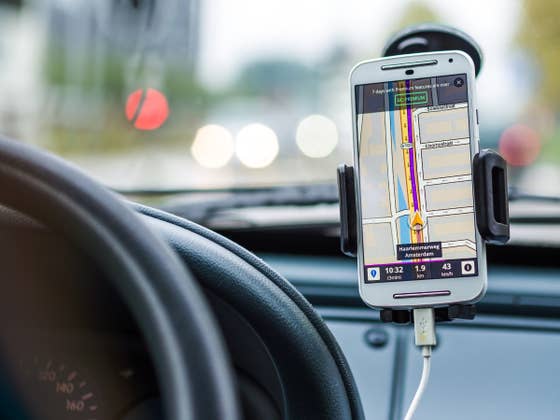
Use your old cell phone in your car as a GPS & car phone
You can utilize a used phone in the cell holder in your car as a replacement for a car phone or navigation device. This allows your main cell phone to remain tucked away. There is no need to plug it in and out. Drivers who get in and out of the car frequently will particularly appreciate this. Powered by a charging cord via the cigarette lighter or USB socket, there’s no need to worry about the battery running low.
However, obtaining a second SIM card is recommended. A navigation app can also work offline if maps can be downloaded. However, the app will have no traffic data or congestion information. Even Google Maps now works offline – albeit only to a limited extent. Alternatively, you can also set up your new cell phone as a hotspot and continue to offer your old cell phone internet access.
However, you can’t make calls without a SIM. If your mobile network operator offers a multi-SIM, this would be the method of choice. Otherwise, any other SIM card can be used and calls from the phone in your pocket will be forwarded to the car phone.
Logbook with the second cell phone
In some situations, it’s necessary to keep a logbook. The unused smartphone in your car can also do this. By leaving your phone in the car, it records the journeys independently of the driver and the owner of the smartphone. In the Google and Apple app stores, you can find apps that automatically record every journey when the car is moving.
Use your smartphone as a mobile hotspot
Especially if several devices are able to access internet at the same time, an internet connection is better than a mobile phone connection for each individual device. The unused cell phone can take over this function and set up a mobile hotspot when you’re traveling. For example, you can take advantage of a daily flat rate so that the whole family can go online in the car. And on business trips, the mobile hotspot in your work bag can power both your smartphone and laptop without draining the battery of either. With a suitably good power bank, you can easily get through the day using your own Wi-Fi hotspot without it running out of battery. You will also need your own SIM card for the unused smartphone.