
Camera control, part 1: The hardware
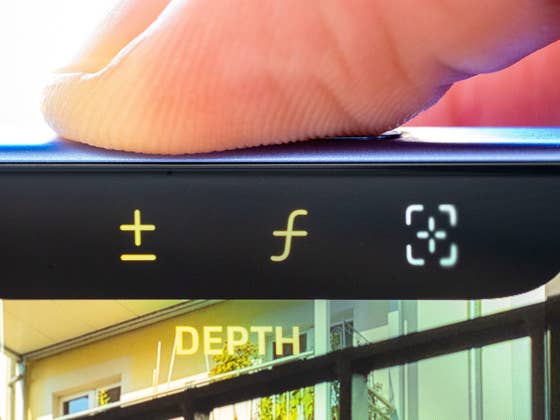
To master Camera Control, you will first need to understand the hardware. First, the button, approximately the width of a finger, can be physically pressed. In addition, the button can also detect the amount of contact pressure and registers a virtual click when a certain amount of pressure is applied. To achieve such a click, you receive feedback via the iPhone‘s vibration motors that approximates the physical feedback of a real button. Hitting the right pressure intensity requires some practice, especially at the beginning.

As mentioned at the beginning, there is also a capacitive touch surface on the top of the button. You can swipe back and forth on it to select various options or precisely adjust certain parameters of the camera app. In summary, there are the following options:
- First pressure level: virtual click.
- Second pressure level: physical click.
- Swipe back and forth.
That brings us to:
Camera control, part 2: The software
A physical click on the camera control performs the obvious: It captures photos. However, you can also use it to launch the camera app and you can do so from any screen, even from the lock screen itself.
The virtual click, on the other hand, activates the currently selected parameter. By default, it would be the zoom. Hence, click the button lightly once before you zoom in and out by swiping on the button.
- Also interesting to know: The iPhone 16 Pro camera is worse than in the iPhone 15 Pro’s in one department
You can toggle various parameters with a virtual double-click. Double-click to activate the menu and then swipe to switch between the following options: Zoom, Cameras, Aperture, Photographic Styles, Tint, and Exposure Compensation. Simply tap to confirm and then swipe to adjust the selected parameter. The available parameters are identical in every camera mode, from photo to portrait and video.
In the following video, you can see the camera controls in action once again:
- The 2024 lineup: All new iPhone 16 models compared
- Read more: iPhone 16 hands-on
What do you think of the new control element in the iPhone 16 series? Is it a stroke of genius from Apple or a redundant gimmick? Will dedicated camera buttons now also become a trend on Android smartphones? I look forward to hearing your opinion!