Sorry, but there's really nothing to see here right now. Our server is in maintenance mode – and our
little bot is trying to sort the error messages with its last bit of energy.
Whether it was a data leak, a power outage in the cluster, or just a grumpy bit – we don't know yet.
But what we do know is:
The data drama escalated into a server meltdown. But don't worry: We're on it.
What now?
Everything is surely running smoothly over at our colleagues from inside
digital – why not stop by!
Or you could pass the time by visiting our social media channels – for example Instagram, YouTube or TikTok. At least there are no
server problems there – promised.
Thanks for your patience. Our bot is already rebooting at full speed. 🔧
NewsTabletSamsung Boosts Image Quality on Expert RAW App with New Update
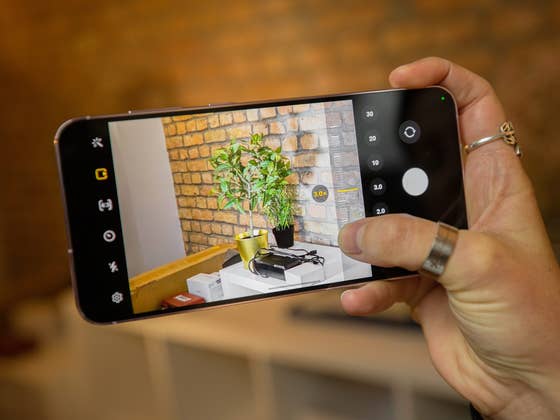
Apart from the standard camera app, Samsung also has an Expert RAW mode for Galaxy phones. This app allows customizable settings and extended controls to enable features like star trail photography. It has since been updated to include support for additional models last year. Recently, the South Korean tech firm shipped a new version that improved shooting quality.
Also read: Why use the Samsung Expert RAW app?
Before the latest firmware, Samsung released an update in April, which leaned more toward general improvements and bug fixes to the image quality and app useability. Now, version 2.0.10.6 of the app has rolled out to more camera phones, and it does seem to introduce more optimizations that help make life for the mobile shutterbug better.
What’s new in the updated Expert RAW app?
The changelog did not specify just what the changes are, but SamMobile spotted a key area that was tweaked—the default saturation level of photos. In layman’s terms, the shots captured are noticeably less vibrant and display natural colors as opposed to oversaturation in the previous version. Furthermore, the changelog added information that some errors were also fixed.
The Expert RAW app is compatible with the latest Galaxy S23 (Plus) and Galaxy S23 Ultra (review) devices all the way to the Galaxy S20 Ultra and Galaxy Note 20. This is also available to the recent Galaxy Z Fold 4 and older Galaxy Z Fold 3 and Galaxy Z Fold 2 as well. You can find the list of the compatible models below.
Samsung Galaxy Note 20 (Ultra)
Samsung Galaxy S20 Ultra
Samsung Galaxy S21 (Plus)
Samsung Galaxy S21 Ultra
Samsung Galaxy S22 (Plus)
Samsung Galaxy S22 Ultra
Samsung Galaxy S23 (Plus)
Samsung Galaxy S23 Ultra
Samsung Galaxy Z Fold 4, Fold 3, and Fold 2
To update to the latest Expert RAW app version, you can head to the Samsung’s Galaxy Store app via the above-mentioned phones and perform the update manually.
Are you using the Expert RAW mode on your Samsung Galaxy camera phone or do you prefer to point-and-shoot with the Galaxy camera app? Let us know your thoughts in the comments.
We mark partner links with this symbol. If you click on one of these links or buttons–or make a purchase through them–we may receive a small commission from the retailer. This doesn’t affect the price you pay, but it helps us keep nextpit free for everyone. Thanks for your support! Prices are based on the date of publication of this article and may be subject to change.
Jade Bryan has been a Junior Technology Editor at nextpit since 2022. His tech journey began much earlier, tracing back to the early days of Android and the peak of the Nokia era. With years of experience contributing to various publications and tech forums, he specializes in providing practical tips and troubleshooting guides for users.
At nextpit, Jade’s expertise extends beyond smartphones and operating systems to include electric vehicles and the latest in gaming. He is particularly interested in how these evolving technologies intersect and shape our daily lives.
Outside of work, Jade is usually immersed in MMORPGs or catching up on his favorite anime and television shows.