Sorry, but there's really nothing to see here right now. Our server is in maintenance mode – and our
little bot is trying to sort the error messages with its last bit of energy.
Whether it was a data leak, a power outage in the cluster, or just a grumpy bit – we don't know yet.
But what we do know is:
The data drama escalated into a server meltdown. But don't worry: We're on it.
What now?
Everything is surely running smoothly over at our colleagues from inside
digital – why not stop by!
Or you could pass the time by visiting our social media channels – for example Instagram, YouTube or TikTok. At least there are no
server problems there – promised.
Thanks for your patience. Our bot is already rebooting at full speed. 🔧
NewsTabletAndroid Cross-Device Tools Arrive: Instant Hotspot and Call Transfer
Google has now rolled out the first two new features in its cross-device services that were announced at I/O 2024. Call casting and Internet sharing aim to enhance the user experience with multiple Android devices and will support Pixel and non-Pixel smartphones and tablets.
Don’t miss this: How to use your phone as a Wi-Fi extender
Internet sharing: Automatic hotspot sharing
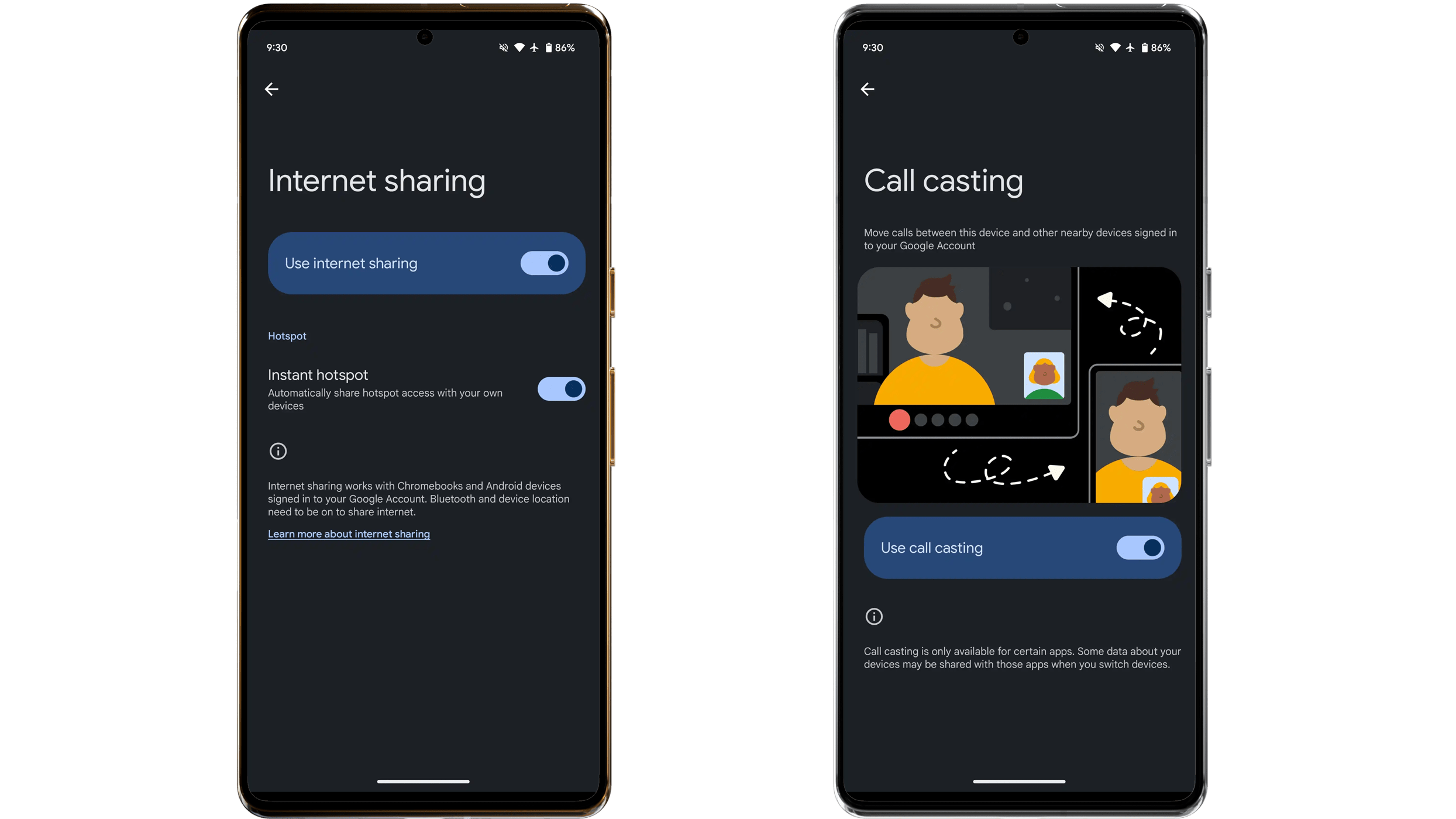
As described on Google’s support page (via 9to5Google), Internet sharing automatically shares the internet connection via hotspot from your handset to other personal connected Android devices. It also supports Chromebooks, provided you have the same Google account logged in to them.
As Google noted, Internet sharing is unavailable on Samsung Galaxy smartphones and tablets. Instead, Galaxy users can use the built-in auto-hotspot functionality.
In addition, the Bluetooth and Location services features are required to be enabled on your primary smartphone and with other Android devices to begin automatic hotspot sharing.
Call casting: Transfer your calls to another device
As for Call casting, it leverages the seamless transfer of voice or video calls between nearby devices sharing the same Google account. For example, you can answer the call on your Pixel 8 (review) and move the call to the Pixel Tablet (review) without dropping or cutting the connection. It also works with Chromebooks via the browser.
At the moment, Call casting is compatible with Google Meet through the Cast brand, but Google said it should include more messaging and call apps later.
Samsung will most likely introduce a similar feature in the One UI 7 update. Based on leaked screenshots, Samsung’s version will be known as Continuity notifications, where Galaxy users can transfer a call to another Galaxy device by sending a notification first.
Where can you access these new cross-device tools?
If you have updated your Pixel, both Internet sharing and Call casting features can be accessed from the new Cross devices services section within Google in the settings. You will need to set up a cross-device before individually toggling each device prior to using them.
What do you think of these two new additions to Android? Are they useful features you’ve been waiting to experience? Let us know in the comments.
We mark partner links with this symbol. If you click on one of these links or buttons–or make a purchase through them–we may receive a small commission from the retailer. This doesn’t affect the price you pay, but it helps us keep nextpit free for everyone. Thanks for your support!