


Contents
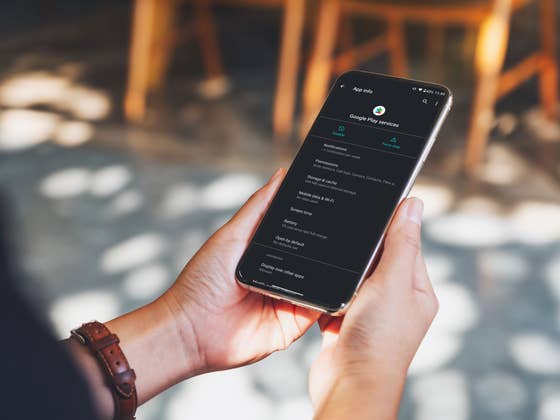
Google Play Services is an app that is very closely linked to the Android system itself that allows your smartphone to benefit from the latest versions of apps and security patches without upgrading to the latest version of Android. Despite the confusing names, this is different from the Google Play Store where you can access, buy, and download media such as apps and games.
Google Pixel 6 smartphone for $599.00
Jump to:
- Install Google Play Services the easy way
- Install Google Play Services the technical way
- Install Google Play Services APK
Google Play Services latest version: what’s new?
You can check out the changelogs for the latest version of Google Play Services here, and also view the timelines and logs for earlier releases. Most of what the updates do are small changes under the hood such as streamlining aspects relating to ads, games, fitness etc., and making the overall Google ecosystem operation more efficient and stable.
Install Google Play Services: the easy way
Keeping Google Play Services up-to-date is beneficial for all users, even the most casual ones, as the improved efficiency it brings will save battery life and improve offline services.
The simplest way to always have the latest version of Google Play Services installed is to keep an eye on this page, where we’ll provide you with a download link to the very latest versions available in the Play Store. Just tap the install button below to ensure you have the current version.
INSTALL (com.google.android.gms)
However, as with most things Android, there are always newer and better versions available if you’re willing to put in a little more effort. For example, there are multiple versions of Google Play Services for the different versions of Android you might have. So, if you want the very latest version, just follow the steps below.
Install Google Play Services: the technical way
Users who want to make absolutely sure they have the latest updates or want to access a beta or test different versions of Google Play Services might want to use a more technical method. This can be useful for app developers, or for anyone who is suffering from a software error that blocks Google Play Services from updating normally.
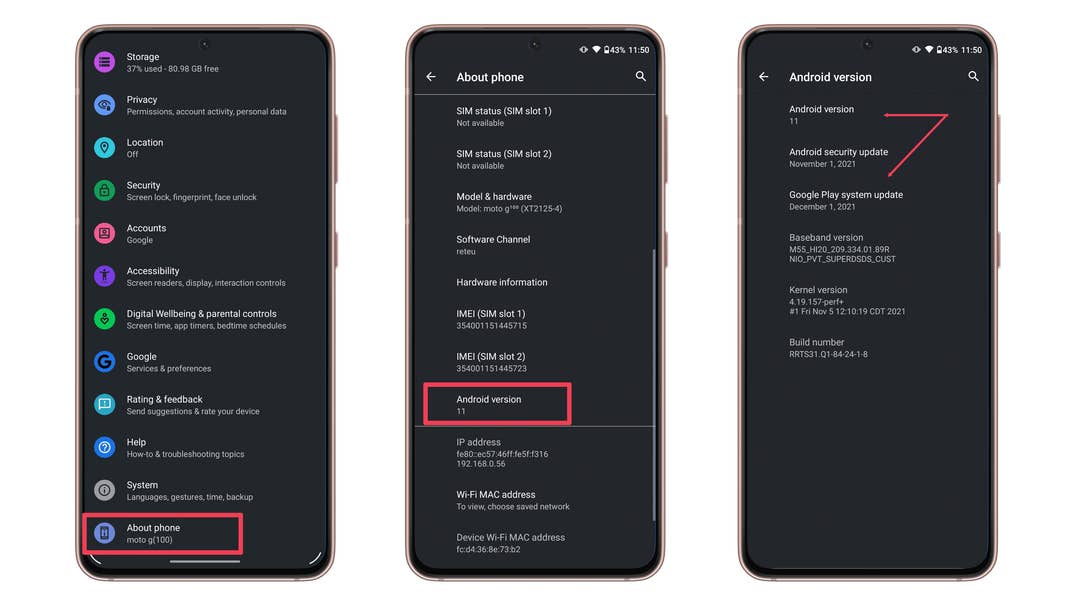
First, you’ll need to know which version of Android you have.
- Go to Settings > About Phone (or just About on some devices) and look for Android version or Software information.
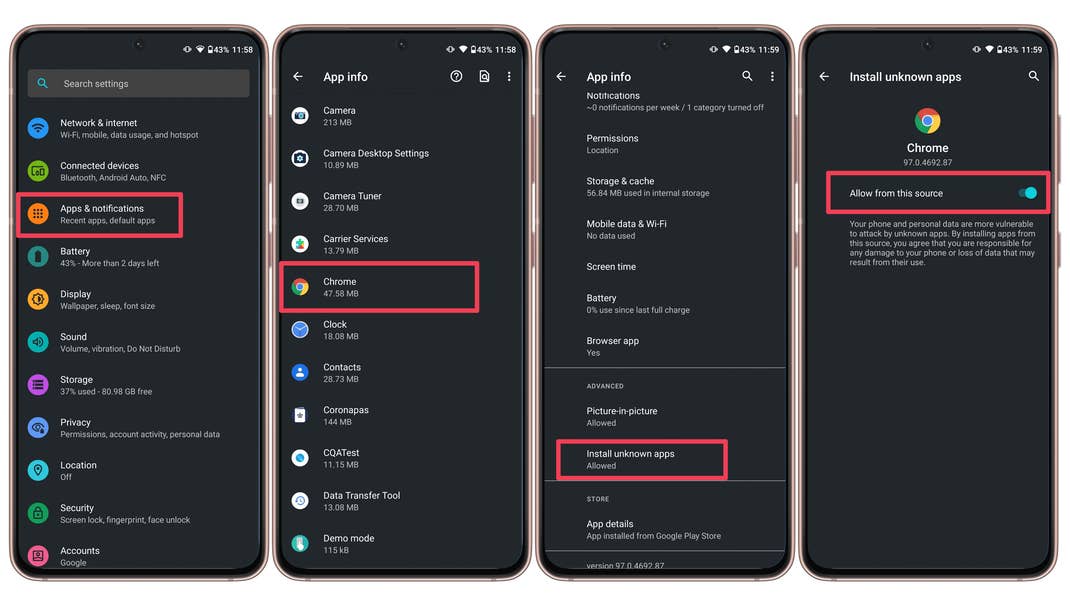
Then, you’ll need to check which apps are allowed to install from unknown sources:
- Open the Settings apps.
- Choose the and then Apps option (or Apps & notifications).
- Tap See all apps.
- Find the app which you will be installing from – usually your mobile browser or a file explorer. Tap on it.
- Tap on Advanced to expand the page.
- Select the Install unknown apps option.
- Activate the option to Allow from this source.
Next, you need to use that same browser to find a Google Play Services APK. Here’s how you do that:
Download Google Play Services APK
Now you simply have to choose the right Google Play Services version for you. You can find the latest versions of Google Play Services hosted on APK Mirror and it’s always a good idea to select the latest stable version and not a beta version. Then, just download and install Google Play Services onto your phone.
Did you find this guide useful? Any tips or information you think we missed out on? Let us know in the comments!
We mark partner links with this symbol. If you click on one of these links or buttons–or make a purchase through them–we may receive a small commission from the retailer. This doesn’t affect the price you pay, but it helps us keep nextpit free for everyone. Thanks for your support! Prices are based on the date of publication of this article and may be subject to change.
Pls help me with this problem when try to update apps or download app it says that "can’t download app error[0]" and I try to clear date or cache and still its not working…
Any suggestion will be appreciated..
Pls help me ASAP
Didn’t an updated play service within the last month have a bug, that screwed up the play store or google pay?
Not open my play store
Thanks
I recently got a different phone, and the google play store version on this one doesn’t seem to have all the apps the other phone I had did and I really wanted to see if I could update it. Well, I checked the version I have and the numbers/letters, etc, look ABSOLUTELY NOTHING like they usually do and since I couldn’t find a way to place a screenshot here I’ll just write it down. I have a Samsung Galaxy Note 5, Version 7.0 and this is what it says in the google play store app in my phone:
Version 12.4.30-all[0] [PR] 220544349
Can someone please help me figure out what this means and how to update it? Thanks
you should NOT update play services unless you absolutely need to. I recently updated, and now my phone is plastered with ads every. Previous ad blocking is no longer working.
No matter what I do the app won’t download what should I do google play services was disabled by accident.
Honor 8 google play services play store gmail driv not download hellp me
Suddenly i got notification on my phone that my google play store has stopped , but i don’t know why. Then I’ve tried some ways above, but it doesn’t work.
Can anyone tell my what should i do now?
I cannot believed that man walked on the moon’ but its impossible to update Google play.
That a lie also, I can’t get telephone and internet together ????but they sent a metal device in the atmosphere,to an unknown place,, ???????????can try to fool all the people all the time
Sooo, because you are too stupid to figure out how to button your own shirt… that EQUATES to the moon landings being fake? LOL What? That’s not any kind of algebra taught in an actual school. It’s hard to admit that you’re a dumbass, and I can sympathize with that… but the facts are… the moon landings are clearly real… but I’m I’m having the damnedest time trying to convince myself that YOU actually exist. My condolences… hit me up if you are having an urgent need to commiserate. Thanks buddy, I really needed a good laugh.
dangelo
I don’t know what went wrong my play store is not even opening…….how do i fix it??
Thank you so much.It has been a rough time for me trying to solve the problem i’m facing.Now i can dowload the new google play service version and not stuck at issue "Turn on sync" while logging in Chrome.That made my day.Love you ?,i hope you will keep writing more useful guide like this.Sorry for my bad english skill XD
Very good and helpful article I have read and experienced it
This method Working 100%
I have a lenovo TB3-X07F and google play services did not come preinstalled so I’m having difficulties in installing it when I do try its saying unfortunately its stop working and my device is useless without the service can you help me please..
Yes, I found your article QUITE HELPFUL. Thank you very much. Definitely APPRECIATE your expertise!!
The automatic behaviors have been fine for me. I don’t recall it ever needing tweaking.