Sorry, but there's really nothing to see here right now. Our server is in maintenance mode – and our
little bot is trying to sort the error messages with its last bit of energy.
Whether it was a data leak, a power outage in the cluster, or just a grumpy bit – we don't know yet.
But what we do know is:
The data drama escalated into a server meltdown. But don't worry: We're on it.
What now?
Everything is surely running smoothly over at our colleagues from inside
digital – why not stop by!
Or you could pass the time by visiting our social media channels – for example Instagram, YouTube or TikTok. At least there are no
server problems there – promised.
Thanks for your patience. Our bot is already rebooting at full speed. 🔧
How-tosTabletHow to Turn Your Pixel Phone into a Superior PC or Mac Webcam
Built-in PC webcams usually are pretty bad, with grainy images, low resolution, and terrible color reproduction. If those words describe your laptop integrated camera quality, Google may have a solution for you. With the December 2023 Pixel Feature Drop, it is now possible to use recent Pixel phones as a webcam by simply connecting the phone to a Windows or Mac PC, keep reading to learn how.
The new feature isn’t quite on the same level as Apple’s Continuity Camera, as it requires the Pixel phone to be connected to the computer using a cable. Even so, the end result is similar, allowing you to use a much better camera sensor than the one found in most laptops (especially on the Windows ecosystem).
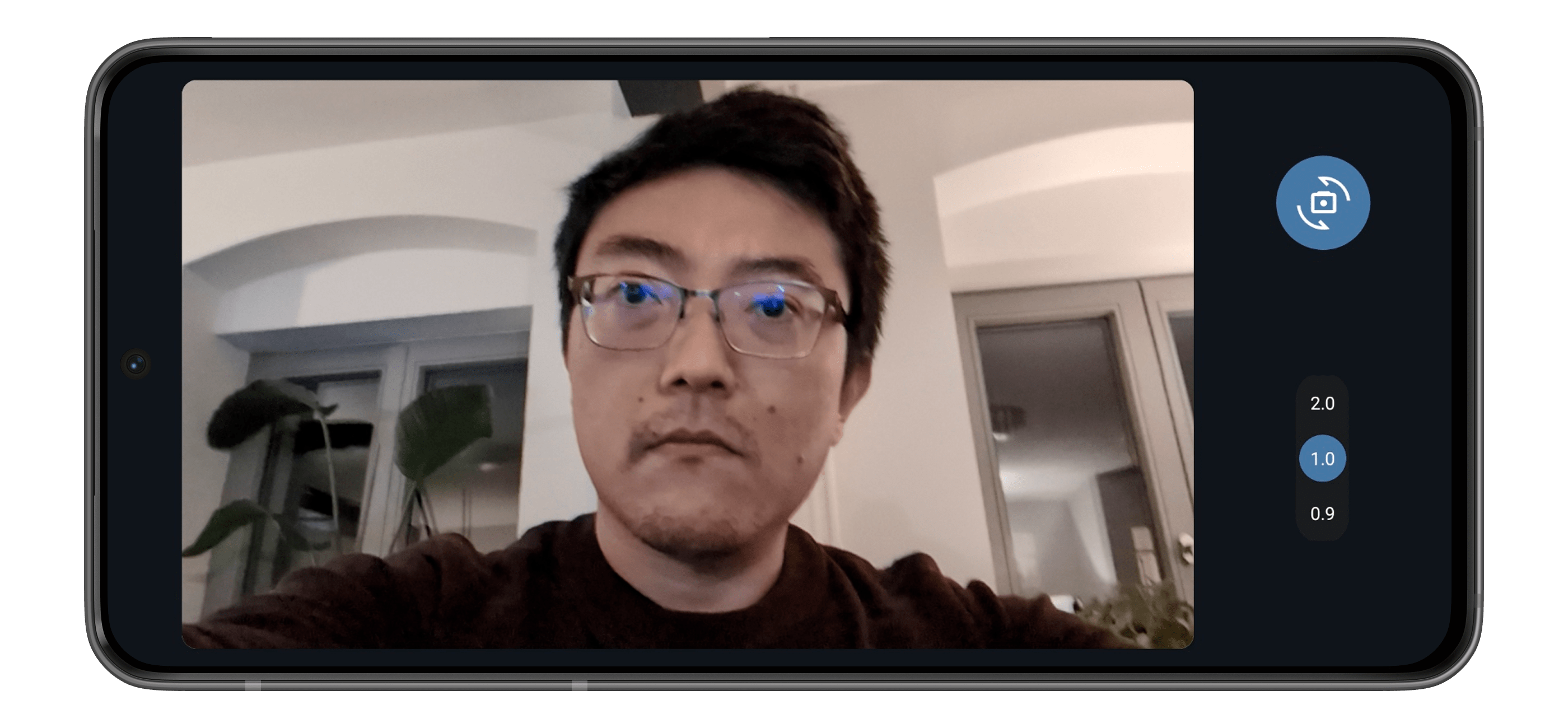
On the other device, it may be necessary to select Android Webcam as the camera, especially when the device has an integrated one. On the phone, you can select the zoom level according to the device hardware, and switch between the front and back cameras.
As an added bonus, since the phone is plugged into the device, it will be charging its battery.
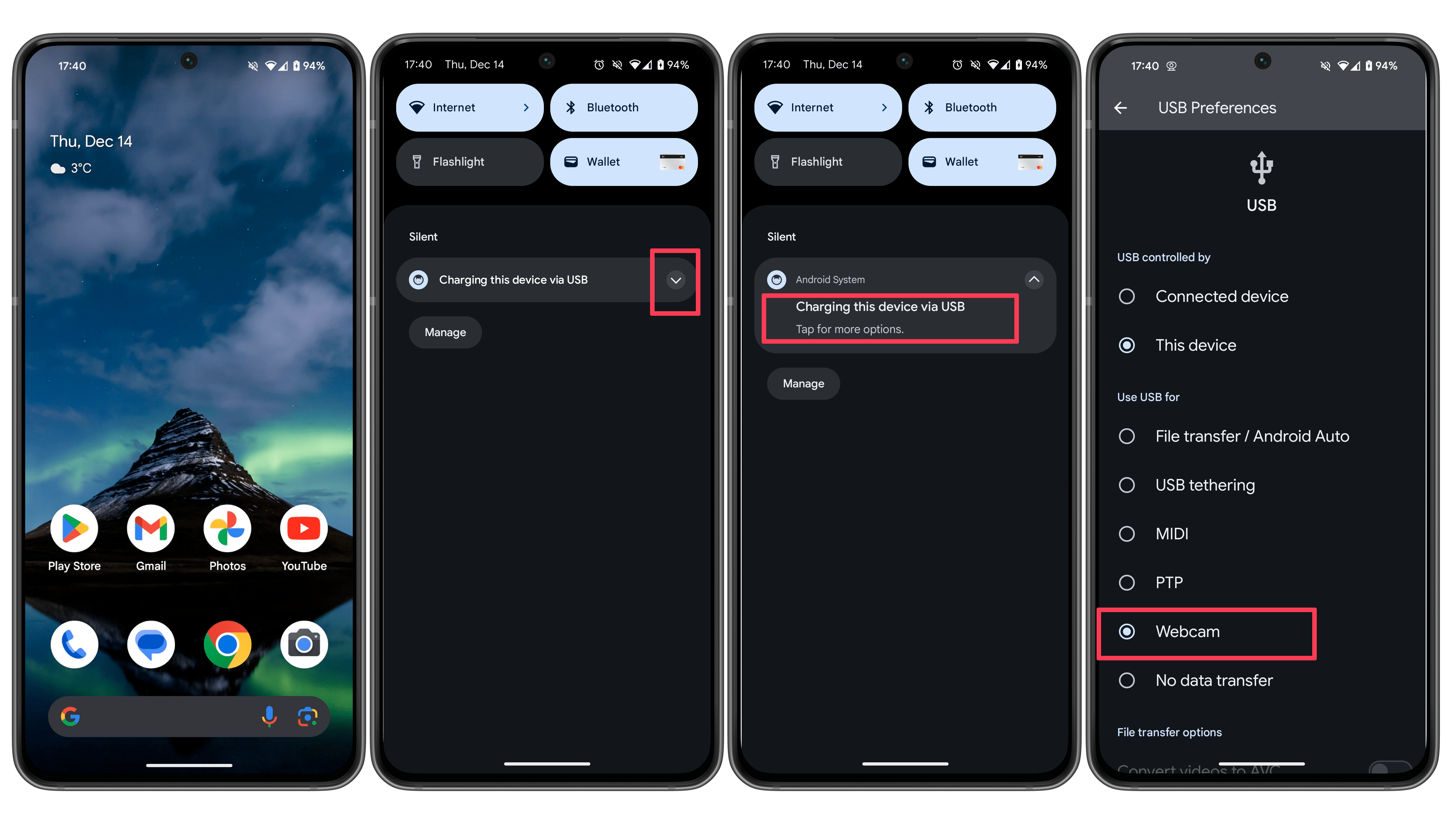
To turn off the feature, simply repeat the steps above and select any other option on the third step, such as File transfer. If you have closed the notification by accident—which can happen and is possibly a bug, simply unplug the cable.
Using an Android phone as a webcam isn’t really a new feature, but by integrating the feature into the operating system, Google made it way easier than previous solutions. As with previous Feature drop updates, there is no indication whether the webcam option will come to other phones. In the meantime, feel free to share your tips in the comments below.
We mark partner links with this symbol. If you click on one of these links or buttons–or make a purchase through them–we may receive a small commission from the retailer. This doesn’t affect the price you pay, but it helps us keep nextpit free for everyone. Thanks for your support!
Seit 2008 schreibe ich für verschiedene Websites in Brasilien, Spanien, Dänemark und Deutschland über Technologie und habe mich auf mobile Ökosysteme spezialisiert. Dabei dreht sich bei mir alles um die interessantesten Modelle, ihre Komponenten und natürlich die ganze Welt der Apps. Dabei lege ich nicht nur Wert auf Leistung und Spezifikationen, sondern auch auf Aspekte wie Reparaturfähigkeit, Haltbarkeit und Herstellersupport.








0 comments