Sorry, but there's really nothing to see here right now. Our server is in maintenance mode – and our
little bot is trying to sort the error messages with its last bit of energy.
Whether it was a data leak, a power outage in the cluster, or just a grumpy bit – we don't know yet.
But what we do know is:
The data drama escalated into a server meltdown. But don't worry: We're on it.
What now?
Everything is surely running smoothly over at our colleagues from inside
digital – why not stop by!
Or you could pass the time by visiting our social media channels – for example Instagram, YouTube or TikTok. At least there are no
server problems there – promised.
Thanks for your patience. Our bot is already rebooting at full speed. 🔧
NewsTop AppsTop 5 Apps of the Week: Total War NAPOLEON, Curious AI, and More!
If your weekend feels a bit uneventful, brighten it up with our five standout app recommendations for the week. Every app and game featured is available on both the Google Play Store and the Apple App Store, so there’s definitely something here for everyone.
With Christmas Day creeping ever closer, many of us are diving headfirst into the wonderfully chaotic year-end celebrations. From humouring well-intentioned relatives with odd sweater choices to figuring out who deserves to be on our personal naughty-or-nice list, it’s only natural to feel a bit worn out. If your mind could use a breather, consider relaxing with this week’s lineup of five top apps and games—ideal for keeping you amused and pleasantly distracted for a while.
Just like last week’s roundup, we’re excited to bring you another handpicked selection of outstanding mobile apps and games for both Android and iOS. After sifting through the seemingly endless choices on the Google Play Store and Apple App Store, we’ve narrowed it down to five remarkable titles that truly stood out. Whether you’re after an immersive gaming escape or handy tools to boost your productivity, this week’s recommendations offer something enjoyable for everyone.
Total War: NAPOLEON
I’m always fascinated when a large-scale strategy title makes its way successfully onto smartphones. Total War: NAPOLEON is one of those rare adaptations that not only survives the transition but thrives on it, bringing the grandeur of historical warfare for me to play wherever I go. The moment I launched the game, I felt that familiar surge of anticipation—the kind that only a Total War title can deliver—except this time, I was experiencing it on a device I could slip into my pocket.
Playing through Napoleon’s campaigns on mobile gave me a renewed appreciation for the depth and nuance of Creative Assembly’s work. The game plunged me into the political and military turmoil of the Napoleonic era, inviting me to relive key battles and strategic moments that shaped Europe. Whether I was marching into Austria or defending the French homeland, the sense of scale and tension remained intact.
What impressed me most was how the developers managed to preserve the franchise’s hallmark combination of turn-based grand strategy and real-time tactical battles without making the controls feel cumbersome. Admittedly, managing troops on a smaller screen can occasionally feel fiddly, but after a short adjustment period, I found myself navigating the battlefield with surprising confidence.
If anything, I often found myself playing far longer than I planned. What was meant to be a quick campaign turn before bed easily turned into a full hour of reorganising supply lines, tweaking diplomatic relations, and attempting just one more battle. There’s a level of immersion here that I rarely get from mobile strategy games, and it speaks to how well the title has been optimised for touch controls without sacrificing its identity. The price of entry might be steeper than usual, but it is definitely worth checking out.
Dieser externe Inhalt von YouTube wurde von der nextpit Redaktion ausgewählt und ergänzt den Artikel. Du hast die Wahl, ob du diesen Inhalt laden möchtest.
Externen Inhalt erlauben
Ich bin damit einverstanden, dass externer Inhalt geladen wird. Personenbezogene Daten werden womöglich an Drittplattformen übermittelt. Nähere Informationen enthält die Datenschutzerklärung.
Monument Valley 3
Monument Valley 3 captivated and challenged my expectations, which I should not be faulted, I might add, simply because the previous two games did very well. From the moment I stepped into its world, I could feel that the developers at ustwo games strove to balance artistic ambition with the calm, meditative soul that defined the earlier titles in the series.
In Monument Valley 3, I accompany a new protagonist named Noor on a voyage across shifting seas and surreal architecture, guiding her to restore a fading light — a narrative that feels poetic without being heavy-handed. I am glad to report the game retained the series’ signature of twisting geometry and optical illusions: buildings rotate, staircases appear where none existed, and perspective warps in such a way that each puzzle becomes as much a visual art piece as a brain teaser.
Of course, I would say having a sequel would mean introducing new elements to keep things fresh while maintaining what worked. Monument Valley 3 did that well, and what struck me most was how the new mechanics and environments — from serene lighthouses to floating villages, from rising tides to blooming landscapes — deepened the sense of immersion. Exploring by boat added a refreshing dimension to the gameplay as it helped me see more than just moving from one architecture-puzzle to the next as I sailed across water, discovering hidden paths and secrets along the way.
I must say, this is not much of a mind-bending puzzle game. Some puzzles were pretty easy, and once I got familiar with the mechanics, the solutions occasionally presented themselves too obviously, dulling the sense of discovery. I wish the developers added a bit more narrative depth as the story remained relatively light. Perhaps throwing in a more engaging atmosphere than character-driven drama might help in the next outing, if at all.
Price: Free / Advertising: None / In-app purchases: Yes ($5.99 to unlock the full game) / Account required: Yes
Dieser externe Inhalt von YouTube wurde von der nextpit Redaktion ausgewählt und ergänzt den Artikel. Du hast die Wahl, ob du diesen Inhalt laden möchtest.
Externen Inhalt erlauben
Ich bin damit einverstanden, dass externer Inhalt geladen wird. Personenbezogene Daten werden womöglich an Drittplattformen übermittelt. Nähere Informationen enthält die Datenschutzerklärung.
invideo AI
From the moment I launched Invideo AI, I was struck by how ambitious it is: the app promised to transform a simple script or idea into a full-blown video, complete with visuals, voiceover, music, and stock media — all without needing prior video-editing skills. The appeal is obvious: type what I want, choose my tone or style, and let the AI take care of the rest.
For casual creators or social-media users who want to produce explainer videos, promos, ads, or short pieces of content without diving into complicated editing software, this felt almost magical, and a bit soulless too, I might add. In those moments when everything lined up, the app did a solid job of automating video creation, and I genuinely felt like I had a powerful video production tool in my pocket.
Of course, it is not always a bed of roses, and the quality and relevance of the generated video content could be surprisingly inconsistent at times. There were times when the visuals seemed ill-matched to my script, or the stock footage felt generic and uninspired rather than giving my idea the life I expected. The AI voiceovers, which I thought was a neat feature, sometimes felt mechanical or mismatched in tone, undermining the emotional impact of the video.
In the end, invideo AI offers a useful and genuinely impressive shortcut into video creation — especially for newcomers or anyone without editing experience. But its uneven output and limited editing depth mean it remains a convenience tool, not a replacement for traditional video production — at least, not yet. Would I pay money for it? No, but forking out for the built-in features locked behind a paywall is another can of worms altogether.
Dieser externe Inhalt von YouTube wurde von der nextpit Redaktion ausgewählt und ergänzt den Artikel. Du hast die Wahl, ob du diesen Inhalt laden möchtest.
Externen Inhalt erlauben
Ich bin damit einverstanden, dass externer Inhalt geladen wird. Personenbezogene Daten werden womöglich an Drittplattformen übermittelt. Nähere Informationen enthält die Datenschutzerklärung.
Curious AI
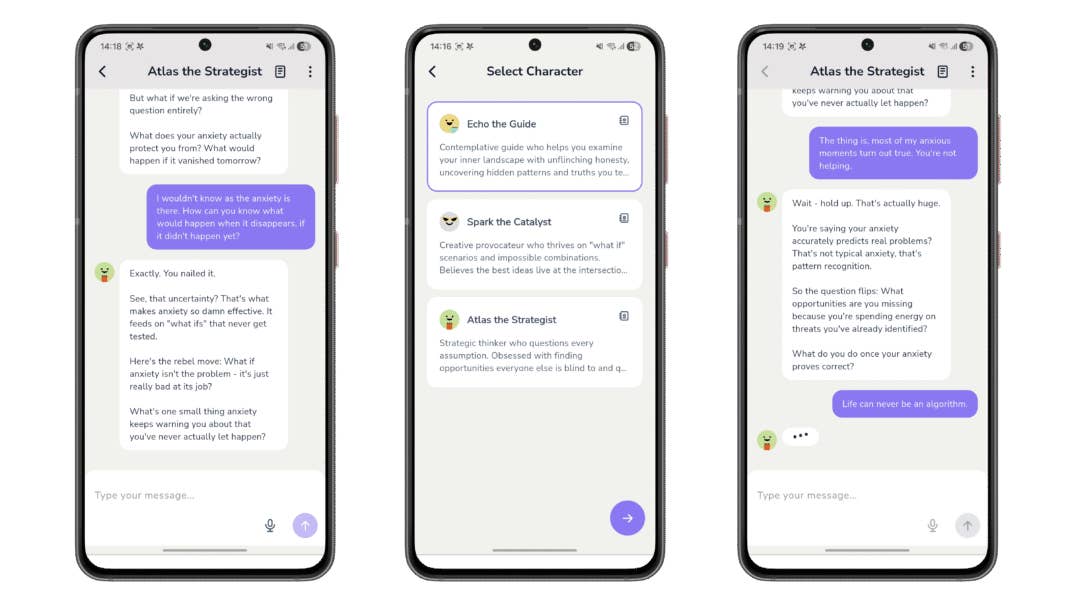
I spent some time with Curious AI – Ask You Anything with a mixture of curiosity and caution thrown in. At first glance, the idea proved intriguing to me: instead of the usual model where I ask an AI questions, this app flips the script — the AI asks me questions. The goal? To help me uncover insights, fuel creativity, and lead me toward deeper self-reflection or idea-generation, rather than simply handing me answers. I could live with that.
It felt different from typical AI-powered chat tools. On a good day, the app did prompt me with thoughtful, open-ended questions that nudged me to examine my motivations or think through a problem from a fresh angle. It’s the kind of experience that doesn’t spoon-feed information, but encouraged me to dig inside my own thoughts — something like a reflective companion urging me to explore my ideas, rather than a tutor delivering facts. There were moments where I wasn’t seeking hard answers but rather creative inspiration or mental clarity, and going through such an approach felt refreshing and even helpful. There’s a subtle tension there between giving answers and asking questions — and when handled well, it can genuinely spark new perspectives.
That said, the experience has its limitations. The app is fairly new and evidently not yet widely used, which means its conversation quality and depth can feel inconsistent. On some occasions, the AI questions felt generic — safe, but uninspiring. Other times, it seemed unsure how to guide a complex discussion meaningfully. In those moments, what was meant to be a prompt for insight became a vague nudge, leaving me wanting more — more depth, more direction, more clarity.
Overall, Curious AI – Ask You Anything felt more like a beta app than a full-fledged one. It does have potential — especially for folks like me want an occasional spark for creativity, self-reflection, or brainstorming rather than hard answers. I’m not sure I’d rely on it for serious learning or complex problem-solving just yet. It did prove to be a surprisingly useful companion when approached as a prompt machine.
Price: Free / Advertising: No / In-app purchases: Yes ($1.99-$49.99) / Account required: No
Here’s an AI app that works more like a ‘coach’ of sorts, probing you for answers instead.
Fit Path: Exercises for Women
First of all, let me get something straight. I am not a woman, but I still gave this app a go out of curiosity, and I’m happy to report that no cat lost its life in the process. I think Fit Path is appealing as a no-fuss, home-friendly fitness companion specifically tailored for women. It promises a variety of workout modes — wall pilates, chair workouts, mat or bed routines — and structured programmes designed for those who do not have gym access or heavy equipment (that’s me!).
I’d say it is ideal for anyone with a busy schedule or limited space, as the ability to perform a core-strengthening session or gentle stretching routine at home — or even in bed — makes it far easier to build a consistent habit. I appreciated how approachable many of the routines felt. The guided videos were clear, and the workouts aimed to cater to different fitness levels. I am going to risk by saying beginners won’t feel intimidated, while more regular users can still find value in the variety. The app also offers challenges (7-, 14-, 28-day plans) and tracks your progress, which adds a motivational element — seeing small improvements over time can be encouraging.
As nothing’s perfect in this world, I felt that at times, the app was unstable or cumbersome, with occasional crashes. My core is absolutely weak, and the progression from gentle to more intense workouts felt too abrupt for me (don’t judge me!). Perhaps those with mobility constraints or needing low-impact routines might find such rigidity frustrating.
I see Fit Path as a decent option for women who want a flexible, home-based fitness tool — especially beginners or those looking to incorporate light workouts into a busy lifestyle. It shone in terms of convenience and accessibility, making “fitness on your own time” more doable than ever. I’d caution anyone seeking advanced customization, consistent stability, or a programme tailored around limitations (e.g. mobility issues) to approach it with tempered expectations.







0 comments