It is that time of the week again, when we scour the two most popular app stores in the market today and check out what kind of games and apps are worth installing on your smartphone. You will find a far younger (and greener) Lara Croft in her own mobile outing, alongside other games and productivity apps that surely deserve a place on your device.
If you haven’t checked out last week’s recommendations, why not give it a go? Apart from that, let’s dive right into all five recommendations. These apps are available in both the Apple App Store and the Google Play Store.
Tomb Raider
Wow, a console game on a smartphone? How far has technology advanced? This is the full, uncompromised experience—it does not offer weird mobile-only shortcuts or missing levels—and it really sets a high bar for what a “triple-A” port should look like in the palm of my hand. I am stoked, as I still have the game on my gaming laptop.
The user interface was surprisingly well-crafted, as touchscreen games tend to feature cluttered controls. However, it is highly customizable and feels very responsive. I would still recommend using a physical controller, but you won’t find it awkward to play with virtual controls, as the buttons fade out when you don’t need them. This allowed me to actually enjoy the cinematic views of the island without a giant joystick blocking the view.
The performance was simply incredible, with the lighting and character models looking nearly as good as I remember them on a big screen. The story proved to be as gripping as ever, and the sense of progression as Lara goes from a scared survivor to a hardened explorer is simply peak gaming. Of course, do expect to charge your phone frequently since this game will drain your battery faster than a Bitcoin bear cycle. Also, do bear in mind to have enough storage space on your phone, since it does take up quite a fair amount of it.
- Price: $19.99 / Advertising: None / In-App purchases: None / Account required: No
- Download Tomb Raider for Android | Download Tomb Raider for iOS
Don’t be taken aback by its price. It’s a polished, gritty, and deeply atmospheric journey that proves mobile gaming can handle “the big stuff” when it’s done right. If you’ve never played this version of Lara’s story, or even if you’re just looking for a nostalgia trip with better graphics, I highly recommend this game.
Tavern Tale
I’m always curious about games that balance high-stakes adventure with a bit of management. It seems Tavern Tale hit the sweet spot. The premise is actually pretty cool—the whole world has been stuffed into a mysterious cube by a witch, and my tiny tavern is the only safe haven left. It’s been my go-to “chill out” game lately, where I am able to explore a few dangerous paths in the cube and then head back to the warmth of the hearth to regroup.
The user interface is exactly what I’d expect from a modern “cozy” RPG—it’s colorful, slightly chunky in a cute 3D way, and really easy to navigate. I loved how the tavern served as my main hub, making it feel less like a menu and more like a home base where I actually want to hang out.
On the battlefield, the controls were super responsive, which was a relief because even though it’s a “cozy” game, the roguelike combat can get surprisingly fast-paced. It’s one of those rare mobile interfaces that didn’t feel like it’s cluttering up my screen with a million tiny graphics, making the entire experience feel much more immersive.
I know I am hooked when this game consistently delivers that “just one more turn” feeling each time I fire it up. It managed to take the normally stressful roguelike genre and wrap it in a warm, dark-fantasy blanket that made me want to keep returning.
- Price: Free / Advertising: Yes / In-App Purchases: Yes ($0.99-$89.99) / Account Required: Yes
- Download Tavern Tale for Android | Download Tavern Tale for iOS
Might & Magic Fates TCG
I have to say, as a longtime fan of the Might & Magic universe, I was both excited and a little skeptical when I heard Ubisoft was dropping a new card game. Playing it, I found it to be a surprisingly deep experience for a mobile title. In fact, it is perfect to jump into a quick match whether I’m commuting or just lounging on the couch. It felt like a genuine attempt to bring that classic high-fantasy lore into a modern, competitive card-battling format.
The user interface was one of the high points for me; it’s slick, polished, and looks every bit like a premium 2026 title. Everything from the deck-building screen to the actual battlefield felt very “high-fantasy,” with glowing runic borders and smooth animations that didn’t overheat my phone. I really liked how intuitive the card interactions are—just drag and drop, and the visual feedback proved to be instant and satisfying.
- Price: Free / Advertising: None / In-App Purchases: Yes ($0.99 – $199.99) / Account required: Yes
- Download Might & Magic Fates TCG for Android | Download Might & Magic Fates TCG for iOS
This title definitely scratched my itch for a strategic, lore-heavy card game on the go. It’s not just a low-effort spin-off; it feels like a well-thought-out addition to the franchise that respects the source material while being accessible to new players. Anyone who is into games like Hearthstone or Magic: The Gathering and wants something with a bit more of that classic RPG flavor will find this a suitable candidate.
Pixel Bookmarks
I have to admit, I’m a bit of a digital hoarder when it comes to interesting articles and random videos, so finding a way to keep them all organized has always been a struggle. I recently started using Pixel Bookmarks on my phone, and it’s honestly been a breath of fresh air compared to the messy, built-in bookmark folders most browsers give you.
It’s marketed as a modern link manager, and so far, it has lived up to the hype by being the central “waiting room” for everything I want to read or watch later. The first thing that grabbed me was the user interface; it uses that clean Material You design language, which made everything feel super smooth and native to the device.
I get an overview of visual thumbnails and subtitles so I can actually remember why I saved a link in the first place. Navigating through the app is a breeze because it’s snappy and doesn’t feel bloated with unnecessary menus. I really appreciated how I could switch between a visual card view and a more compact list, depending on how much of a “deep dive” I decided to do.
- Price: Free / Advertising: None / In-App Purchases: Yes ($1.99 – $9.99) / Account required: No
- Download Pixel Bookmarks for Android | Download Pixel Bookmarks for iOS
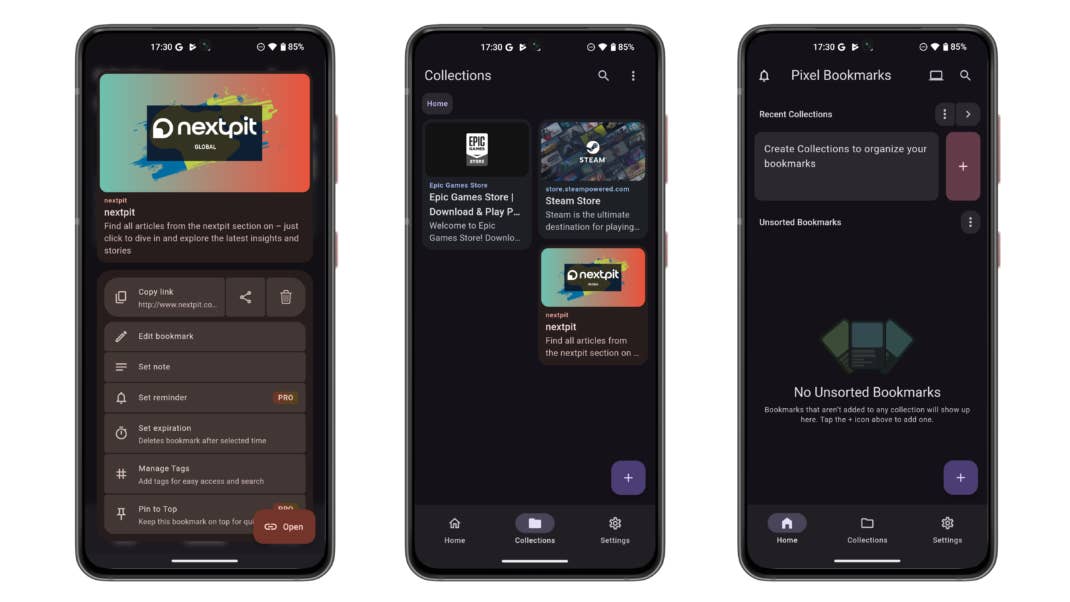
Ultimately, Pixel Bookmarks has turned into one of those apps I didn’t realize I needed until I actually started using it. It’s the perfect middle ground for anyone who finds tools like Notion too complex but thinks standard browser bookmarks are too primitive.
BNESIM
I’ve spent a lot of time hunting for the perfect travel companion to keep me connected without those expensive roaming charges whenever I go abroad, and I finally decided to give BNESIM a spin. Since it’s available on both the Play Store and the App Store, it was super easy to get started. I’m honestly impressed by how much they’ve managed to pack into one app—it’s not just about data; it’s like having a global telecom hub right in my pocket. Whether I’m hopping across borders or just need a backup line at home, it feels like they’ve thought of everything a modern nomad might need.
The user interface proved to be surprisingly slick and modern, which I didn’t expect from a telecom app. Navigating through the different sections to buy data or set up a virtual number is pretty intuitive, and I didn’t feel like I was drowning in menus. It has this clean, “all-in-one” vibe where checking my remaining balance or topping up my eSIM only takes a couple of taps. The account setup was a painless affair, which is a good thing.
In terms of the good stuff, the flexibility is the biggest win. I love that the data plans don’t expire—seriously, that’s a game-changer for someone like me who doesn’t travel every single month. Plus, having access to virtual numbers from over 100 countries is a nice touch for staying professional while on the move. On the flip side, the sheer number of options can be a bit overwhelming at first if you just want a quick data plan. I felt the “AI” features to be more like ‘tacked on’ than essential tools, but they’re still fun to play with.
- Price: Free / Advertising: None / In-App purchases: None / Account required: Yes
- Download BNESIM for Android | Download BNESIM for iOS
Overall, BNESIM has definitely earned a spot on my “must-have” travel list. It takes the stress out of finding a local SIM card every time I land in a new country, and the fact that it works so seamlessly across both iPhone and Android devices is a major bonus.