Sorry, but there's really nothing to see here right now. Our server is in maintenance mode – and our
little bot is trying to sort the error messages with its last bit of energy.
Whether it was a data leak, a power outage in the cluster, or just a grumpy bit – we don't know yet.
But what we do know is:
The data drama escalated into a server meltdown. But don't worry: We're on it.
What now?
Everything is surely running smoothly over at our colleagues from inside
digital – why not stop by!
Or you could pass the time by visiting our social media channels – for example Instagram, YouTube or TikTok. At least there are no
server problems there – promised.
Thanks for your patience. Our bot is already rebooting at full speed. 🔧
NewsElectric VehiclesChiming AirPods Pro 2? You’re Not Alone – Here’s What’s Going On
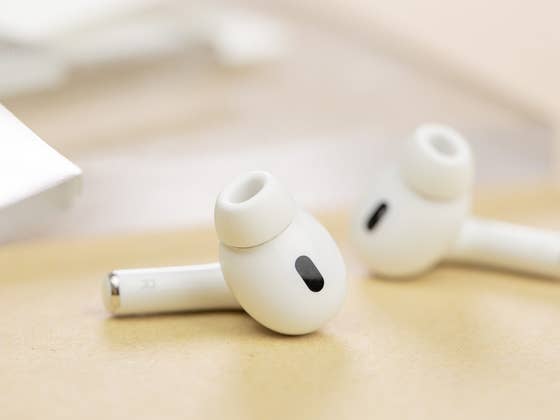
Apple didn’t refresh the AirPods Pro 2 last year, but it did introduce new health-focused features, including a hearing aid function and a hearing test. Alongside these updates, a subtle change through a periodic chime was also added to earbuds. Since Apple didn’t highlight this feature, many users were initially puzzled by the unexpected sound—but not anymore.
Also read: Which Apple AirPods should you buy in 2025? Read our comparison.
On platforms like Reddit and Mastodon (via MacRumors), users have been discussing the periodic chime they hear from their AirPods Pro 2 (review). Reports about the sound date back to last year, when the feature was introduced, but it has only recently gained wider attention as more users encounter it.
Some users noted that the AirPods Pro 2 produced the sound after being placed back into the charging case. Others believed the chime was related to starting the case’s charging process. What stood out to many was that this sound differed from the usual low-battery or charging tones. Adding to the confusion, the chime often plays after a noticeable delay, making it harder to identify its source.
Apple has clarified the purpose of the periodic chime through its support page for the new hearing health features of the AirPods. According to the guide, the chime serves as a diagnostic check for the earbuds’ microphones and speakers, particularly when the hearing test feature is in use.
“To help ensure that your AirPods’ microphones and speakers are operating at their best (for example, to help provide high-quality hearing test results), your AirPods may periodically play a quiet chime when they’re in their charging case.”
This diagnostic process ensures the AirPods are functioning optimally, especially for health-related tasks like the hearing test.
While it was not confirmed on the support page if this affects all AirPods Pro models, the new hearing health features are only available to the AirPods Pro 2. Some users also stated the chime does not happen in their first-gen AirPods Pro.
Can You Disable the Periodic Chime on the AirPods Pro 2?
For users who find the chime inconvenient, disabling it isn’t straightforward. Currently, there’s no direct option to turn off the periodic sound, even if the hearing health features are deactivated. This is likely because the chime is tied to other system-level checks for the earbuds.
However, there is a workaround to minimize the number of sounds your AirPods Pro 2 emit. You can disable charging case sounds via the AirPods settings on your iPhone. While this won’t completely silence the chime, it can reduce other auditory notifications.
Have you noticed the periodic chime on your AirPods Pro 2 or other AirPods model? Were you able to find any solutions to stop it? Share your experiences in the comments!
We mark partner links with this symbol. If you click on one of these links or buttons–or make a purchase through them–we may receive a small commission from the retailer. This doesn’t affect the price you pay, but it helps us keep nextpit free for everyone. Thanks for your support!






0 comments