Sorry, but there's really nothing to see here right now. Our server is in maintenance mode – and our
little bot is trying to sort the error messages with its last bit of energy.
Whether it was a data leak, a power outage in the cluster, or just a grumpy bit – we don't know yet.
But what we do know is:
The data drama escalated into a server meltdown. But don't worry: We're on it.
What now?
Everything is surely running smoothly over at our colleagues from inside
digital – why not stop by!
Or you could pass the time by visiting our social media channels – for example Instagram, YouTube or TikTok. At least there are no
server problems there – promised.
Thanks for your patience. Our bot is already rebooting at full speed. 🔧
How-tosWhatsApp 101: How to Delete Your Account for Good
Creating a WhatsApp account has always been an easy process, and so does deactivating or deleting your account. We show you how to delete your WhatsApp account and reactivate it if you decide to change your mind later.
Whether you decide to quit the messaging app entirely or if your phone with the associated WhatsApp number has been stolen, deleting your WhatsApp is pretty straightforward. You’ll just need to remember some important guidelines, which we share below.
What happens to messages when you delete your WhatsApp account
Keep in mind that deleting your WhatsApp account is irreversible. More importantly, you should note that it permanently erases your entire data such as messages, backups, and even photos or videos not saved.
Here’s what will be affected when you delete your WhatsApp account:
WhatsApp account will be deleted in all linked devices.
Message history and your channels created will be deleted.
You will be removed from all your WhatsApp groups.
You will be removed as admin or follower in channels.
You will be removed from the contact list of your contacts.
Google storage backup will be deleted.
You can always create transfer your chat history if you are moving to a new phone. This gives you an opportunity to copy most of the data on the new device in case you decide to register on it with the same number.
However, Meta warns that some log files or usage history may remain stored, but without the user’s personal identification. Information shared with other company services is also excluded from the procedure.
How to delete a WhatsApp account
If you decide to move forward in deleting your WhatsApp account, the first thing you need to do is deactivate your account. This will temporarily disable your account and will be fully deleted 30 days after that you don’t activate your account.
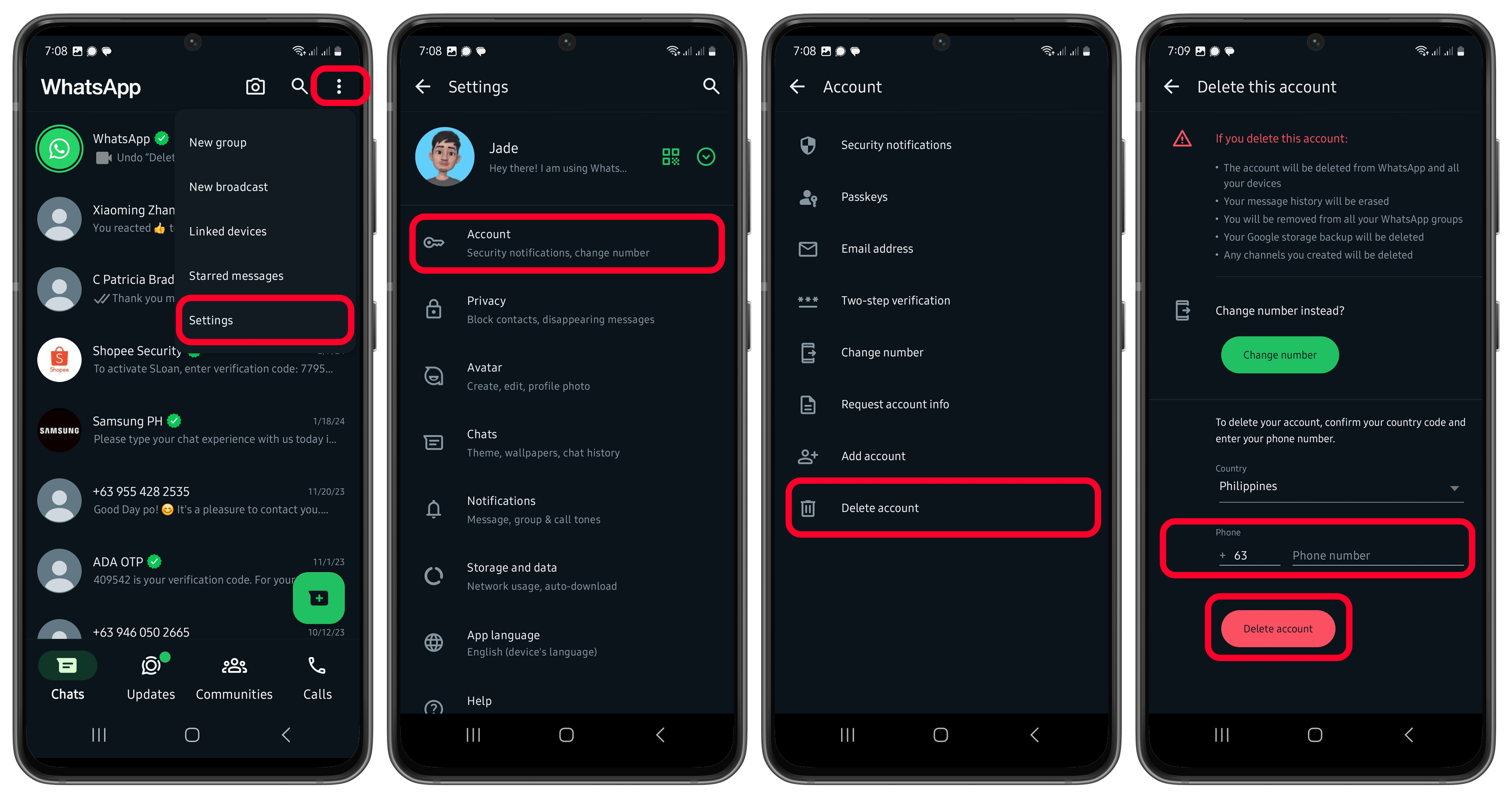
Follow the steps on how to deactivate and delete your WhatsApp account:
Open WhatsApp on your main device.
In the Chat tab, touch the three dots and choose Settings.
Tap Account.
Select Delete account.
Select the country code and enter your WhatsApp phone number.
How to deactivate WhatsApp account if your phone is lost or stolen
If your phone has been stolen or lost, you have the options to block your number with your carrier or send a request to WhatsApp to deactivate your account. Perhaps the most viable option is by going to your carrier like and blocking the SIM card or number.
Block your WhatsApp number
To block your WhatsApp number, you can contact your carrier provider. Once your number is blocked, you can request a new SIM card or eSIM profile with the same number. This prevents others from accessing your WhatsApp account and data on the lost device.
You can use the new SIM to log in your WhatsApp account and verify on a new device. Subsequently, your WhatsApp account in the previous device will be log out.
Deactivate your WhatsApp account via email
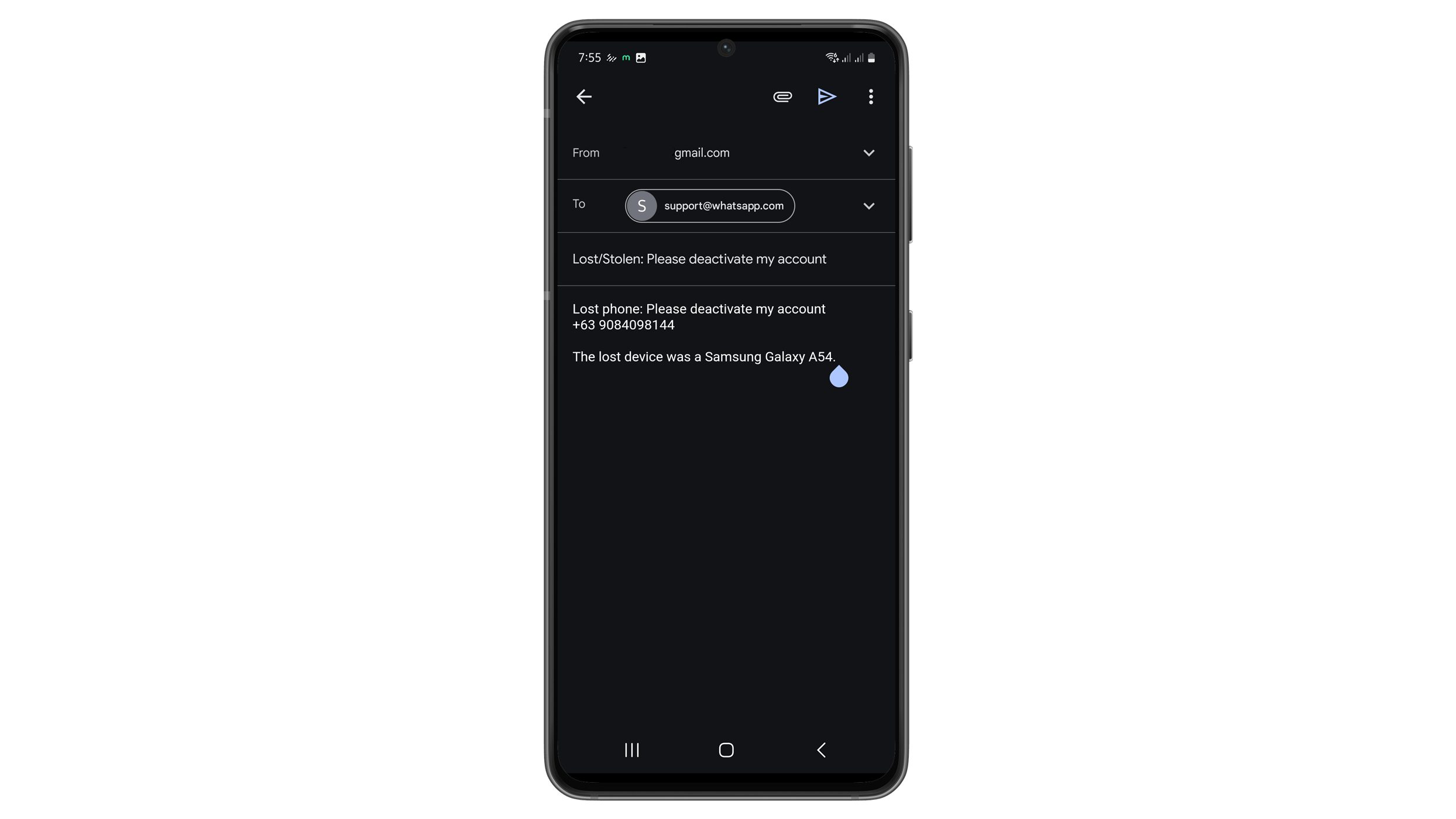
Alternatively, you can disable your account by sending an email to WhatsApp. To disable your WhatsApp account, follow the steps below:
Send email to the WhatsApp support team at support@whatsapp.com.
Use the subject line: “Lost/Stolen: Please deactivate my account”.
In the body of the email, include your full phone number in international format.
Provide any additional information that may help them verify your identity as the account owner.
Keep in mind your account will be deactivated soon after you send the email. You can later reactivate your account via SMS or a phone call, as you would normally, once you have a new phone. If you do not reactivate your account within 30 days, it will be permanently deleted.
Once you’ve written the email out correctly, send it off and wait for your account to be deactivated. It is recommended that you don’t send multiple emails with the same request. Where necessary, the app support team will get in touch with you.
How to reactivate your WhatsApp account
If you decide to reactivate your WhatsApp account for whatever reason and still falls within the 30-day period, you can gain back access to your account by re-registering your number.
The steps are listed below:
Open WhatsApp on the phone.
Agree and continue on the terms.
Enter your phone number and proceed.
Verify it through the 6-digit code you will receive via SMS or call.
But remember, if you’re coming from an account deactivation, you won’t be able to restore your backup during this process. So, it’s always recommended to transfer your chats to another device.
Have you ever needed to delete or deactivate your WhatsApp account? Tell us about your experience in the comments section!
Article updated in June 2024 with reviewed instructions. Previous comments have been retained and may refer to changed instructions and rules.
Seit 2008 schreibe ich für verschiedene Websites in Brasilien, Spanien, Dänemark und Deutschland über Technologie und habe mich auf mobile Ökosysteme spezialisiert. Dabei dreht sich bei mir alles um die interessantesten Modelle, ihre Komponenten und natürlich die ganze Welt der Apps. Dabei lege ich nicht nur Wert auf Leistung und Spezifikationen, sondern auch auf Aspekte wie Reparaturfähigkeit, Haltbarkeit und Herstellersupport.
to diable whatsapp go to phone settings thn apps thn downloaded apps thn watsapp thn clear data…simple
Log in to Reply
This guide is intended for people with lost/stolen/broken phones.
Log in to Reply
Good info!
Log in to Reply
is it really works?…if it disabled then whether my frnds can see/message to my number in watsapp?
Log in to Reply
I lost ma phone 2month back then i blocked sim.now i took duplicate sim card and tried to start whatsapp..but i couldnt get old group and other messages..any1 knw y it is?
Log in to Reply
Please how do I blocked my WhatsApp, someone hacked my account
Log in to Reply
Can I get back my whatsapp account after delete.
Log in to Reply
how much times does it take for my account to get deactivated after i’ve sent the mail
Log in to Reply
My account got banned and I am not able to delete my account
Log in to Reply
Hii
Log in to Reply
Hello WhatsApp team my WhatsApp ID verification code not receive any problem please help me
Log in to Reply
I faced a similar issue where I received a verification code. The problem arose because I was logged in and out of the same WhatsApp account on two different WhatsApp apps on the same device simultaneously, causing the issue I’m experiencing.







to diable whatsapp go to phone settings thn apps thn downloaded apps thn watsapp thn clear data…simple
This guide is intended for people with lost/stolen/broken phones.
Good info!
is it really works?…if it disabled then whether my frnds can see/message to my number in watsapp?
I lost ma phone 2month back then i blocked sim.now i took duplicate sim card and tried to start whatsapp..but i couldnt get old group and other messages..any1 knw y it is?
Please how do I blocked my WhatsApp, someone hacked my account
Can I get back my whatsapp account after delete.
how much times does it take for my account to get deactivated after i’ve sent the mail
My account got banned and I am not able to delete my account
Hii
Hello WhatsApp team my WhatsApp ID verification code not receive any problem please help me
I faced a similar issue where I received a verification code. The problem arose because I was logged in and out of the same WhatsApp account on two different WhatsApp apps on the same device simultaneously, causing the issue I’m experiencing.