


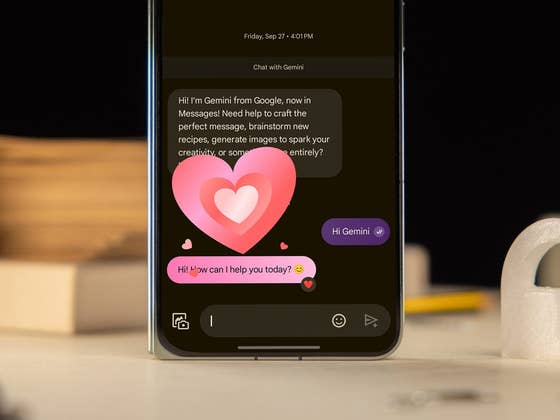
Google Messages App Reactions Upgraded
Reactions to Google Messages have been a notable feature of the app, but it lacks support for gestures to apply a reaction to a message. As discovered by 9to5Google, Google has added a ‘double tap to heart’ gesture to the Android app. This works similarly to the ‘double tap to heart’ feature users have been accustomed to in Facebook Messenger and Instagram.
The feature is being added via the server so some users may get it at a later date. More importantly, it is only available when you enable RCS and the recipient you’re chatting with has also enabled the rich messaging standard.
Once you receive the feature, a visual prompt is shown which is labeled “Double tap to heart” below the recent message and besides the time stamp. However, it should also work with the previous messages. Here’s a brief of how to use the feature.
Enable RCS Chats in the Google Messages App
You’ll first need to enable RCS to use the double tap-to-heart gesture and other RCS functions. Follow the steps below.
- Launch the Messages app on your phone.
- Tap on your profile to open the menu.
- Tap on Message settings and then RCS Chats.
- Toggle on Turn on RCS chats.
- For a single SIM RCS, select which SIM or mobile number to set up.


How to use Double Tap to Heart Gesture in Google Messages
Once you have finished setting up RCS on the Messages app, you can now enjoy the smart features included with RCS such as typing indicators and the new double tap-to-heart gesture. Keep in mind that RCS is also enabled on the contact you’re messaging. Here’s how to use it.
- On an RCS chat, double-tap on a message to add a red heart reaction.
- A playful heart animation will appear along with a red heart marking the message.
- Double tap again on the message to remove the heart reaction.
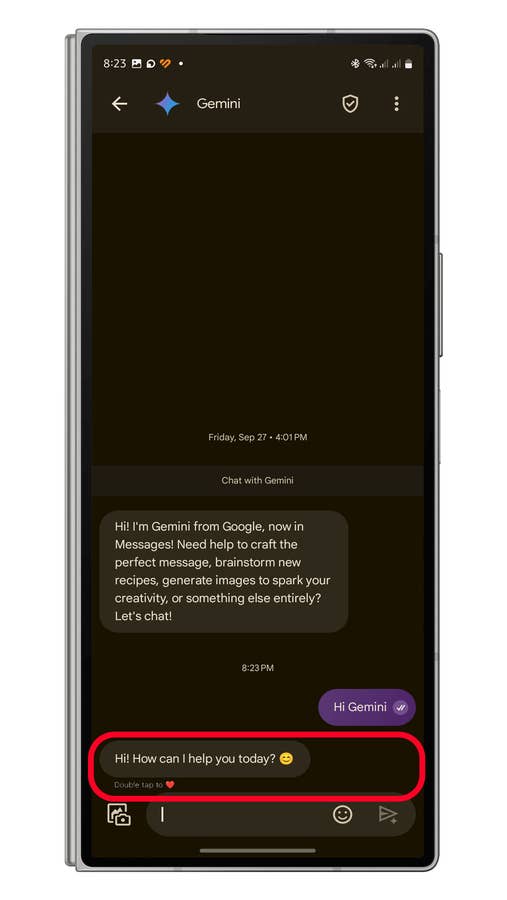

Right now, the feature is limited to the heart reaction and there’s no way to customize which reaction to use. But this is something Google should likely be adding in the future.
Are you using Google Messages? Do you have tips or tricks would like to share? Share with us in the comments.
We mark partner links with this symbol. If you click on one of these links or buttons–or make a purchase through them–we may receive a small commission from the retailer. This doesn’t affect the price you pay, but it helps us keep nextpit free for everyone. Thanks for your support!


0 comments