Sorry, but there's really nothing to see here right now. Our server is in maintenance mode – and our
little bot is trying to sort the error messages with its last bit of energy.
Whether it was a data leak, a power outage in the cluster, or just a grumpy bit – we don't know yet.
But what we do know is:
The data drama escalated into a server meltdown. But don't worry: We're on it.
What now?
Everything is surely running smoothly over at our colleagues from inside
digital – why not stop by!
Or you could pass the time by visiting our social media channels – for example Instagram, YouTube or TikTok. At least there are no
server problems there – promised.
Thanks for your patience. Our bot is already rebooting at full speed. 🔧
NewsVR & ARHands-Free TV: Galaxy Watch May Feature Air Gesture Controls Soon
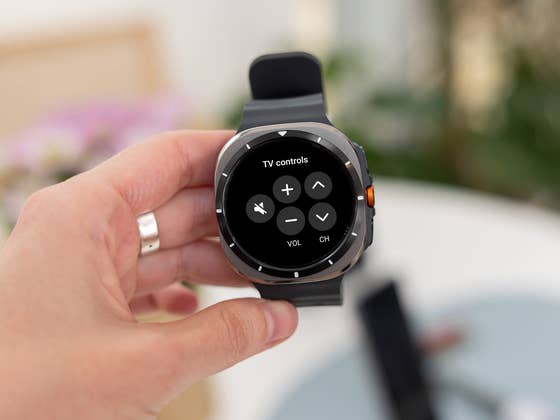
The Galaxy Watch already offers the ability to control a connected smart TV, but Samsung’s implementation is currently limited to basic touch controls and navigation. A recent discovery suggests the Galaxy Watch may soon support air gestures, bringing a more advanced and intuitive control system for users.
Also read: How to use your Galaxy Watch as a camera remote on the phone
At present, the Galaxy Watch pairs with Samsung TVs via the SmartThings app, providing virtual buttons on a touchpad interface. These buttons enable users to change channels, adjust the volume, and navigate using a directional pad. The addition of air gesture support could take this functionality further by utilizing the Galaxy Watch’s universal gesture capabilities for a more seamless experience.
As revealed in the decompiled code of the latest SmartThings app for WearOS (via Android Authority), Samsung is working on a feature known as “pointer mode.” This new mode, based on the findings, can be activated by shaking your hand. However, enabling pointer mode will require users to disable all other hand gestures, including the Universal Gesture feature.
What Can the Galaxy Watch Pointer Mode Do?
Pointer mode offers several gesture-based controls to navigate and interact with a Samsung TV. For example, pinching allows users to select an item or confirm an option while clenching a fist takes them back to the previous menu. A double clench returns the user to the home screen, and twisting the wrist performs a play/pause action.
In addition, wrist movements can be used to control the on-screen cursor, similar to the existing pointer and scroll features on the Galaxy Watch. For models equipped with a rotating bezel, scrolling through menus can also be done using the bezel.
Pinching: Selects an item or confirms an option.
Clenching your fist: Returns to the previous menu.
Double clenching: Returns to the home screen.
Twisting your wrist: Plays or pauses content.
Compared to the touchpad, the new pointer mode would offer a hands-free, intuitive method to control the TV, making it easier to navigate and manage entertainment without reaching for a physical remote.
It’s important to note that pointer mode may not be compatible with every app. However, it is expected to be compatible with most first-party apps on Samsung TVs, including the Samsung browser and popular streaming services like Netflix.
At press time, Samsung has not confirmed when pointer mode will launch or which Galaxy Watch models will support the feature. However, based on the evidence uncovered, it seems likely this new functionality will roll out sometime this year.
Have you tried using the TV remote app on your Galaxy Watch to control your TV? Share your experience in the comments below!
We mark partner links with this symbol. If you click on one of these links or buttons–or make a purchase through them–we may receive a small commission from the retailer. This doesn’t affect the price you pay, but it helps us keep nextpit free for everyone. Thanks for your support!





0 comments