Sorry, but there's really nothing to see here right now. Our server is in maintenance mode – and our
little bot is trying to sort the error messages with its last bit of energy.
Whether it was a data leak, a power outage in the cluster, or just a grumpy bit – we don't know yet.
But what we do know is:
The data drama escalated into a server meltdown. But don't worry: We're on it.
What now?
Everything is surely running smoothly over at our colleagues from inside
digital – why not stop by!
Or you could pass the time by visiting our social media channels – for example Instagram, YouTube or TikTok. At least there are no
server problems there – promised.
Thanks for your patience. Our bot is already rebooting at full speed. 🔧
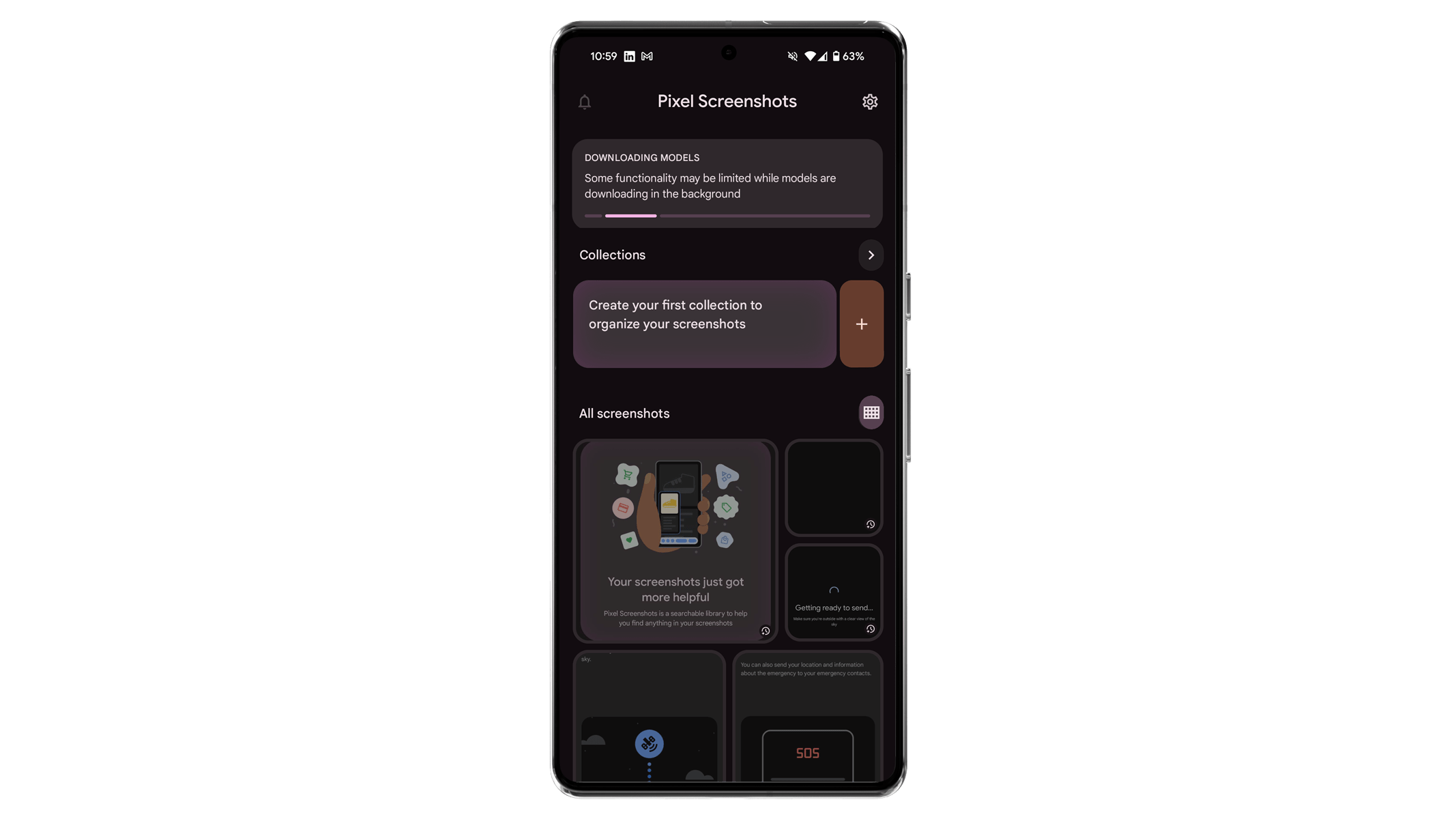
The Pixel Screenshots app was one of the AI-powered additions introduced with the Pixel 9 series. This app allows users to capture screenshots or upload images and save details that can be retrieved later or via Gemini. A recent update brings several changes that enhance the app’s usability.
Don’t miss: Top must-have AI features in your mobile device
Pixel Screenshots Gains Enhanced Gestures and Shortcuts
These improvements arrive with app version 0.24.373.08. One notable update is a redesigned homepage, which now displays a grid view of all screenshots and images in chronological order, with the most recent at the top. Users can adjust the grid size to show 2, 3, or 4 images per row. The Collection section remains unchanged, with its glanceable cards positioned at the top of the screen.
This new layout contrasts with the previous design, which only displayed highlight images on the homepage and required users to tap the “All Screenshots” arrow to view all stored images.
Alongside visual changes, Google has added support for new gestures, similar to those in Google Photos, making screenshot management more intuitive. For example, users can now select multiple images by long-pressing on one screenshot and then swiping to select additional items for sharing, deletion, or moving.
Additionally, a new home screen shortcut—Add Image—joins the existing Take Photo option, enabling these actions without opening the app.
Upcoming Features: Save and Call Phone Numbers
A further feature, not yet live but discovered in the app’s code (via Android Authority), will allow users to copy or save phone numbers and email addresses detected in screenshots directly to their contacts or address book. These details could also be used to initiate calls or send emails.
The latest update is currently rolling out, so some users may see these changes in a few days, while others may wait a few weeks. The Pixel Screenshots app is compatible with the Pixel 9, Pixel 9 Pro (review), and Pixel 9 Pro Fold.
Which Google Pixel Screenshots features would you wish to try? Let us know in the comments.
We mark partner links with this symbol. If you click on one of these links or buttons–or make a purchase through them–we may receive a small commission from the retailer. This doesn’t affect the price you pay, but it helps us keep nextpit free for everyone. Thanks for your support! Prices are based on the date of publication of this article and may be subject to change.
Jade Bryan has been a Junior Technology Editor at nextpit since 2022. His tech journey began much earlier, tracing back to the early days of Android and the peak of the Nokia era. With years of experience contributing to various publications and tech forums, he specializes in providing practical tips and troubleshooting guides for users.
At nextpit, Jade’s expertise extends beyond smartphones and operating systems to include electric vehicles and the latest in gaming. He is particularly interested in how these evolving technologies intersect and shape our daily lives.
Outside of work, Jade is usually immersed in MMORPGs or catching up on his favorite anime and television shows.