Sorry, but there's really nothing to see here right now. Our server is in maintenance mode – and our
little bot is trying to sort the error messages with its last bit of energy.
Whether it was a data leak, a power outage in the cluster, or just a grumpy bit – we don't know yet.
But what we do know is:
The data drama escalated into a server meltdown. But don't worry: We're on it.
What now?
Everything is surely running smoothly over at our colleagues from inside
digital – why not stop by!
Or you could pass the time by visiting our social media channels – for example Instagram, YouTube or TikTok. At least there are no
server problems there – promised.
Thanks for your patience. Our bot is already rebooting at full speed. 🔧
NewsTop AppsTop 5 Apps of the Week: Picto Demo, StarNote, and More!
If your weekend feels a bit dull, why not spruce it up with our selection of standout app recommendations for the week? Every app and game featured is available on both the Google Play Store and the Apple App Store, so there’s definitely something here for everyone.
How are your Christmas preparations coming along? Have you narrowed down your list of who’s naughty and who’s nice? If you feel stressed from all the planning, perhaps it is time to take a break for a while. Breathe a little. Smell the roses, and possibly download one (or two) games we have recommended below to blow some steam.
Following last week’s roundup, we’re back with another curated list of standout mobile apps and games for Android and iOS. After combing through the overwhelming sea of options on both the Google Play Store and the Apple App Store, we’ve distilled it down to five exceptional picks that caught our attention. Whether you’re in the mood for an immersive gaming break or looking for practical tools to enhance your productivity, this week’s lineup has something for everyone.
Red Dead Redemption
It is always a tricky affair when porting over full-blown console games to the mobile platform, and I had my reservations with Red Dead Redemption on mobile. I wasn’t sure how well a sprawling, console-born Western epic would translate to a handheld screen. Within minutes, though, it became clear that the developers weren’t interested in offering a watered-down port. Instead, what I found was a surprisingly faithful recreation of the gritty frontier world that made the original so unforgettable, now reimagined with touch controls and optimised performance that breathed new life into a modern classic.
What impressed me most was how seamlessly the game’s atmosphere carried over. The dusty settlements, sweeping plains, and tense encounters with outlaws all felt remarkably intact, evoking the same sense of scale and loneliness that defined the console version. Riding across the wilderness at sunset or stepping into a saloon filled with suspicious stares hits just as hard on mobile, thanks to an impressive level of graphical polish for a device-friendly version.
The controls, often the primary weakness of mobile action titles when one does not hook it up to a physical controller, exceeded my expectations. While it will never match the precision of a controller, the touch interface felt workable after a short adjustment period. Gunfights retained their weight and rhythm, and missions—ranging from shootouts to quiet moments of exploration—managed to hold their dramatic punch. I found myself slipping back into the role of John Marston with surprising ease, rediscovering the game’s moral weight and emotional depth along the way.
Playing this on my phone felt like revisiting an old favourite through a fresh lens—compact, convenient, yet still powerful in its storytelling and world-building. It reminded me of why this title left such a lasting impact when it first debuted: the characters remained compelling, the world was engrossing, and the narrative still cut deep. For anyone who missed the original or simply wants to experience it again on the go, this mobile version delivers a surprisingly rich and immersive return to the American frontier.
Dieser externe Inhalt von YouTube wurde von der nextpit Redaktion ausgewählt und ergänzt den Artikel. Du hast die Wahl, ob du diesen Inhalt laden möchtest.
Externen Inhalt erlauben
Ich bin damit einverstanden, dass externer Inhalt geladen wird. Personenbezogene Daten werden womöglich an Drittplattformen übermittelt. Nähere Informationen enthält die Datenschutzerklärung.
Hitman: Absolution
Booting up Hitman: Absolutionon mobile felt like stepping back into a slick, moody chapter of Agent 47’s career—one that leans heavily into atmosphere and cinematic flair. I approached the mobile version with a fair bit of curiosity, wondering if the game’s blend of stealth, precision, and stylish brutality could survive the transition to a smaller screen. What I found was a polished, thoughtfully adapted experience that preserves much of what made the original such a standout in the franchise.
The first thing that struck me was how well the visual tone carried over. The game’s world—grimy alleyways, neon-lit clubs, seedy motels, and tightly guarded corporate offices—retains its grim cinematic punch. Even on mobile hardware, Hitman: Absolution’s environments feel dense and alive, packed with small atmospheric touches that pulled me deeper into 47’s morally murky world. It doesn’t shy away from the noir-inspired stylings that defined the title, and seeing those details maintained on a handheld screen gave me a genuine sense of appreciation for the porting effort.
The controls were understandably my biggest concern. Hitman games depend on finesse, whether it was lining up a silent takedown, slipping past guards unnoticed, or timing a disguise switch perfectly. To my relief, the mobile control scheme was surprisingly intuitive after a short learning curve. The developers clearly rethought the interface rather than simply cramming in virtual buttons. Movement felt smooth, interactions were reasonably precise, and the stealth mechanics—always the heart of a Hitman experience—remained satisfying. There were moments where I missed the tactile certainty of a controller, but never enough to break immersion.
I am happy to say that in the end, Hitman: Absolution on mobile didn’t feel like a stripped-down souvenir of the original—it felt like a carefully retooled version that respected its source material. Any long-time fan revisiting Agent 47 or a newcomer curious about what made the series so compelling can dive right into this mobile adaptation without any second thoughts.
Dieser externe Inhalt von YouTube wurde von der nextpit Redaktion ausgewählt und ergänzt den Artikel. Du hast die Wahl, ob du diesen Inhalt laden möchtest.
Externen Inhalt erlauben
Ich bin damit einverstanden, dass externer Inhalt geladen wird. Personenbezogene Daten werden womöglich an Drittplattformen übermittelt. Nähere Informationen enthält die Datenschutzerklärung.
StarNote: Handwriting & PDF
What did I expect from this app? Well, I think I was struck by the promise of a true digital notebook experience tailored for handwritten notes and document annotation on a mobile device. The app sets itself apart by focusing on low-latency handwriting that feels remarkably close to pen on paper, especially with a stylus in hand, and an infinite canvas that lets me think and write without page boundaries — a feature that immediately appealed to my workflow as someone who likes to sketch ideas freely rather than being confined to rigid templates.
Over time, I came to appreciate how it weaved together note-taking, PDF annotation, and planning tools into a single workspace. Importing PDFs and marking them up with highlights, hand-drawn notes, and text feels intuitive, and organizing study materials or professional documents became a smoother process with folders and tags. The infinite scroll and layer support were genuinely useful when working on complex projects, allowing me to separate annotations, sketches, and typed text without clutter.
StarNote’s one-time purchase model for lifetime access rather than a subscription is a breath of fresh air in a landscape that is often dominated by recurring fees. There’s a rich library of templates, stickers, and digital paper styles that helped me greatly in personalizing the notebook experience, making it ideal for both students and professionals alike.
However, I did run into some performance issues along the way. Perhaps it is the lack of processing muscle in my mid-range smartphone, and I think those using flagship models might not suffer from the same fate as I. I basically experienced scrolling lag in larger documents and noticeable battery drain during extended sessions, but this is nitpicking on a high level.
Dieser externe Inhalt von YouTube wurde von der nextpit Redaktion ausgewählt und ergänzt den Artikel. Du hast die Wahl, ob du diesen Inhalt laden möchtest.
Externen Inhalt erlauben
Ich bin damit einverstanden, dass externer Inhalt geladen wird. Personenbezogene Daten werden womöglich an Drittplattformen übermittelt. Nähere Informationen enthält die Datenschutzerklärung.
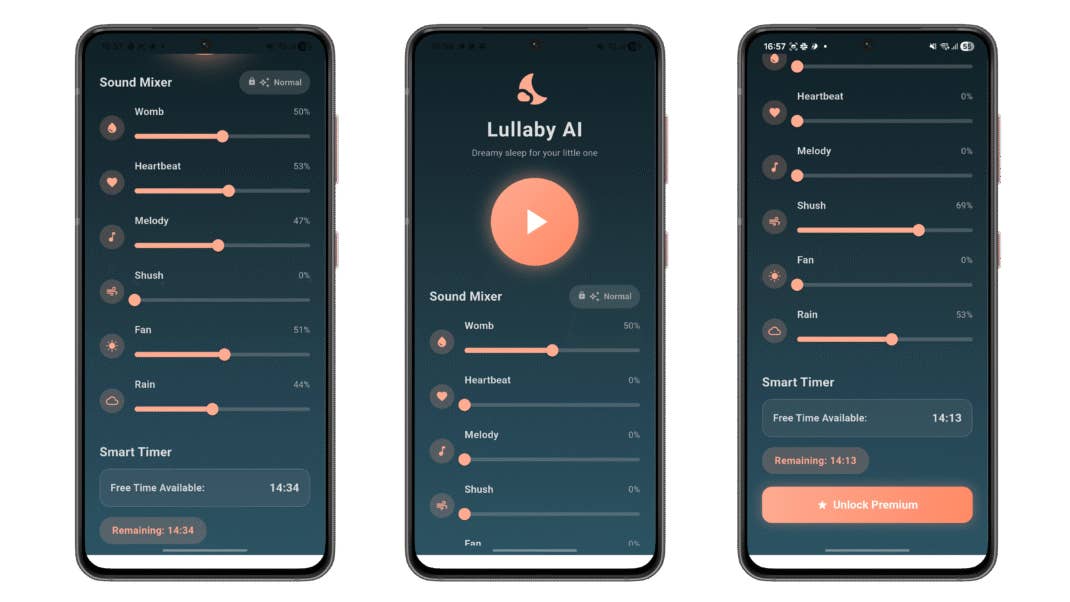
Lullaby AI: Baby Sleep Sounds
Anyone with a newborn baby would know just how tough it can be to put the little one to sleep. Thankfully, there is an app for that! Of course, while I do not have a little one of my own to test this app out on, I can still use it on myself, who is one big baby, as my wife described me at times. I was expecting the usual white-noise mixers and generic soundscape players, but I was pleasantly surprised to discover a simple yet soothing, well-designed tool.
It offers a suite of calming sounds like womb tones, heartbeat, and rain that feel intentionally chosen to mirror environments known to be comforting for babies and toddlers. The sounds blended into the background instead of demanding attention, and the inclusion of asmart fade-out timer helped me tailor sessions so that the audio doesn’t play endlessly after, assuming sleep had taken hold.
In-app purchases are present, and the app nudges me toward a premium tier, but the baseline experience is generous enough for me to decide whether upgrading is worth it, based on the baby’s bedtime needs. I appreciated that the developer’s privacy note indicates data usage isn’t tied to directly identifying information, offering a bit more peace of mind when using an app that may run in the background of the sleep cycle. Still, the 15-minute timer for the free account is good enough for most parents, or I might be too optimistic.
Overall, I would say this is a well-designed app that doesn’t try to be flashy or overengineered, just functional and comforting instead. The primary intention is clear — to deliver gentle audio that supports rest rather than distracting or stimulating the listener, with that focus showing up in regular use. Now, if you’ll excuse me, it is time for me to catch my nap.
Price: Free / Advertising: No / In-app purchases: Yes ($2.99-$19.99) / Account required: No
Send your little one to La La Land with this nifty little app.
Picto Demo
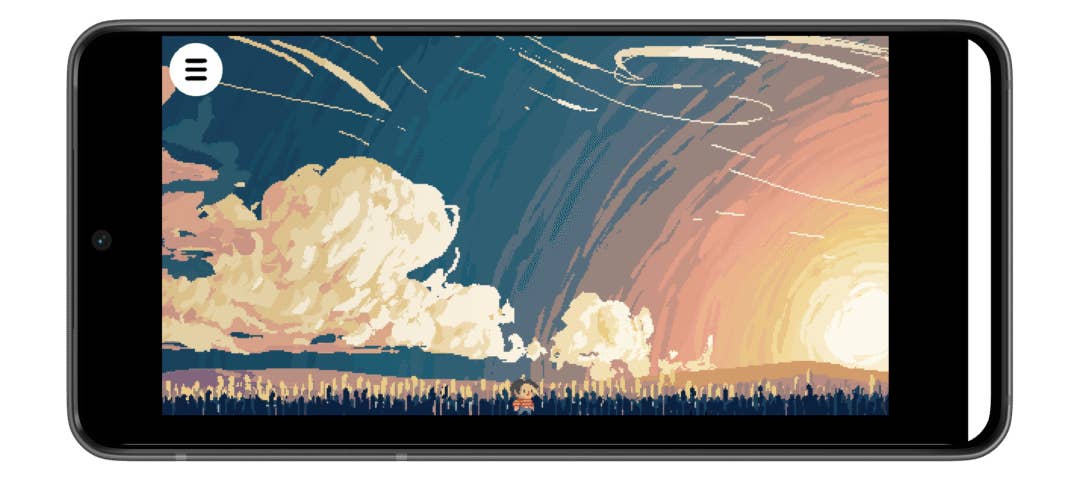
When I tried Picto Demo out, I wasn’t sure what to expect from this free puzzle demo. Perhaps I was jaded by the ton of generic titles out there, and basically anything of a different flavor can be seen as an innovation. After spending some time with it, Picto Demo grew on me. Basically, this is an intriguing little experiment in mixed-reality gameplay that felt different from most mobile titles. I play a character trapped inside a video game world who dreams of escaping to something beyond his pixelated reality — this is a simple premise, yet one that sets the stage for surprisingly creative interaction with my real environment.
Now here’s what it looks like in the virtual world…
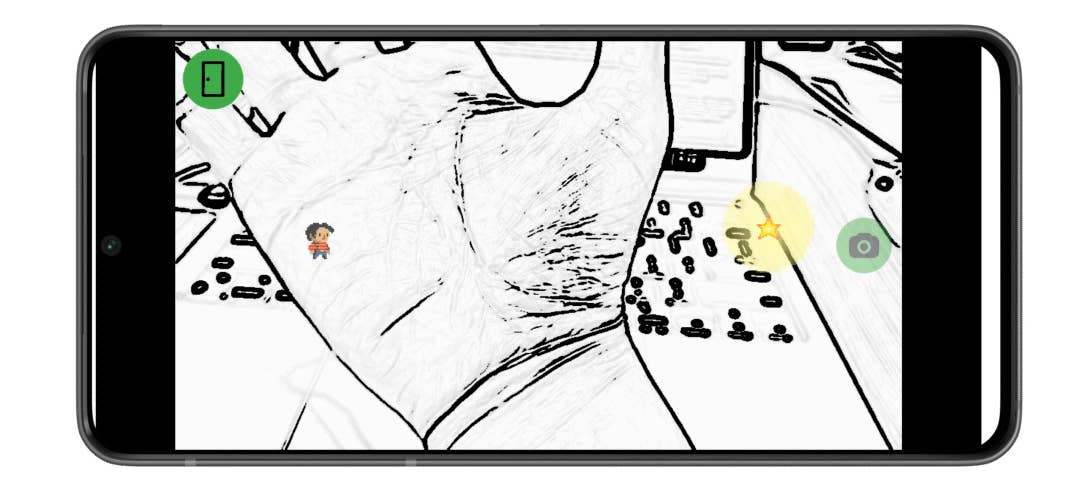
The core idea of the demo involves using my smartphone camera as part of the puzzle mechanics. It skips the traditional on-screen taps or swipes, with Picto asking me to think about my physical surroundings as part of the level itself. Everyday objects become bridges, obstacles, and tools to guide the protagonist, and that physical interplay between the game and real world elevates the usual puzzle experience into something more playful and engaging.
It’s a clever twist that makes me literally move around and experiment, bridging the gap between digital and physical spaces in a way that felt fresh on mobile. Graphically, the demo leans into a hand-drawn, sketch-like aesthetic for its virtual components, which contrasts charmingly with the live camera feed of my surroundings.
As this is a demo, the experience is necessarily limited — levels are few, and the full scope of mechanics hinted at in the broader project isn’t fully realised here. Yet even in this early form, I found the puzzle design to be intelligent and rewarding. The satisfaction of seeing a virtual character traverse a path you’ve improvised from real objects is unexpectedly delightful, and it made me wish there were more levels and scenarios to explore. Hopefully, it will develop into a full-fledged title in time!