Sorry, but there's really nothing to see here right now. Our server is in maintenance mode – and our
little bot is trying to sort the error messages with its last bit of energy.
Whether it was a data leak, a power outage in the cluster, or just a grumpy bit – we don't know yet.
But what we do know is:
The data drama escalated into a server meltdown. But don't worry: We're on it.
What now?
Everything is surely running smoothly over at our colleagues from inside
digital – why not stop by!
Or you could pass the time by visiting our social media channels – for example Instagram, YouTube or TikTok. At least there are no
server problems there – promised.
Thanks for your patience. Our bot is already rebooting at full speed. 🔧
WhatsApp is an increasingly important app in the lives of many people, so it is natural to fear strangers having access to your account. To protect your WhatsApp profile from being used by other people, you can activate two-factor authentication (2FA) to force a PIN when setting the same WhatsApp number on a new install.
Check the most common WhatsApp problems and their solutions.
With lots of personal data shared online with family, friends, and groups, including payment information in countries like India and Brazil, it is important to keep your WhatsApp account secure.
Using 2FA—or Two-step verification, as WhatsApp calls it—every time your phone number tries to be authenticated on a new WhatsApp installation, usually when setting up a new phone, you (or someone else) will be asked to confirm the activation with a 6-number PIN code.
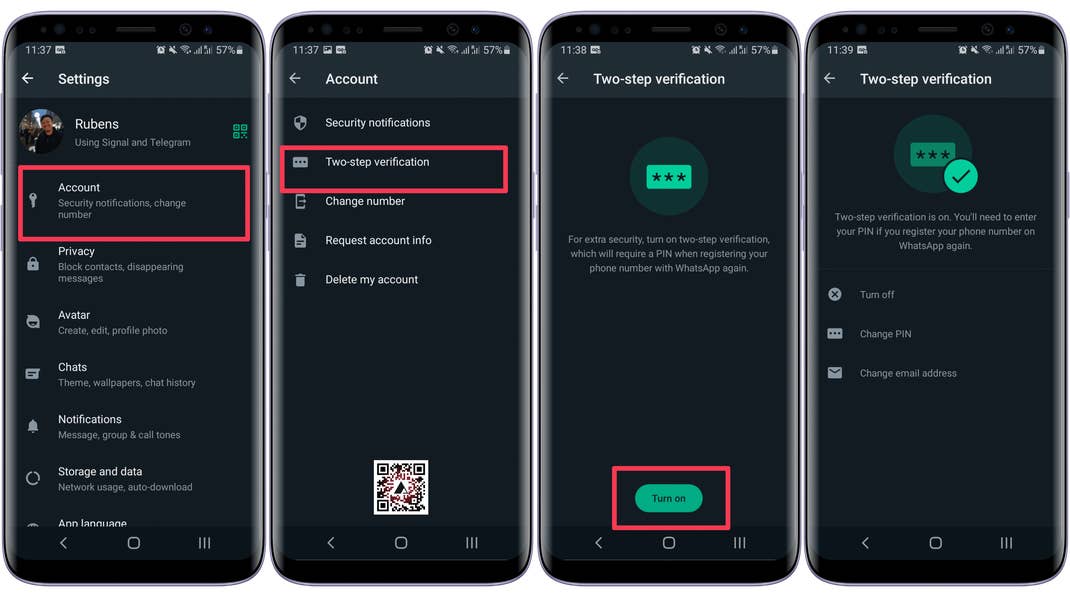
How to enable two-factor authentication on WhatsApp
Different from other apps or services, the WhatsApp two-step verification process requires only a PIN, since the phone number is considered the first step/factor.
One important consideration, since most people don’t need to activate the WhatsApp account often, is that after setting a WhatsApp 2FA, the app will ask for the PIN from time to time, which has the side-effect of avoiding strangers to checking your messages when the phone is unlocked.
The same screen after step 4 allows you to turn off the feature (handy if you are troubleshooting WhatsApp issues), change the pin, and add/change the recovery e-mail address.
WhatsApp’s two-step verification is a bit different from other services, and currently (as of February/2023) doesn’t offer an option to use a 2FA code generator, which could be better if you don’t want to be frequently prompted for the PIN, just make sure to not use “123456” as the PIN.
What are your steps to protect WhatsApp from strangers? Share your tips in the comments below!
We mark partner links with this symbol. If you click on one of these links or buttons–or make a purchase through them–we may receive a small commission from the retailer. This doesn’t affect the price you pay, but it helps us keep nextpit free for everyone. Thanks for your support! Prices are based on the date of publication of this article and may be subject to change.