
Contents
With the introduction of AirTag in April 2021, Apple sparked a wave of compact trackers among iPhone users. Whether it’s luggage, a bicycle, a set of keys, or a TV remote, the small trackers are designed to help locate misplaced items. According to Apple, they are explicitly not intended for tracking your cats or dogs. Now, the iPhone maker has introduced the second generation of its own trackers. For the most part, this update is a refinement, with the main improvements hidden inside.
AirTag 2: Mostly the same – on the outside
At first glance, it’s difficult to tell the first- and second-generation AirTag apart. The differences become more noticeable in day-to-day use. The dimensions of both versions remain unchanged, and the silver back can still be opened with a slight twist to replace the CR2032 battery when needed.
Setup is just as straightforward as before. Once removed from the packaging, the AirTag powers on automatically. A few seconds later, the setup assistant appears on a nearby iPhone and guides you through the process. Here, you can assign a name and an emoji to the tracker.
After setup, the AirTag appears in the “Find My” app under the “Items” tab. Using Apple’s Find My network – which includes devices such as iPhones, iPads, and Macs – the tracker relays its current location. In the app, you’ll see this position on a map and have access to the AirTag’s tracking features.
AirTag 2: Longer range, different sound
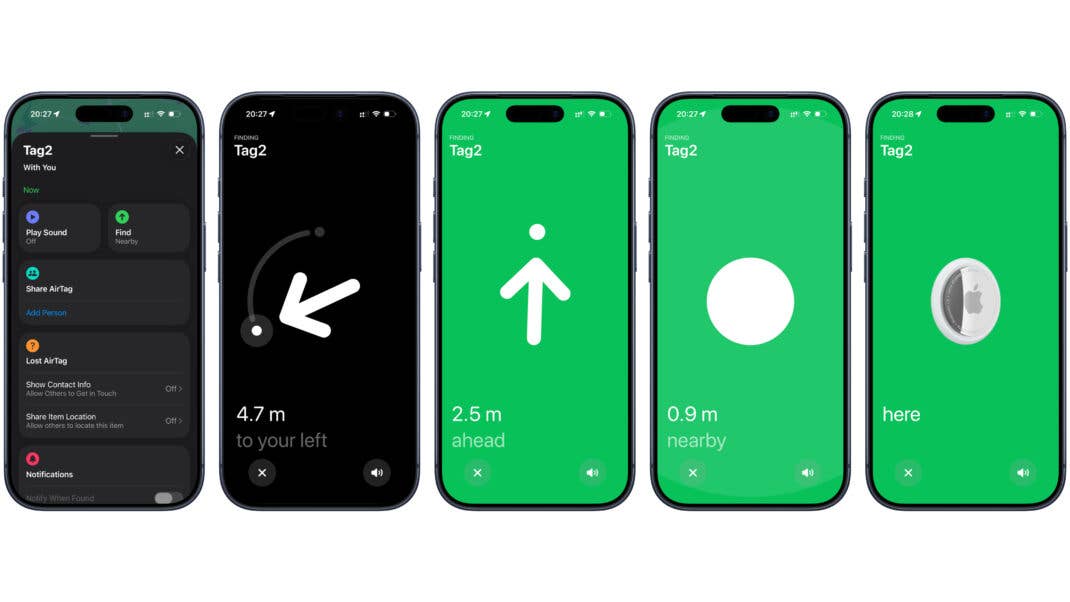
The most important feature of an AirTag is finding the items it’s attached to. This is where Apple has focused its improvements for the second generation. The company has increased the effective range in both Bluetooth and ultra-wideband operation.
The ultra-wideband (UWB) chip is one of the AirTag’s key advantages over alternative trackers for iPhone users. It enables Apple’s “Precision Finding” feature. Instead of just showing an approximate distance, the app displays an exact measurement along with an arrow pointing in the direction of the AirTag – making searches significantly easier.
Compared to the first generation, Apple has noticeably extended the effective range. In our tests, Precision Finding with an original AirTag only activated at a distance of around three to four meters. With the AirTag 2, distance and direction were already displayed accurately from roughly ten meters away, making the target much easier to locate.
If distance and direction aren’t enough, AirTag also includes a built-in speaker. Apple has made adjustments here as well. A revised sound profile makes the second generation slightly easier to locate by ear. In our tests, however, the difference was minimal. It may become more noticeable in different environments, such as when hunting for your luggage at an airline’s lost and found.
Precision Finding on the Apple Watch: More Complicated Than Expected
One of the new features of the AirTag 2 is support for Precision Finding on the Apple Watch. This requires at least an Apple Watch Series 9 or an Apple Watch Ultra 2 (or newer). The feature isn’t available directly in the “Find Items” app and must be added separately to Control Center:
- Open Control Center by pressing the side button
- Scroll down and tap “Edit”
- Tap the plus icon in the top left and select the AirTag from the “Find Items” category
- Tap “Choose” and select the desired AirTag
- Tap the green checkmark at the top right
- The AirTag now appears in Control Center, tap “Done”
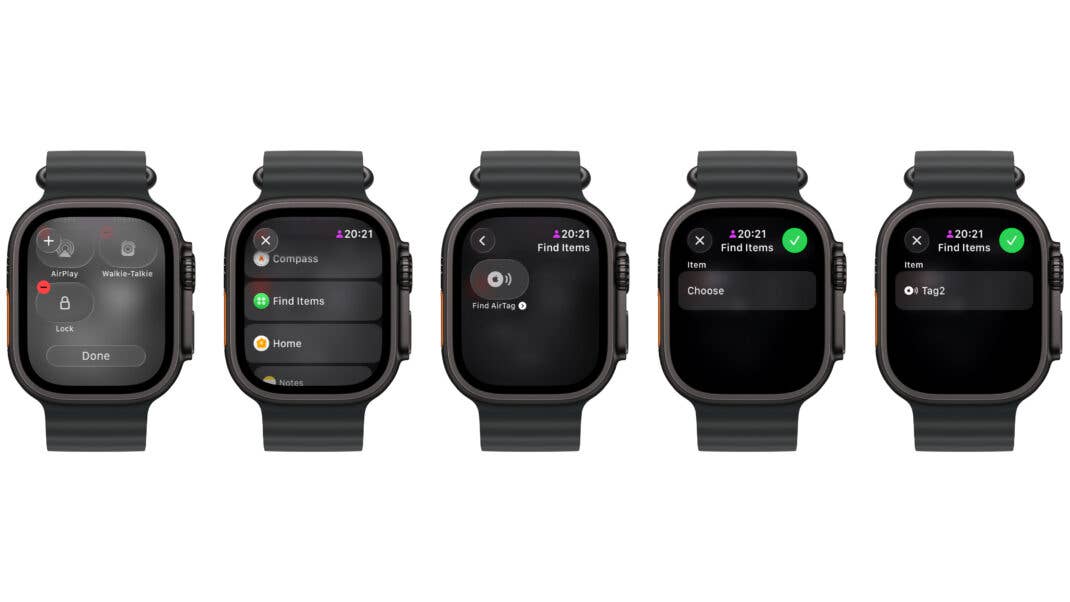
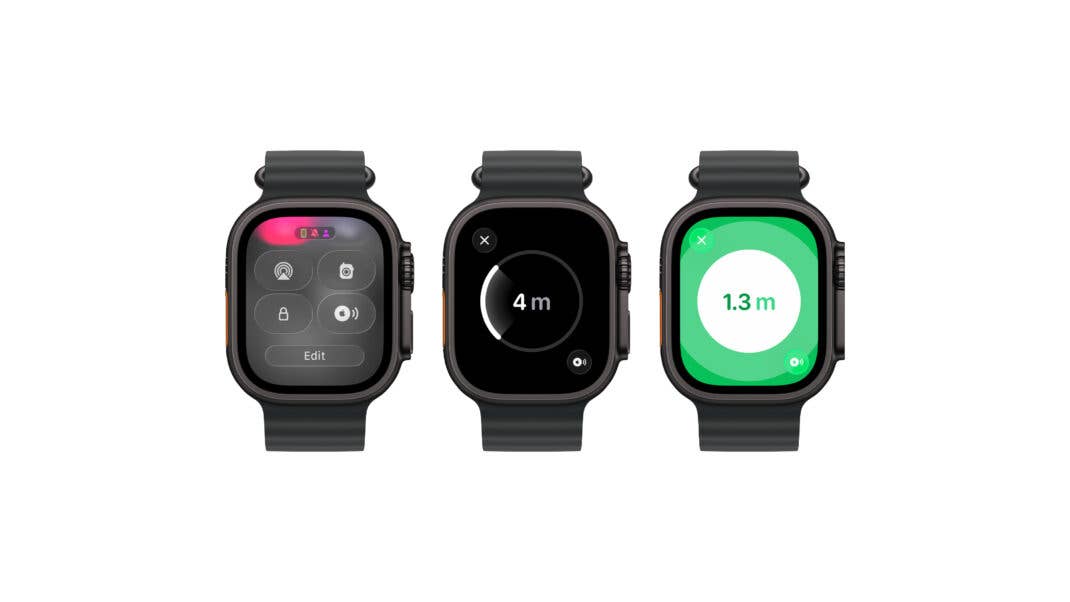
If you want to locate multiple AirTags 2 using the Apple Watch’s Precision Finding feature, you’ll need to repeat these steps for each one. After adding the tag, you start the search for it by tapping on its symbol. Even if it’s nearby, it might take a few seconds to establish the connection.
As on the iPhone, the Apple Watch provides haptic feedback during the search once you’re close to the AirTag you’re looking for. The closer you get, the stronger the vibrations become.
AirTag (2. Generation) requires at least iOS 26.2.1, iPadOS 26.2.1 on iPhone or iPad. Apple Watch support comes with watchOS 26.2.1.
Is an upgrade worth it?
If you already own a first-generation AirTag, upgrading won’t be necessary for most users. The differences between generations are relatively minor. In some cases, however, the improved Precision Finding range could justify an upgrade. An AirTag placed in checked luggage, for example, can be a helpful way to tell when a suitcase arrives on the baggage carousel. Your older AirTag can then still be used elsewhere.
Apple sells AirTags individually and in four-packs for $29 and $99, respectively. You can also add free engraving to personalize one – or all four – trackers. That said, the AirTags are often available at significantly lower prices from retailers such as Amazon.
We mark partner links with this symbol. If you click on one of these links or buttons–or make a purchase through them–we may receive a small commission from the retailer. This doesn’t affect the price you pay, but it helps us keep nextpit free for everyone. Thanks for your support! Prices are based on the date of publication of this article and may be subject to change.