Sorry, but there's really nothing to see here right now. Our server is in maintenance mode – and our
little bot is trying to sort the error messages with its last bit of energy.
Whether it was a data leak, a power outage in the cluster, or just a grumpy bit – we don't know yet.
But what we do know is:
The data drama escalated into a server meltdown. But don't worry: We're on it.
What now?
Everything is surely running smoothly over at our colleagues from inside
digital – why not stop by!
Or you could pass the time by visiting our social media channels – for example Instagram, YouTube or TikTok. At least there are no
server problems there – promised.
Thanks for your patience. Our bot is already rebooting at full speed. 🔧
DealsSmartphonesPowerful Windows 11 Mini PC: Geekom Mini IT 11 is Now on Sale
Are you looking for an inexpensive mini PC that is powered by Windows 11 and has enough power for everyday use, including casual games and 4K video editing? If you have answered in the affirmative, then you should take a look at the Geekom Mini IT 11, which is now on sale from October 25. Read on to find out what the powerful mini PC can do and whether this deal is worth picking up.
More on this: Geekom Mini IT 11 review: A powerful mini PC
The Geekom Mini IT11 is listed for $849 a pop in the manufacturer’s online store. However, the mini PC’s price has been reduced to $549 currently, and by entering the coupon code “IT11nextpit50”, you can save another $50 upon checkout. What do you actually get in return from Geekom for $499? Let’s find out.
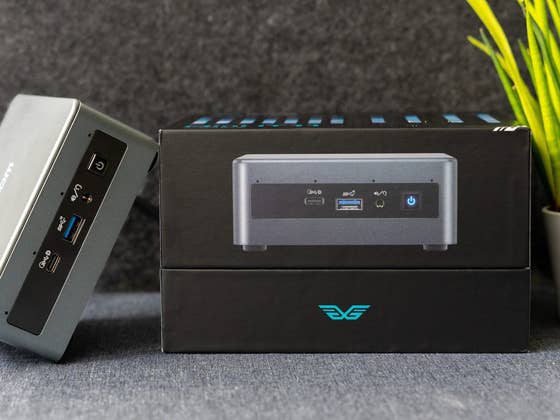
The Geekom Mini IT 11 is powered by the 11th generation Intel Core i7 11390H processor. In addition, there is 32 GB of RAM and 1 TB of internal SSD storage, as well as an Intel Iris Xe graphics solution. In our Geekom Mini IT 11 review, this configuration was, for instance, easily capable of editing 4K videos and playing different computer games using medium graphics settings.
The powerful mini PC comes with Windows 11 right out of the box, but you can also install Linux and other operating systems of your choice on it. The small computer is really practical if you have a monitor with a VESA wall mount. With that setup, you can simply screw the Mini IT 11 to the back of your screen and have a tidy all-in-one PC. With its dimensions measuring 11.7 x 11.2 x 4.6 cm and tipping the scales at 565 grams, the mini PC is also highly portable.
However, the compact chassis offers very little room for expansion and future upgrades. For example, you can pack a maximum of 64 GB of RAM inside, while the 2.5-inch hard drive slot allows memory expansion of up to 2 TB.
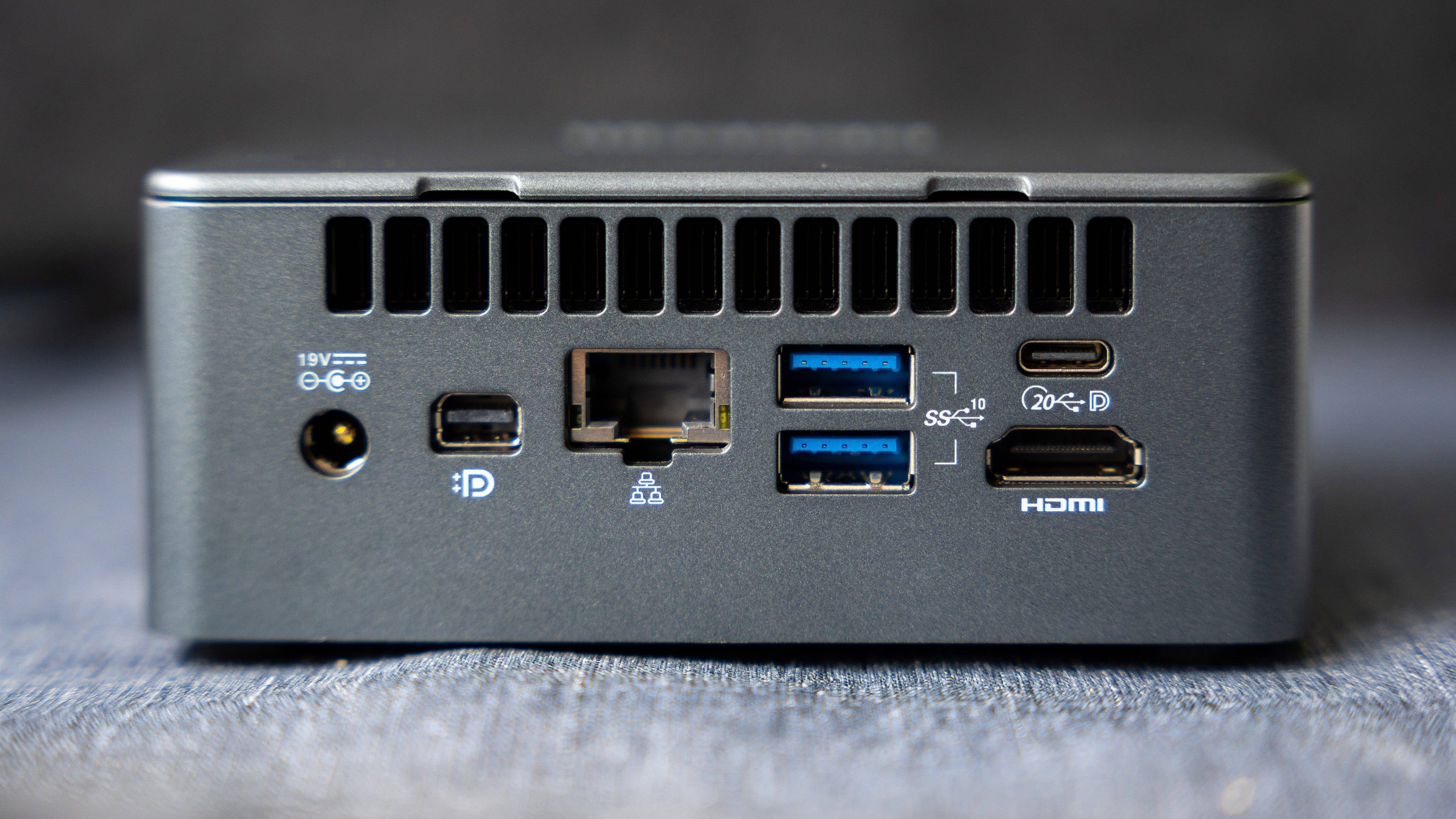
For communication with the outside world, you can choose between WiFi 6, Bluetooth 5.2, or as seen in the picture above, an Ethernet port. Beyond that, there’s also a generous array of ports, namely:
Front
1x USB 3.2 Gen 2 in USB-C format
1 x 3.5 mm headphone jack
Left side
1 x SD card reader
Right side
1 x Kensington lock
Rear
1 x USB 3.2 Gen 2 in USB-C format
2 x USB 4 in USB-A format
1 x RJ45 Ethernet port
1 x HDMI 2.0 port
1 x Mini DisplayPort connector
1 x DC jack
Unfortunately, it is not possible to power the computer via USB. In the nextpit review, the Geekom Mini IT 11 received a rating of 4.5 out of 5 stars and a solid “buy” recommendation from our colleague Ben Lucks. If you are looking for a really compact mini PC with decent performance, then you will not go wrong with this.
This article is part of a collaboration between nextpit and Geekom. This collaboration has no influence on nextpit’s editorial opinion.
We mark partner links with this symbol. If you click on one of these links or buttons–or make a purchase through them–we may receive a small commission from the retailer. This doesn’t affect the price you pay, but it helps us keep nextpit free for everyone. Thanks for your support!
I have been writing about technology since 2004 with a strong passion for smartphones, photography, and IoT, especially in the world of smart homes and AI ever since they debuted. I'm also an avid cook and bake pizza at least three times a week using my Ooni Koda 16. In order to compensate for all the consumed calories, I indulge in sporting activities on a daily basis while strapping on at least two fitness trackers. I am strongly convinced that you can DIY a lot of things if you put your mind to it - including a photovoltaic system and power station.




0 comments