


Best solution: LockMyPix
There are a lot of apps out there that claim to hide your photos from nosy snoopers, but LockMyPix stands out for the level of simplicity and security that it offers, even in the free version. It locks your files in a vault protected by military-grade AES encryption standard, accessed via a PIN, pattern or fingerprint.
It has an intuitive UI that enables you to encrypt your photos/ videos directly from the app itself, a simple tap-and-vault. The app can be hidden from the app drawer, naturally.
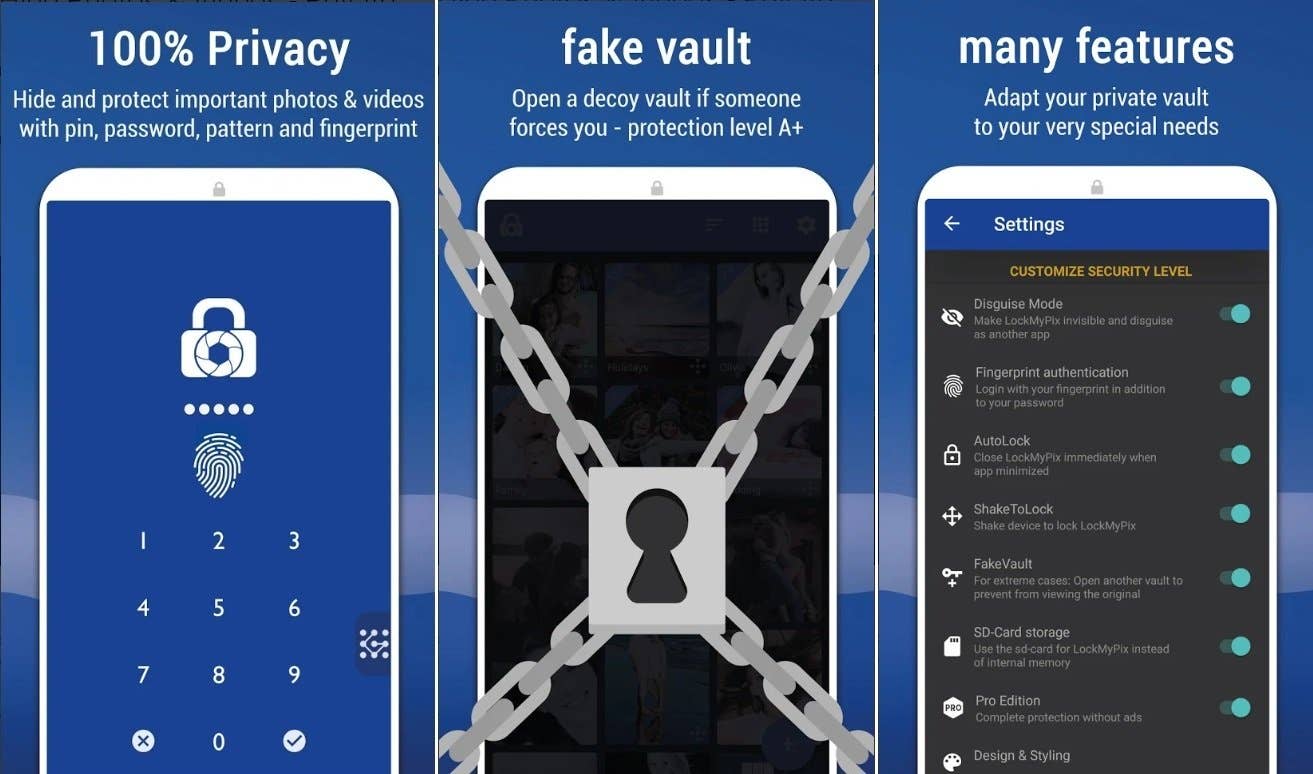
The paid Pro variant offers even more options for the really paranoid. For example, you get the option to set up fake login credentials in the Pro variant, in case someone discovers the vault and demands the login, you can give them access to the ‘decoy’ vault. The paid version also offers SD card compatibility and the ability to disguise the app as something else. Of course, it also makes the whole experience ad-free.
INSTALL (com.fourchars.lmpfree)
Alternate solution: Astro File Manager
If you prefer to use a file manager rather than a gallery lock app, then you just need to follow these easy steps. First, download Astro File Manager below.
- Once you’re in the app, go to Primary then tap Pictures.
- Now tap and hold the folder you want to hide.
- Once it’s highlighted, hit the menu button (three dots at the top right of your screen).
- From here go to Rename.
- Now, rename the folder .nomedia and be sure to include the period in front of the text. Hit Rename and you’re all set.
Watch the video below to see an example of how this is done.
- If you want to see those hidden folders in Astro again you need to go to the menu and hit View Settings.
- From here, hit the Advanced tab.
- You just need to check the box after Show hidden files and go back into the app and you should see your folder.
- If you want to unhide it, just rename it but don’t include a period at the front.
Do you have any other solutions for hiding your albums? Let us know in the comments.

With a Note 4 running MM 6.0.1, the PRIVATE MODE is used to hide pics one doesn’t want others to see.
Is it possible to hide apps without root (and no launchers please)?
The reviews in the Play Store says that the app doesn’t seem to be doing so well. A lot of bugs and errors for most.
Still liked this article though, as I’m looking for a way to protect my gallery from
*cough!* Curious friends… *cough!*
EDIT: I just discovered an app you might want to put on this list: "Gallery Vault – Hide Pictures". There is a free version and a pro version to it. Reviews, stars and user feedback seems really good. I will try the free version for a couple of days for my final opinion.
There are a lot of app hider available at store
https://play.google.com/store/search?q=app%20hider&c=apps&hl=en
Thanks for sharing….Though I have a very good app locker but its always good to know other available options.
Makes absolute sense, good info!
I use Photo Locker. In my opinion, it is a very good app for hiding photos and documents. It sounds like it is much easier to use than Gallery Lock also. All you have to do to hide a photo in Photo Locker is to share the photo and one of the options presented is to hide in Photo Locker. A pop up appears where you can select the folder to hide the photo in or you can create a new folder for the photo you want to hide. It also has protection with a PIN. You may want to check Photo Locker out.
I thought this would be by default gallery app. My phone lag due to too many third party apps.
I have to ask you since you use it, what happens when you update the app? According to the reviews in Play Store all your photos disappear after an update is done. Overall the concept of the app seems good, but the feedback…
I think the app has updated several times since I have been using it. I just checked and all the photos that I have hidden there are still there. It updated in the past few weeks. I don’t know what happened to the people in the reviews. No problems for me. I am using a Samsung Galaxy S7 Edge. Had Photo Locker on my S5 also and no problems there either. They were all still there last time I checked on that phone.
I don’t know about how to hide albums in android app gallery but i can tell you how you can hide those album in other way,I would suggest you to download Leo privacy app lock hide which will help you to hide your albums,videos and even your important files or data.i am currently using the same and its running good.So give it a try.
Thanks, but I’m using Photo Video Gallery Locker for my personal and important photos and videos gallery. It has multi security, cloud backup and data recovery feature.
Look like useful apps! never thought about the idea of hiding/locking galleries!
Jim W
Levipic can also do this!
Ya this method also works but i mostly use like i will create an folde named .xyz {Make sure you put . before foler name} and then will transfer those file in that folder and its safe.
Hey everyone some buddy help me i using s7 and im facing new problem overlay mobile not allow to save any phote & video please guid me how to solve it
No pee(k)ing!! Interesting the possibility to hide the Photo Gallery, I did not know about this possibility, because I did not even need it. However, as a possibility, it seems to me that Astro would be more useful, because it has a more general character. For now I can handle what the phone offers me by default.
.nomedia file written to the directory will stop most snoops.
I use encrypted storage for confidential files other than images or video, but don’t use local "locker" apps or the "vault" in X-plore file manager, since they’re local storage only, with that fragility. Instead, BoxCryptor for Android (there are some alternatives) creates and opens an independently encrypted folder in standard cloud services like Google, OneDrive, or Dropbox that can be synchronized to a local version on the microSD. (Cloud synch isn’t true safe "backup" in my book, but provides redundancy and multi-device access for active files.)
1st one is great… i also use that