


We’re all familiar by now with the risks and disastrous consequences of viruses and other types of malware on PCs, but now malicious software is targeting our smartphones too. The threats are on the rise and constantly evolving.
There are several different ways of catching malware on your Android device. You might have thought the Play Store would be safe, but you’d be wise to think again. Android’s former Chief Security Engineer Adrian Lugwig stated in the past that he doesn’t believe the average Android user needs to install antivirus apps. But, in 2017 alone, Google removed 700,000 malicious apps from its own Play Store. The fact that these apps made it onto the platform in the first place doesn’t exactly inspire confidence.
Malicious apps can masquerade as helpful utilities or they can be copycats of popular apps, with the same name and icon. These can be found on the Play Store or as APKs that can be installed manually outside of the Play Store. You can also get malware from email attachments, text messages, WhatsApp hacks, phishing scams, sketchy download links and more.
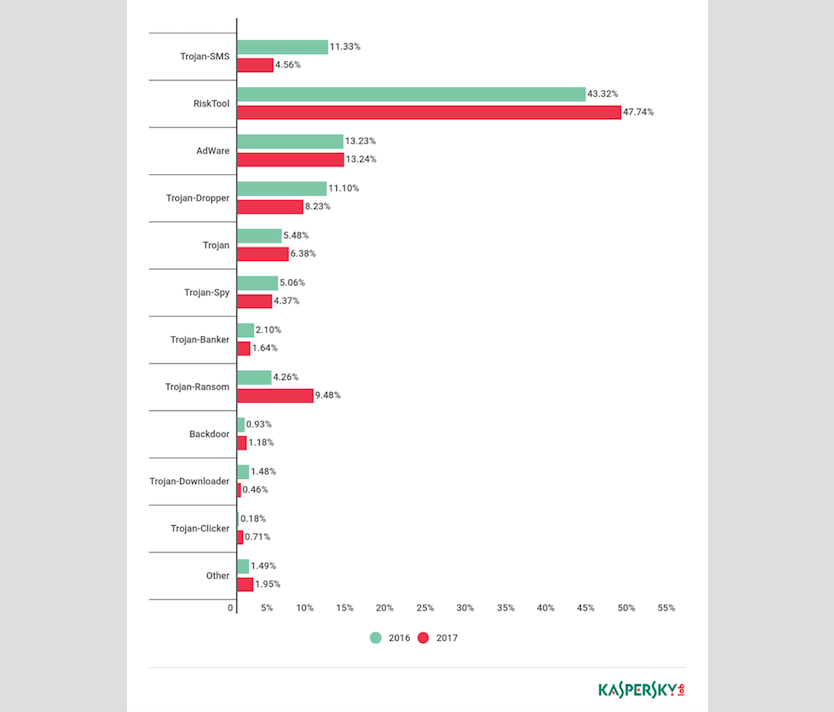
There are also a ton of different types of malware which can infect mobile devices, from merely annoying AdWare that just shows you ads to more devastating ransomware trojans. The table below shows some of the different types from 2016 and 2017 and their prevalence. Regardless of the type of malware, any malicious software which makes its way onto your device can have severe consequences, like having your credit card information stolen or your photos lost forever. Malicious software can even brick your device, making it no longer usable and unrepairable.
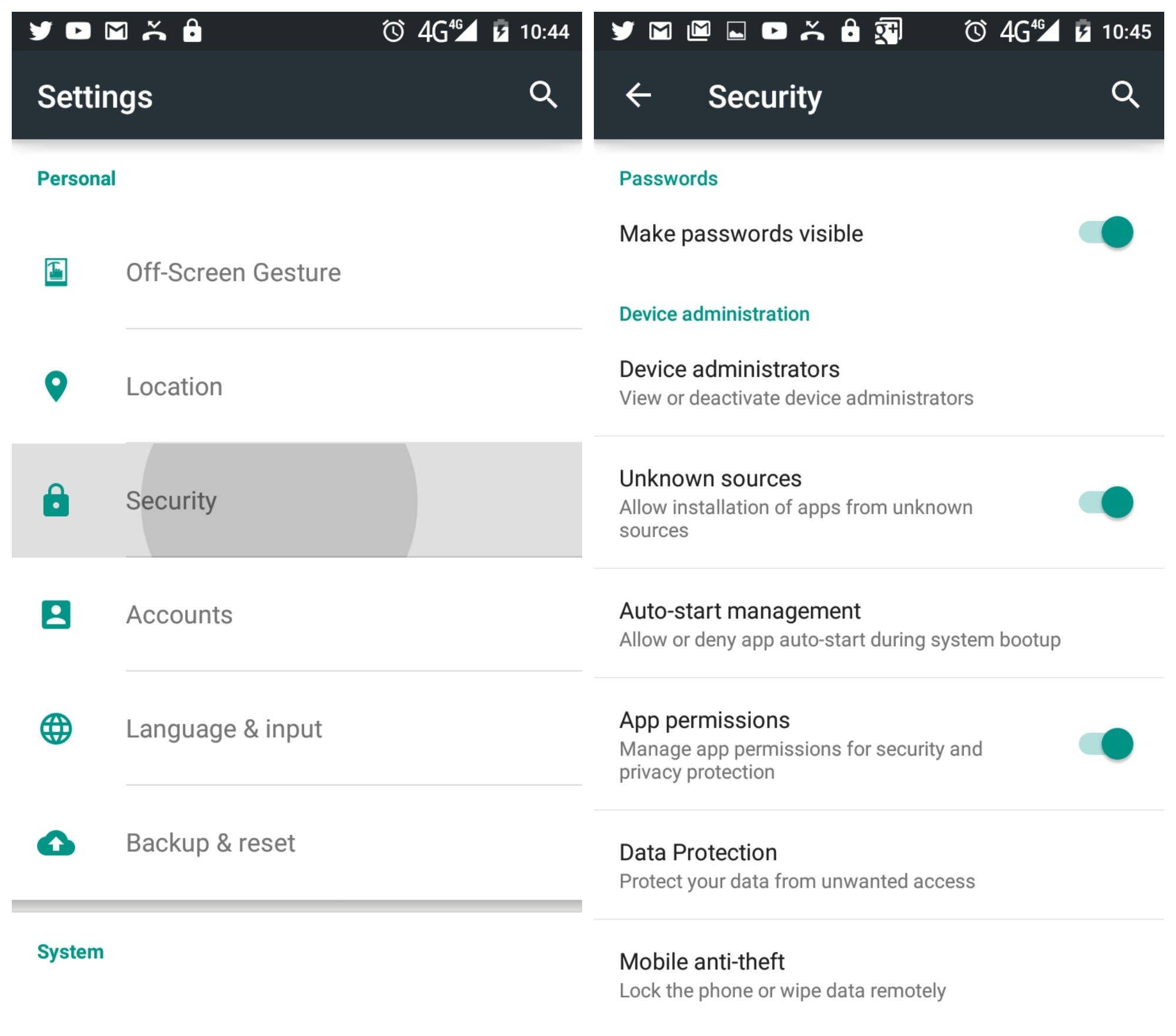
When it comes to security, you’re your own biggest threat and common sense will get you far. You’re probably a lot more likely to lose your phone or have it compromised because of a silly PIN code like ‘1234’ than you are to get infected with malware, but there are some things you can do to avoid risk. Apart from installing an antivirus app and using common sense to avoid opening suspicious attachments and links, you can also avoid installing apps via APK files from outside of the Play Store. Checking your app permissions is always a good idea.
Pros and cons of Android antivirus apps
Often you won’t be able to tell if your smartphone is under threat, or if you are about to download something potentially harmful. What’s worse is that, once you are affected, you frequently won’t even know it, unless an unusually high credit card bill comes in or your phone starts acting strangely. Besides installing an Android antivirus app and running a scan, there’s not much more you can do.
Antivirus apps for Android work in a similar way to the antivirus software you would find on your PC. Once installed, you can use them to scan the files on your phone for sneaky software you may have inadvertently downloaded, and the antivirus app will highlight any problems. Unlike Windows or Mac-based antivirus software, however, Android antivirus apps do not automatically remove harmful software for you – you have to do this manually once they have been identified.
Not all virus definitions are up-to-date and not all antivirus apps have the same features. The good news is that they quite often provide a lot of added features that can be really useful, such as backup solutions and remote wipe features. We’ve made a list of our recommendations for the best Android antivirus apps, which considers both free and paid solutions.
Though they can’t replace common sense, Android antivirus apps can prevent, detect and eradicate malware infections. They do have their drawbacks, though. If you do choose to install an antivirus app, be aware that they commonly consume a lot of battery, take up disk space, annoy you with notifications and reduce processing speed. Naturally, how they affect your system depends on how you use them, but most Android users will probably never encounter any security threats or see any need to clog up their system with antivirus apps, especially given that Google Play Protect is built into Android and its malware protection scans your device and apps already. Whether you should use an antivirus app or not depends on your risk tolerance.
Do you have an antivirus app on your Android? Have you ever been affected by malware? Share your experiences in the comments.
This article has been brought up-to-date in August 2018. Comments below may reflect a previous version of the article.



Yes, I am using Avast Mobile Security. It works well. I am using smart phone from last 4 years but till now nothing happened. It is good to use your device responsibly. Even I had some misconception about Anti Virus before reading this article. Now everything is crystal clear. Time to free some space in my phone.
Thank you Scott.
You should take a look at Sophos free AV app. Tons of features, top rated. And more importantly, ad free.
for me 360 security is the best…. well i guessssss.
im use 360 security… so far no dubt about it. It’s work fine for my phone..
This is actually true , you don’t need antivirus on android. for 3 years until now I never experienced virus. my phone is rooted for a long time and without antivirus.
If the antivirus app can’t remove the malware, how do you actually get rid of it?
I think the app will report the malware and you need to manually delete it
Some of them are hidden though. I have just tried to uninstall some app I have stupidly installed. It created an overlay on my screen. I can only guess it was a phishing app. Tried to look it up in the Apps page, but it was not there. However I could see that the app was still running. They are becoming much more crafty.
thanks good news
Thank’s for good news…
Coming from years of using windows based PC’s, it’s only natural to think you may need one. Fight the feeling! They really do take up resources, and annoy you, with notifications, them trying to take over sometimes. At one time, I’ve used lookout, avg, avast, and have seen battery hits. Some are persistent in wanting you to install more features of their apps. I haven’t used a antivirus app in a good while, and no, you don’t need one. Just have common sense, and read up on what your going to put on your phone, do your homework first.
Not needed if the only source for apps is the Play Store. I don’t want or have a commercial "credit card identity" relationship with snoopy Google, only a nonsense Gmail address, and sideload apps purchased elsewhere. While I think they’re good sources, the security scanner automatically confirms an app is clean. No AV deserves brand loyalty – best to check credible lab test roundups in the tech press. My standing beef with Android is the ridiculous failure to control security updating for all devices running a currently supported OS, as Apple and Microsoft do. While Android is brilliant, the idea of leaving security to OEMs and telcos was a stupid mistake from the get-go, and third party AV helps to mitigate it.
"Do I think the average user on Android needs to install [antivirus apps]? Absolutely not" Blatant, unapologetic lie. Not only did I get a virus, I also lost my tablet. It’s dead. Hard-bricked. And you know what? I was browsing the Internet! And was cautious! Google only thinks about getting money. And how do you get money? By breaking tablets, that’s how! It wasn’t the first one. But it was a first attack that completely broke my tablet. Guys, if you care about your devices, don’t listen to any of those guys. Download an antivirus. Just do it, for your own safety.
Don’t tablets have an option to be restored back to factory settings? I have never used a tablet. However, having infected my own Android phone with some speed boosting app which was hidden and therefore was impossible to uninstall, I had to lose all the data by resetting it to the factory settings. Hard learned lesson, and the app came from Google Play Store!
Well, I’ve almost got my phone hard-bricked. Restored it after a specific time by the power of GOD.
Quora had a discussion about how to restore your phone after an infection. They said that if a virus have gotten into the system files, the only way to restore your phone is flashing a custom ROM through a bootloader. That means that there is a possibility that you’ll get one of these. Mine was just a mocking jokey.
As a student of 3 years attaining my bachelor’s and "masters in Computer Science" I can assure you an anti-malware software of some sort is very important. This is in regards to Windows, Mac, Android, and even legacy Linux systems in some cases. Being cautious about your methods are very important but with the amount of exploits for almost any form of programming, millions of forms of malware being created, the NSA, and the fact that only 1-2% of all desktop and mobile users have the most up to date software and firmware I’d say everyone needs a reputable (AV Test) anti-virus. And that’s just one minor step to protect yourself. You need anti-tracking software, anti-hijacking, cloud protection if possible. You need to use VPN’s to mask your location and IP for malware injection (Even if you have a good ISP). You need to also disable marketing and tracking features with Google, Microsoft, and Apple. You need to use email and text messaging with end to end encryption and you need to use strong passwords that vary with different networks. Also never input your real numbers or names if possible. And never spread your DL, SS, or even birthday across the net. Do this and you make yourself much less of a target. This post would be over 1000 pages if I truly went over everything but simply following these steps and this blogs steps (except for the no antivirus part) will make most of you malware-free.
Virus on Android is basically just an app you install from playstore or apk’s. It can’t automatically installed on your phone. To remove virus you just have to find which app you supect contain ‘virus’ and uninstall it from apps list on setting.
To fully clean up these viruses, I recommend returning the phone to the factory setting.But then you lose everything
Ran a professional Virus Scan for a Year…. 20 Devices…no issues ever found or blocked… Going to be dropping the licenses, normal users just "don’t" install APK’s or install much at all.
As with any "normal" program, there will always be fragments of said program leftover.
Any of the anti-virus apps that you can download (if you think you need it) will only identify what it is that you have and you need to kill it manually. All I have is what my Android came with. I feel that I just may install a certain app I’ve looked into but then again, all it will do is identify the virus. To hopefully help with eliminating what I MIGHT end up with, I will also install the Revo-uninstaller removal app that will also locate any bits and pieces of whatever it is I MAY get. The problem here is that most if not all viruses are not recognized within any list you have. So, no matter what. it’s a crapshoot either way but at least it’s a place to start.