Spotify has been known for more than just its music streaming service for some time now. With a Premium subscription, you can also browse audiobooks for up to 15 hours per month. Now, the company has introduced a new feature that will allow seamless switching between traditional books and audiobooks.
This is useful, for example, if the print version of the book is released some time before the digital audio version, or if you don’t have room for books while traveling. The streaming service allows you to switch between the two – in both directions.
- Also read: This app is like Spotify, but free
Audiobooks on Spotify: A seamless transition from the traditional book
Spotify has aptlynamed the feature “Page Match.” The idea behind the feature is incredibly simple. To switch from a regular book or eBook to an audiobook, you simply need to take a photo of the page you’re currently reading using the app.
The prerequisite is that Spotify recognizes and supports the book in question. If so, open it in the app and tap the “Page Match” icon. On the next page, you’ll find a “Scan to listen” function that opens your smartphone’s camera. Take a photo of the page you’re currently reading. If the app recognizes the page, it will then give you the option to play the audiobook from that point. Alternatively, you can save the location for later. Some books also include recaps, which provide a brief summary of the plot so far.
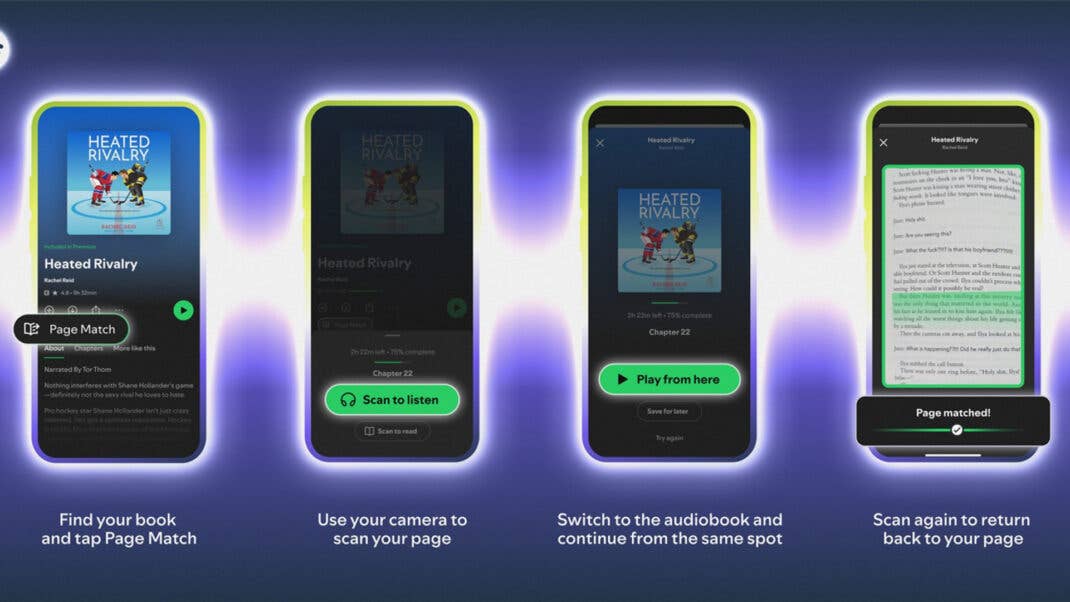
With this new feature, you can easily switch between multiple media. If you’re on the go and don’t want to carry books around, you can use Spotify’s audiobook function. Thanks to the screenshot of the current page, there’s no more annoying searching in the audio player. Back home, you simply check the app to see which page you’re on and then continue reading in a traditional book.
Conversely, behind the “Page Match” icon, there’s also a “Scan to read” function. This allows you to switch from the audiobook to the familiar printed book. Here, you need to take a picture of any page of the book or e-reader with your camera so Spotify can orient itself. The app will then help you find the right spot in the book, telling you whether you need to turn the page forward or backward to reach the correct location.
Page Match availability
According to Spotify, the Page Match feature is currently being rolled out to all users. It will initially be available for most English-language titles until the end of February. The feature is available to both paying subscribers and users of the free app. If you don’t have a subscription, you must have purchased the audiobook through Spotify.
Spotify has also announced a collaboration with Bookshop.org. Thanks to this partnership, users in the US and UK can purchase printed books directly from the app.
We mark partner links with this symbol. If you click on one of these links or buttons–or make a purchase through them–we may receive a small commission from the retailer. This doesn’t affect the price you pay, but it helps us keep nextpit free for everyone. Thanks for your support! Prices are based on the date of publication of this article and may be subject to change.