



19
8 Min.
Most smartphones produce a fake shutter sound when you take a picture. It can be loud and annoying, especially when you’re trying to discreetly snap a candid picture of a friend or a bunch of selfies. Getting rid of the shutter sound can be as easy as turning down the volume on some devices, whilst for others, a little more effort may be involved. Find out how to turn off the camera shutter sound on your phone below.

17
3 Min.
Is the lowest brightness setting on your smartphone not low enough for you? Well, you have come to the right place. In this article, we tell you a simple method to reduce the screen brightness beyond what the brightness slider on your smartphone allows you to.

20
10 Min.
Despite its convenience and a long list of features, is WhatsApp really that great? If you’ve been thinking about making the switch for a while but can’t make up your mind, here are 8 reasons to leave WhatsApp and look for an alternative.
Check out the latest features on WhatsApp

0
5 Min.
Is it unbearably hot outside again as the temperature begins to rise, and you’re thinking of running to the nearest ice cream parlor to cool yourself down? Perhaps you should be a little less selfish and think of your loved ones, too! That’s right, your smartphone is very heat averse. That’s why NextPit has compiled some tips and tricks to help you protect your smartphone from the soaring heat as summer arrives.

7
4 Min.
Chose the wrong app as default on your Android smartphone by mistake? Looking for ways to change the default app on your Android smartphone? Well, you have come to the right place! Below, we give you simple steps that will let you easily change your default apps on Android.
0
13 Min.
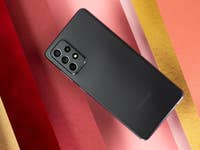
The Galaxy A72 tops the trio of Galaxy A mid-range smartphones that were released in 2021. This smartphone carries an amalgamation of the best features in this range, although it disappoints in terms of display capability and fast charging. Still, it remains an excellent option for those who want a smartphone that will last them for a few years before making a new purchase. Stay tuned with this review to find out more!

5
17 Min.
Tablets and smartphones are the ideal platforms for strategy games. Fortunately, there are many excellent titles from this genre to keep you occupied for hours on end. In this list, we’ll introduce you to a slew of fantastic strategy games for Android and iOS.

1
14 Min.
The Xiaomi Mi 11 Ultra is supposed to be the ultimate Android flagship, surpassing even the Samsung Galaxy S21 Ultra. But behind all the hype, Super Saiyan names, and an exorbitant price tag, can Xiaomi’s “top of the line” smartphone really be considered as the ultimate indulgence? The answer lies in my full review for NextPit.

2
7 Min.
OnePlus has had a good start to 2021. The smartphone manufacturer’s latest quarterly figures were better than expected, well in the positive territory. Those figures certainly reflected the results of a strategic turnaround that began more than a year ago by shifting to the premium market and the release of the Nord range. But isn’t this grand dream going to end up cannibalizing Oppo’s market share, which is also OnePlus’ sister company?
20
7 Min.
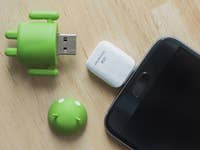
Whether you are using your Android smartphone as a game console, a multimedia server, or a camera, most of us will, at some point, maybe required to connect it to external peripherals like hard drives, USB sticks, or even a keyboard/mouse. For most of these functions to work, your smartphone needs to support a standard known as USB OTG. In this article, we explain how to use USB OTG on your Android device.