Sorry, but there's really nothing to see here right now. Our server is in maintenance mode – and our
little bot is trying to sort the error messages with its last bit of energy.
Whether it was a data leak, a power outage in the cluster, or just a grumpy bit – we don't know yet.
But what we do know is:
The data drama escalated into a server meltdown. But don't worry: We're on it.
What now?
Everything is surely running smoothly over at our colleagues from inside
digital – why not stop by!
Or you could pass the time by visiting our social media channels – for example Instagram, YouTube or TikTok. At least there are no
server problems there – promised.
Thanks for your patience. Our bot is already rebooting at full speed. 🔧
With cuddly fur, floppy ears or a cute snout: there are many reasons why animals magically attract us. If you like animals, but can’t get one for various reasons, a Tamagotchi app might be something for you. Here are the best ones out there.
Having your own pet would be great. But if you don’t have the time or money, or your apartment is too small or you suffer from an allergy, your dream of having a pet can often remain unfulfilled. With Tamagotchi apps, you can get your favorite pet on your mobile phone. I have tested four apps for you.
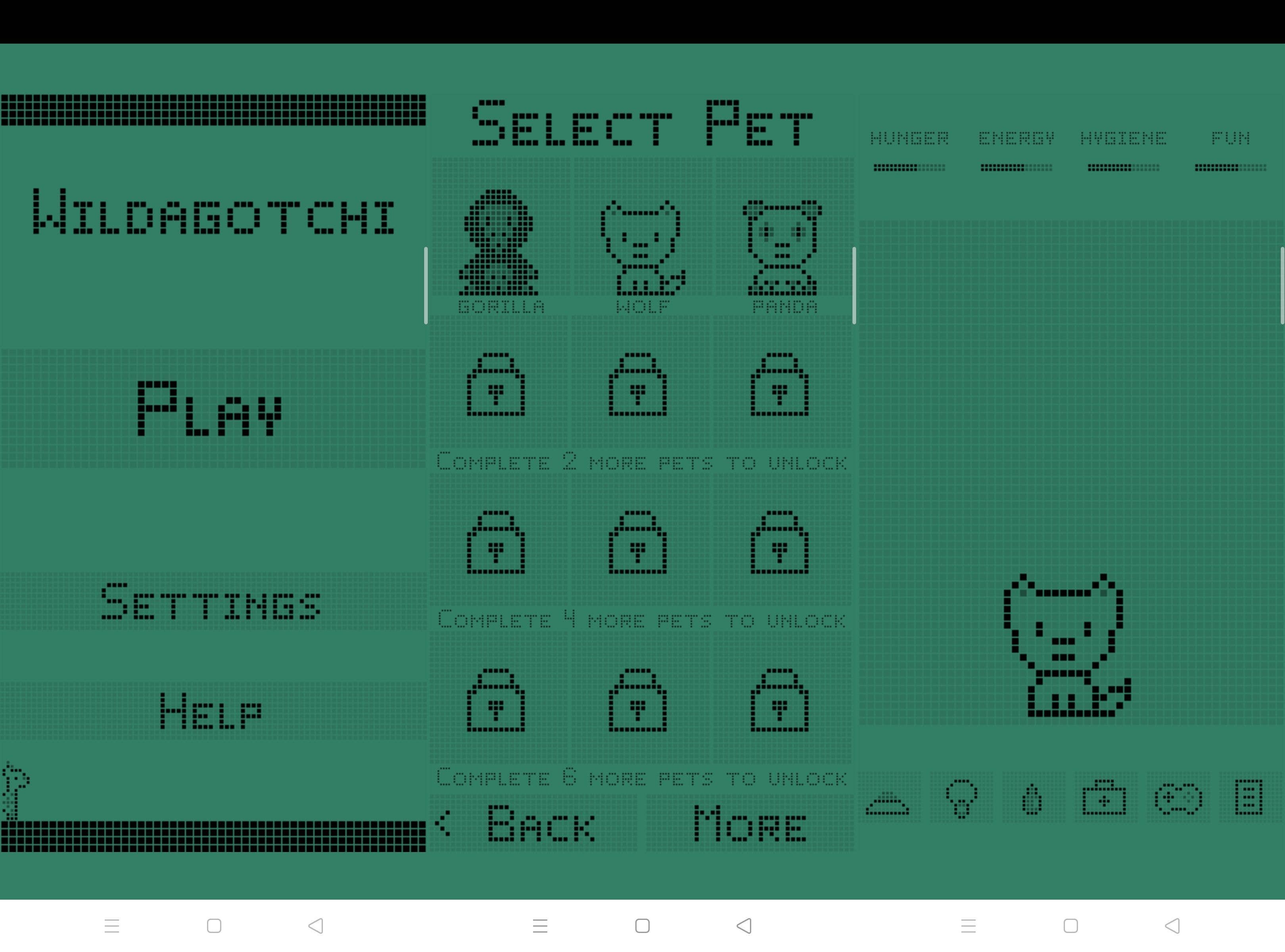
Wildagotchi: the retro Tamagotchi look
A little plastic egg with four or five buttons and a tiny display with a pixelated creature jumping around on it: that was them, the old-school Tamagotchis. If you miss the old-school style of the primitive animals for the display, there are some Tamagotchi apps in a retro design available. One of them is Wildagotchi.
At the beginning, the app offers you a choice of three animals: a monkey, wolf or panda, with the option of unlocking other animals. Once you have entered the gender of your animal as well as its name, you can start. I myself have decided on a wolf here and called him Loup (the French for wolf). In the classic display design, you will see the bar at the top of the screen showing what your new pet needs: fun, hunger, energy or hygiene – everything is included. From the list at the bottom of the display, select the icon you want to use to fulfill the Tamagotchi’s wishes. All in all this app is quite cute and worth a look especially for those who miss the old Tamagotchi times.
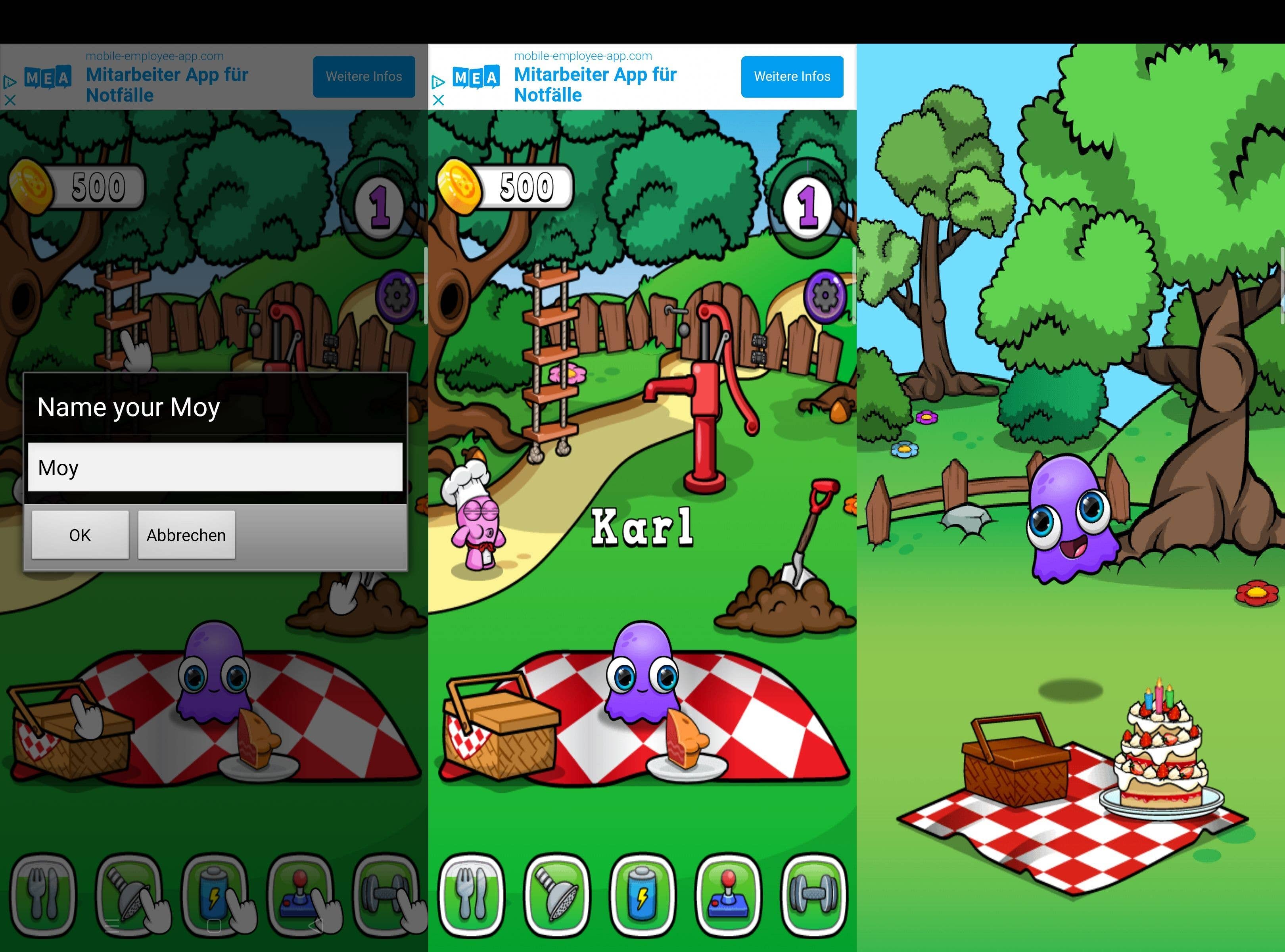
Moy will most likely appeal to younger children, because its shape reminds us of a Pac-Man ghost with huge eyes. Just like Wildagotchi, this app is also only available in English, but since it hardly needs any words to explain mini-games or actions, it is also quick and easy for children all over the world to understand.
After a short intro, you can give your Moy a name – I named mine Karl – and you can start playing and maintaining him. What Karl needs is shown by a toolbar in the lower display area. When you tap on an icon, you’ll be taken to different areas, which could be a picnic in the park or the bedroom. Besides the numerous mini-games, I liked the fact that you can adapt the environment to your own taste. From the wallpaper to the color of the picnic blanket, everything was possible. You have to pay for the changes with in-game coins, but you can easily earn them from the mini-games.
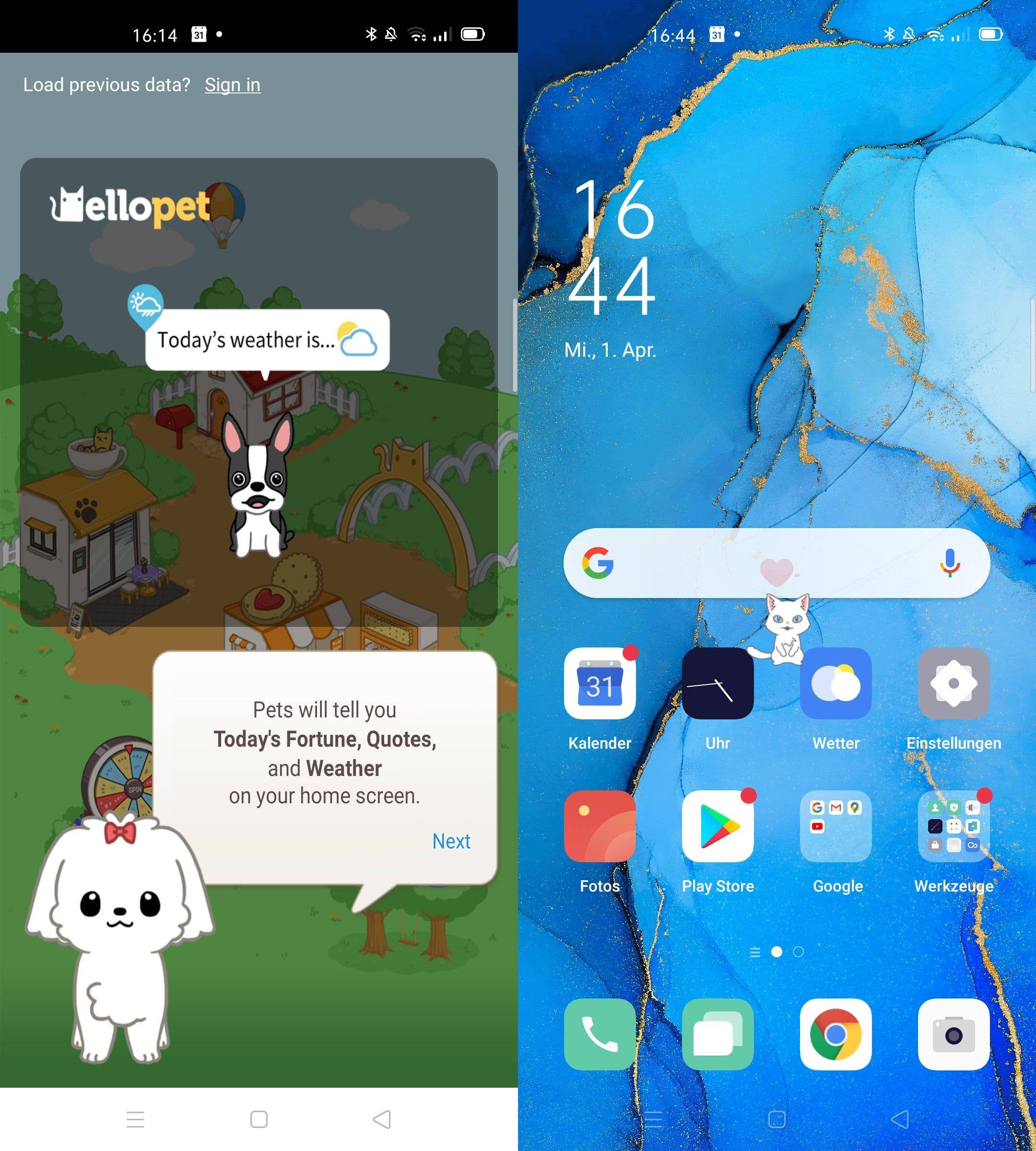
Having a Tamagotchi in an app is cute, a pet on your display even cuter. Hellopet offers you just that. Once you have installed the app, you need to allow the app to access your display. Then you can choose between a dog or a cat as your pet and give them a name. I chose a cat and since I know that my colleague Julia is an absolute cat fan, I named her Juliet.
A small room is available for the fulfillment of essential basic needs. Occasionally speech bubbles or hearts appear above your pet. Tap on the hearts to collect them. Besides the cat, you can also buy other animals. However, you will need the internal game currency for this. You can also participate in a mini-game or go to the chat area.
But what’s special – and what I enjoyed most – is that your pets can be seen on your screen after leaving the app. Juliet, for example, loved sleeping next to Julia during a video call. So cute!
If dogs, cats and weird jelly Tamagotchi don’t appeal to you, then how about a red panda instead? The My Red Panda app sends you into the jungle and offers you exactly these cute companions as pets. Here you can also give them a name – in my case it was Haki. Then you will be introduced to the most important basics of the game with a tutorial before you start playing for real.
Just like with my Moy, you can unlock new things by leveling up. These include new mini-games or different coat colors for your panda. I fell a little bit in love with the white panda, but unfortunately, it is only available from level eight on. The app also scores points because it’s available in multiple languages – so you don’t have to translate anything here. As with all Tamagotchi apps, you will see what your panda needs at the top of the screen. But here you can move a bit more freely in the Tamagotchi world. For example, if your pet needs a bath, you can wash it in the nearby pond. This is quite cute and much more interactive than the retro Tamagotchi app.
As I’m sure you’ve already guessed, my favorite has become the little red panda. While I threw the other apps off my phone relatively quickly, I still look after this furry friend. How about you? Did you find a Tamagochi app for you?





0 comments