Follow nextpit Global:

Internal server error » nextpit
500: maintenance mode

Greetings from the Engine Room!

Sorry, but there's really nothing to see here right now. Our server is in maintenance mode – and our little bot is trying to sort the error messages with its last bit of energy.

Whether it was a data leak, a power outage in the cluster, or just a grumpy bit – we don't know yet. But what we do know is:

The data drama escalated into a server meltdown. But don't worry: We're on it.

What now?

  • Everything is surely running smoothly over at our colleagues from inside digital – why not stop by!
  • Or you could pass the time by visiting our social media channels – for example Instagram, YouTube or TikTok. At least there are no server problems there – promised.

Thanks for your patience. Our bot is already rebooting at full speed. 🔧

Smartphones
Poco F6 Pro

0

13 Min.

TABLET
Poco F6 Pro Review: Closer but Not Quite a True Flagship
Poco once again launched a premium phone with a recipe perfected to please its hardcore fans: The Poco F6 Pro comes with last year’s flagship processor, plenty of memory, excellent display and battery, at under $600/600€. But as usual, there are some compromises, and you can find more about that on nextpit’s review.

by Rubens Eishima

0 Comments

13 Min. Reading time

A man holds a Xiaomi phone on top of which there is a floating ball

0

3 Min.

TABLET
This HyperOS Shortcut Makes your Xiaomi Phone More Intuitive
Xiaomi loves shortcuts in its interface. With HyperOS, a somewhat hidden feature called Quick Ball is a very powerful virtual action button for opening lots of applications with a single touch gesture. With Quick Ball, you can make your Xiaomi smartphone much more intuitive and efficient for multitasking. In this tutorial, nextpit explains how to activate it.

by Antoine Engels

0 Comments

3 Min. Reading time

Google Pixel 8a viewed from the front showing the default home screen

0

3 Min.

TABLET
Android Feature Drop: Edit Sent Messages, Instant Hotspot, and More!
Following the latest Android 15 beta, Google has announced new features that are coming with its May Pixel feature drop update. Some enhancements already hitting eligible devices, including the new edit feature for sent messages, while others are planned to be released in the coming months.

by Jade Bryan

0 Comments

3 Min. Reading time

Torras Ostand case on an iPhone 15 Pro, transparent and sleek, showing the phone's design.

0

4 Min.

TABLET
The Must-Have Torras Cases and Power Banks for iPhone 15 Pro Series
We received the Torras Ostand cases for the iPhone 15 Pro series to test, along with the Torras MagStall and Ostand Power Banks. The first thing to point out is that, in addition to functionality, both accessories are incredibly practical. This article provides a first look at both accessories, highlighting their features, pros, and cons.

by Camila Rinaldi

0 Comments

4 Min. Reading time

How to use Samsung Galaxy Image Clipper tutorial

0

4 Min.

TABLET
Samsung Image Clipper: How to Cut or Copy Subjects in Images
Image Clipper is a popular built-in feature on Samsung devices that lets you separates subjects in images or videos. You can use the clipped images to spice up other photos or turn them into stickers with a transparent background. nextpit presents a guide on how to use and master Image Clipper on your Samsung phone.

by Jade Bryan

0 Comments

4 Min. Reading time

Digital Wellbeing app with cough and snore detection for Pixel 7

0

3 Min.

TABLET
Samsung Screen time: How Long do You Use Your Phone Daily?
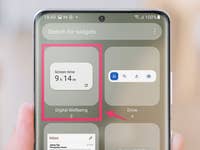
You can display the screen time on your Samsung phone—and thus see how long you are on the phone. Samsung enhances the native Android feature with additional functions. You can also add the somewhat hidden feature directly to the app drawer or as a widget on the home screen with these instructions.

by Benjamin Lucks

0 Comments

3 Min. Reading time

Samsung Smart View

0

3 Min.

TABLET
Samsung Smart View: How to Connect Your Galaxy Phone to the TV
Samsung offers an integrated and easy way to display your phone’s contents on compatible TVs, using the Smart View feature available in most recent Galaxy smartphones and tablets and its line of smart TVs. Learn how to pair and mirror your mobile videos, pictures, and even games on the big screen. No Samsung phone? Learn how to connect an iPhone or Android device to your TV

by Rubens Eishima

0 Comments

3 Min. Reading time

Xiaomi 14 Ultra held horizontally with Pro Photography Kit

1

3 Min.

TABLET
This HyperOS Feature Speeds Up your Xiaomi Smartphone’s Camera
When you snap a photo with your Xiaomi smartphone, the camera application resets as soon as you close it. With HyperOS, you can save the last mode used and the last used lens. If you want to take a selfie in portrait mode on the fly, your Xiaomi smartphone can remember this mode, activating it automatically as soon as you launch the camera. nextpit shows you how to use this HyperOS function in this tutorial.

by Antoine Engels

1 Comment

3 Min. Reading time

Best sub-$600 smartphones list

0

8 Min.

TABLET
Best Premium Smartphones Under $600 to Buy in 2024
With smartphone prices trending upwards, and many flagship models way beyond a thousand dollars, sub-$600 phones still offer a good balance between features and performance. Whether you are looking to play games, take great pictures, or simply have a reliable phone that will last you many years, keep reading to find out the best phones on the market for less than 600 dollars. Looking for the best of the best? Check NextPit’s list of the best phones to buy today

by Rubens Eishima

0 Comments

8 Min. Reading time

Samsung Galaxy Z Fold 5

0

2 Min.

TABLET
Galaxy Z Fold 6’s New Boxy Look is Put Side-by-Side to the Fold 5
Samsung is set to launch the Galaxy Z Fold 6 around in July according to many forecasts. That makes it over a month away, so it is not surprising that the leaks about the foldable smartphone are coming out non-stop. Following the purported partial shot of the Galaxy Z Fold 6, now a new leak is out that even depicts the entire front of the device.

by Jade Bryan

0 Comments

2 Min. Reading time